


 Jul 14, 2026
 8 min
8 minEquipment reservation app: prevent conflicts and track returns
Plan an equipment reservation app that prevents double bookings, records returns and damage, and places faulty items on maintenance hold.

Explore website accessibility best practices designed to make the internet truly inclusive. Learn to create accessible web design and testing tools to ensure users of all abilities can access the internet.

Website accessibility refers to the inclusive practice of designing, constructing, and maintaining websites usable and accessible to users of all abilities, regardless of any disabilities or impairments they may have. This concept is significant for ensuring that the Internet is open, equitable, and available to all, fostering a more inclusive digital environment.
Web accessibility encompasses a range of considerations, including visual, auditory, cognitive, neurological, physical, and speech impairments. As internet usage continues to grow, it is essential to support users with diverse needs and provide equal access for an enhanced online experience.
This universal access to online content is achieved by adhering to established accessibility guidelines and best practices, understanding the requirements of various disabilities and impairments, and employing testing tools and methodologies. By incorporating these considerations into the design and development process, websites and applications can become more accessible, benefiting users and businesses.
Website accessibility holds significant importance for various reasons, including the following:

The Web Content Accessibility Guidelines (WCAG) are a set of global standards and best practices developed by the World Wide Web Consortium (W3C) to make online content more accessible to people with disabilities. WCAG provides recommendations on designing, developing, and maintaining accessible websites and applications, addressing a wide range of disabilities, including visual, auditory, cognitive, learning, and motor impairments.
The WCAG is organized into four principles, known as POUR:
WCAG offers three levels of accessibility conformance:
Adhering to the WCAG ensures that websites and applications are built with accessibility in mind, providing a more inclusive experience for users with diverse needs and abilities. By complying with these guidelines, businesses can better reach their entire audience and provide equal access to their online content and services.
Creating a website accessible to individuals with varying disabilities entails addressing diverse challenges and considering several essential factors. When designing an accessible website, developers must consider the needs of users with visual, auditory, motor, cognitive, and speech disabilities. To truly create an inclusive online experience, here are some guidelines to follow:
Implementing these design guidelines will help you create a more inclusive online experience for users with diverse abilities and disabilities, ensuring your website is available to a broader audience.
Once you've designed your website or application with accessibility in mind, it's important to test its compliance with established accessibility guidelines regularly. Numerous tools can assist you in quickly and efficiently identifying accessibility violations and providing valuable recommendations for improvements. Some popular accessibility testing tools include:
WAVE (Web Accessibility Evaluation Tool) is a free tool developed by WebAIM. It helps identify accessibility issues and provides guidance on how to address them. To use WAVE, simply enter your website URL, and the tool generates a report detailing potential problems and areas for improvement.
Developed by Deque Systems, axe is a highly-scalable accessibility testing tool available as a free browser extension for Chrome, Firefox, and Edge. It helps identify and resolve accessibility violations, offering specific recommendations and resources on improving your website's accessibility.
Lighthouse, developed by Google, is an open-source tool integrated into Chrome DevTools. It audits a page's performance, best practices, SEO, and accessibility. The tool presents actionable guidance on improving your website in each area and is particularly useful for developers who frequently work with Chrome DevTools.
These accessibility testing tools should be employed as part of your website development and maintenance process to ensure that your content remains accessible, inclusive, and compliant with industry standards.
AppMaster is a powerful no-code platform enabling users to create backends, web and mobile applications more efficiently. Recognizing the importance of accessibility, AppMaster encourages implementing accessible design practices when building applications through its platform.
Using AppMaster, developers are urged to consider and address the needs of users with different abilities from the very start of app creation. This proactive approach promotes inclusive design principles and helps create a more accessible online environment for all users.
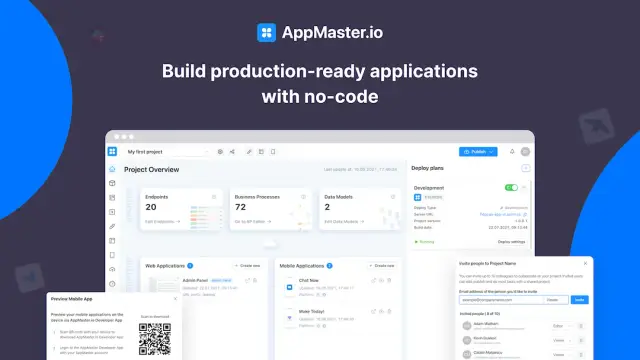
AppMaster not only generates code using accessible conventions, but also fosters a clear consciousness of accessibility issues among developers interacting with the platform. By embedding accessibility awareness into the platform's core ethos, AppMaster inspires developers to work more responsibly in terms of addressing accessibility constraints and adopting user-centric perspectives in their projects.
With its dedication to promoting accessibility and the plethora of features available, AppMaster's no-code platform presents an excellent choice for developers looking to craft accessible web and mobile applications.
When you make your AppMaster-powered apps accessible, you start by ensuring that your web and mobile applications fulfill the Web Content Accessibility Guidelines (WCAG). AppMaster, a comprehensive no-code platform to create backend, web, and mobile applications, empowers you to follow accessibility best practices from the beginning, allowing you to build applications that cater to users with diverse abilities.
Here are some actionable steps you can take to make your AppMaster-powered apps accessible:
By keeping web accessibility in mind while building your application with AppMaster, you create a more user-friendly, equitable, and effective product that can reach a larger audience.
Maintaining web accessibility is an ongoing process that should be integrated into your app development and maintenance routine. As your website evolves and new features and content are added, accessibility adjustments may be needed to ensure continued compliance with the WCAG standards. Here are some strategies to help you maintain and monitor accessibility for your web applications:
By prioritizing web accessibility maintenance and integrating it as a vital component of your development and QA process, you create a welcoming and inclusive user experience and demonstrate your commitment to addressing the needs of all users, regardless of their abilities or disabilities.
 What is website accessibility?
Website accessibility refers to the process of designing, building, and maintaining websites in a way that enables users with diverse abilities and disabilities to interact effortlessly with internet content and services.
Why is website accessibility important?Website accessibility is essential because it ensures that everyone, regardless of their abilities or disabilities, can access and benefit from the internet. It enables businesses to effectively target a broader audience, improves overall user experience and stands as a legal requirement in many jurisdictions.
What are the Web Content Accessibility Guidelines (WCAG)?The Web Content Accessibility Guidelines (WCAG) are a set of best practices, recommendations, and standards created to make online content more accessible to people with various disabilities. It provides three levels of accessibility conformance: A, AA, and AAA.
What are ways to design for various disabilities?To design for various disabilities, consider implementing alternative text for images, transcripts for audio content, captions for videos, logical page structure, keyboard navigability, consistent navigation elements, and high contrast between text and background colors. Additionally, use descriptive link text, and consider the needs of users with cognitive, neurological, and learning disabilities.
Is making a website accessible a one-time process?No, making a website accessible is an ongoing process. As websites evolve and new content is added, accessibility should be regularly tested and maintained to ensure all users can interact with the site effectively.
How does AppMaster promote accessibility?AppMaster promotes accessibility by enabling users to create web and mobile applications through its no-code platform, which encourages the implementation of accessible design practices while building apps. This allows developers to consider and address accessibility issues from the outset.
Can we make an AppMaster-powered app accessible?Yes, you can make your AppMaster-powered apps accessible by following best practices and the Web Content Accessibility Guidelines (WCAG) during the design and development process. Regularly testing your app for accessibility issues ensures a more inclusive experience for users with diverse abilities.
What tools can be used to test website accessibility?There are various tools available for testing website accessibility, such as WAVE, axe, and Lighthouse. These tools help identify accessibility violations and provide valuable insights to improve a site's overall accessibility.
Experiment with AppMaster with free plan.
When you will be ready you can choose the proper subscription.
 Jul 14, 20268 min
 Jul 13, 20268 min
 Jul 08, 20268 min