


 Jul 14, 2026
 8 min
8 minEquipment reservation app: prevent conflicts and track returns
Plan an equipment reservation app that prevents double bookings, records returns and damage, and places faulty items on maintenance hold.

Learn how to optimize the performance and scalability of your no-code app using DigitalOcean infrastructure and the AppMaster platform. Discover best practices to ensure your application remains fast and reliable.

DigitalOcean is a popular cloud infrastructure provider known for its simplicity, cost-effectiveness, and scalability features. These qualities make it an excellent choice for running no-code apps like those developed on the AppMaster platform. The following factors highlight the advantages of choosing DigitalOcean for your no-code application:
By pairing your AppMaster-developed app with DigitalOcean infrastructure, you can deliver a fast, responsive, and reliable application that meets the demanding requirements of modern users.
Getting started with DigitalOcean is a simple and straightforward process. To set up your DigitalOcean account and start optimizing your no-code app's performance, follow these steps:
Once your DigitalOcean account and infrastructure are set up, you can deploy your AppMaster-developed no-code app.
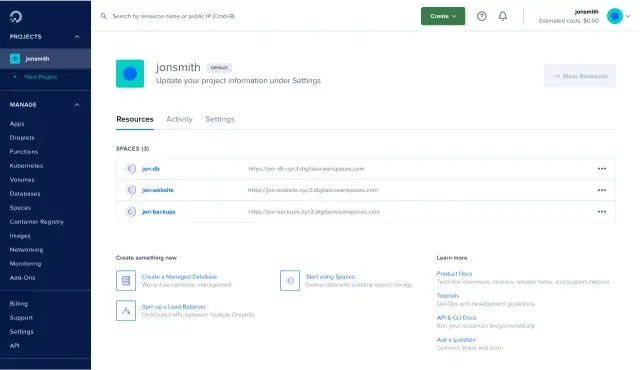
Image Source: DigitalOcean
Deploying your no-code app, developed on the AppMaster platform, to DigitalOcean requires a few steps. This guide will provide an outline of the deployment process, involving both backend and frontend components of your app:
These steps will ensure your AppMasterno-code app is successfully deployed on DigitalOcean, delivering enhanced performance and scalability.
DigitalOcean Spaces is an object storage service that provides a scalable, cost-effective, and reliable solution for hosting your no-code application's data. When developing your app on the AppMaster platform, you can seamlessly integrate DigitalOcean Spaces into your application to improve performance and reduce latency. In this section, we'll go over the benefits of using DigitalOcean Spaces and how to integrate them with your no-code app developed using the AppMaster platform.
DigitalOcean Spaces offers features that significantly improve your app's data storage capabilities:
To integrate your no-code app built using the AppMaster platform with DigitalOcean Spaces, follow these steps:
After completing these steps, your no-code app will store its data in DigitalOcean Spaces, improving performance, availability, and scalability of your storage solution.
As your no-code app grows, it's critical to ensure it remains both performant and available at all times. DigitalOcean Load Balancers and Kubernetes can help you scale your app, cater to the growing user base, and maintain high availability.
Load Balancers are crucial for efficiently distributing incoming network traffic across various backend servers, preventing any single server from getting overwhelmed. DigitalOcean Load Balancers offer the following benefits over traditional load balancing methods:
Set up a DigitalOcean Load Balancer with your deployed AppMaster application by following these steps:
Once you've completed these steps, your no-code app built with AppMaster will benefit from improved availability and traffic distribution thanks to DigitalOcean Load Balancers.
Kubernetes is a powerful orchestration platform for deploying, managing, and scaling containerized applications. DigitalOcean Kubernetes offers a fully-managed Kubernetes service that simplifies container management and deployment. Integrating your AppMaster app with DigitalOcean Kubernetes provides the following benefits:
To deploy your AppMaster-generated application on DigitalOcean Kubernetes:
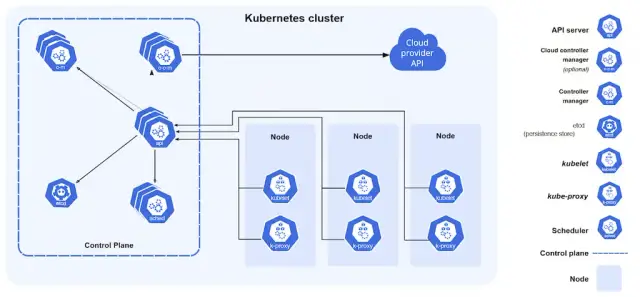
Optimizing your no-code app's performance is crucial for ensuring user satisfaction and engagement. DigitalOcean provides built-in monitoring tools that help you track your app's performance to identify potential bottlenecks and improve resource utilization.
DigitalOcean Metrics is an integrated monitoring solution providing valuable insights into your app's resource usage. Some of the key metrics that you can monitor include: \
You can access these and other metrics through the DigitalOcean Dashboard or using DigitalOcean's API. Leverage this information to make data-driven decisions, optimize resource allocation, and improve your app's performance, all without leaving the DigitalOcean platform.
Once you've gained insight into your app's performance, consider the following optimizations and best practices tailored for DigitalOcean deployments:
By implementing these performance tuning tips and best practices, you can improve your no-code app's performance and reliability on DigitalOcean, ensuring an excellent user experience and a scalable application architecture.
Ensuring the security of your no-code application is a crucial aspect of development and deployment, and DigitalOcean provides a comprehensive suite of security features that can help protect your app. In this section, we'll explore several security measures and best practices you should consider implementing when using DigitalOcean to host your AppMasterno-code app.
DigitalOcean provides Cloud Firewalls, which allow you to create security rules to filter incoming and outgoing traffic to your resources, such as Droplets and Kubernetes clusters. These rules help you to limit access to specific IP addresses, ports, and protocols, thus creating a more secure environment for your application. You can also set up security groups to apply a consistent set of firewall rules to multiple resources, simplifying management and reducing configuration errors.
While DigitalOcean takes care of its own infrastructure updates, you should ensure that your no-code app servers are up-to-date with the latest patches and security fixes. Regularly updating your servers can prevent vulnerabilities from being exploited, keeping your app safe from potential security threats. You can set up automated updates on your server to minimize maintenance overheads and ensure timely updates are applied.
Encrypting your data is essential for safeguarding sensitive information, both in transit and at rest. DigitalOcean's Load Balancers, for instance, provide built-in SSL/TLS termination, allowing you to offload the decryption of incoming traffic to the Load Balancer. This ensures that data transmitted to and from your application is encrypted, and only authorized clients can interact with your service.
Furthermore, DigitalOcean Spaces supports client-side encryption, allowing you to encrypt your data before transferring it to Spaces. This ensures that only you, or authorized parties, can access your data in its unencrypted form.
DigitalOcean's monitoring and alerting features help you keep track of your app's health and performance. By monitoring key metrics, such as CPU usage, memory usage, and response times, you can detect potential security threats, like denial-of-service (DoS) attacks, or unexpected sudden spikes in resource consumption. Setting up alerts on these metrics can help you respond rapidly to incidents, ensuring minimum impact on your app's performance and availability.
Managing access to your DigitalOcean resources is crucial to ensure only authorized users can perform actions on your app's infrastructure. Implement strong authentication methods, such as two-factor authentication (2FA), and follow the principle of least privilege, granting users only the minimum required permissions for their roles. This helps minimize the risk of unauthorized access and reduces the potential impact in case of a compromised account.
A Virtual Private Cloud (VPC) is a private network space within DigitalOcean, enhancing the security and privacy of your resources by isolating them from public networks and other customers' resources. Utilizing DigitalOcean's VPCs ensures that your app's components have limited exposure to external threats and can communicate securely within the private network, thus minimizing the attack surface.
Securing your no-code app hosted on DigitalOcean involves multiple aspects, from configuring firewalls and updating servers, to practicing proper identity and access management and utilizing VPCs for network isolation. Adhering to these security measures and best practices can significantly improve the security posture of your AppMaster-developed no-code application and ensure a safe environment for handling sensitive data.
 Why should I choose DigitalOcean for my no-code app?
DigitalOcean is renowned for its simplicity, cost-effectiveness, and scalability features. It's an excellent choice for running no-code applications like those developed on the AppMaster platform; offering easy infrastructure setup, improved performance, and the possibility to scale as your app grows.
How do I set up a DigitalOcean account?To set up a DigitalOcean account, you need to sign up on their website (www.digitalocean.com) and follow the onboarding process. Once your account is active, you'll be able to use their various services to manage, scale, and optimize your no-code app.
How can I deploy my AppMaster project on DigitalOcean?You can deploy your AppMaster project on DigitalOcean by first generating the backend and frontend binary files or source code. Then, set up a server or a Kubernetes cluster on DigitalOcean, and upload the code to the server. Configure your domain, SSL certificate, and complete the deployment by connecting your application with the backend services.
What are DigitalOcean Spaces?DigitalOcean Spaces is an object storage service that provides cost-effective, scalable, and reliable solutions for storing your app's data, such as files, images, and videos. Integrating your no-code app with DigitalOcean Spaces helps reduce latency and improve performance due to its CDN capabilities.
How can I scale my no-code app with DigitalOcean Load Balancers and Kubernetes?DigitalOcean Load Balancers can distribute traffic among available backend servers, ensuring the high availability of your no-code app. Additionally, DigitalOcean Kubernetes can help in deploying, scaling, and operating containerized applications, resulting in improved scalability and performance. Both technologies integrate seamlessly with AppMaster generated apps.
What are the security measures I should take when using DigitalOcean?There are several security measures to consider while using DigitalOcean, such as configuring your firewalls, ensuring regular security updates, using encryption, enabling monitoring and alerting, and practicing proper access management.
Can I monitor my no-code app's performance on DigitalOcean?Yes, DigitalOcean provides built-in monitoring tools to help you track your no-code app's performance. You can use these insights to identify potential bottlenecks and make necessary improvements to ensure optimal performance and reliability.
What AppMaster subscription plans allow me to host my app on DigitalOcean?AppMaster Business and Business+ subscription plans provide binary files and the option to host on-premises, making it possible to deploy and host your app on DigitalOcean. The Enterprise plan additionally offers source code for hosting on your preferred infrastructure.
Experiment with AppMaster with free plan.
When you will be ready you can choose the proper subscription.
 Jul 14, 20268 min
 Jul 13, 20268 min
 Jul 08, 20268 min