


 Jul 14, 2026
 8 min
8 minEquipment reservation app: prevent conflicts and track returns
Plan an equipment reservation app that prevents double bookings, records returns and damage, and places faulty items on maintenance hold.

Get an in-depth understanding of the features and attributes of the ideal ERP system for your business, factors to consider, and crucial choices to make in this comprehensive guide.

An ERP System ( Enterprise Resource Planning) is an integrated software platform that helps businesses manage and streamline a wide variety of core processes, such as accounting, inventory management, customer relationship management (CRM), human resources (HR), and more. The primary aim of an ERP system is to consolidate multiple business functions into a single, centralized database, thereby fostering effective communication, informed decision-making, and improved overall efficiency.
One of the significant advantages of implementing an ERP system is its ability to break down information silos and improve data visibility across the organization. This high level of transparency enables businesses to monitor and analyze their operational performance in detail and promptly identify areas for improvement. In addition, the automation of many routine tasks provided by ERP systems helps reduce error-prone manual operations and lower operational costs.
However, with a plethora of ERP systems available in the market today, selecting the perfect one for your business can be an overwhelming task. In this article, we will guide you through the process of understanding your business requirements and identifying the key features you should look for in an ERP system.
Before diving into the vast pool of ERP systems, it's crucial to have a clear understanding of your business requirements to make an informed choice. Here are some steps to follow in identifying your needs:
Now that you have a better understanding of your business requirements, it is time to evaluate the features that ERP systems offer. Here are some key features to consider during your evaluation:
Prioritizing the features that most closely align with your business requirements will help you make an informed decision when selecting the right ERP system for your organization.
When evaluating ERP systems, a significant decision for your business is choosing between web-based (cloud) or on-premises ERP solutions. Each option has its advantages and drawbacks, depending upon various factors such as the size of your organization, the complexity of your processes, budget, and IT infrastructure.
Pros:
Cons:

Pros:
Cons:
To choose between web-based and on-premises ERP systems, consider your organization's unique requirements, budget, IT capabilities, and long-term objectives. In many cases, web-based solutions are becoming increasingly popular due to cost savings, ease of implementation, and flexibility.
Selecting the right ERP vendor is critical to the success of your system implementation. Here are some crucial factors to consider when evaluating ERP vendors:
Taking the time to thoroughly evaluate ERP vendors will help you make the best decision for your business, ensuring a successful implementation and long-term return on investment.
As you explore different ERP systems, you may come across industry-specific solutions designed to cater to businesses in a particular sector. They differ from generic ERP systems by addressing unique industry requirements, regulations, and processes. There are some advantages to industry-specific ERP systems:
However, there are also disadvantages to consider:
When evaluating industry-specific ERP systems, weigh the benefits of a tailored solution against the costs and limitations. Consider the long-term goals of your business and the level of customization and flexibility required to meet those objectives. Keep in mind that modern generic ERP systems often offer a wide range of functionalities and customization options, making them versatile and adaptable to various industries. The decision to opt for an industry-specific ERP system should be based on a thorough analysis of your business requirements, budget, and strategic objectives.
Integration with other software solutions plays a crucial role in enhancing the capabilities of an ERP system. One such integration that can significantly bolster the efficiency of your ERP system is with AppMaster, a powerful no-code platform for developing backend, web, and mobile applications. Integrating your ERP system with AppMaster can yield several benefits, including:
Connect your ERP system with backend, web, and mobile applications built using AppMaster to create a seamless flow of data. This synchronization improves the efficiency of your business processes and reduces the need for manual data entry, further reducing the risk of errors.
AppMaster's visual BP designer and drag-and-drop UI builders can be used to create applications that cater to your unique business needs. By integrating these custom applications with your ERP system, you ensure that your organization benefits from tailored software solutions.
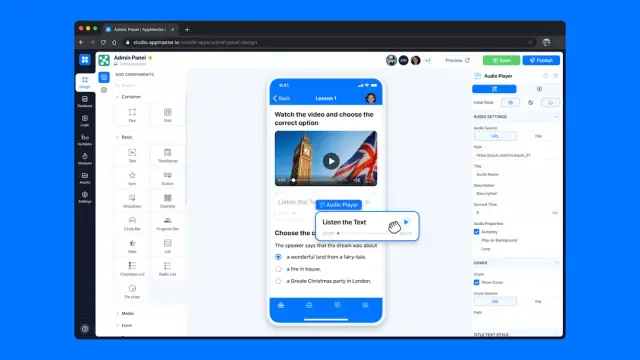
Combined with the centralized data management capabilities of an ERP system, AppMaster allows you to access real-time data across various applications through REST API and WSS Endpoints. This aids in informed decision-making in a fast-paced business environment.
Both AppMaster and modern ERP systems are highly scalable, ensuring that your software solutions can grow along with your business. As your organization evolves, you can create new applications and integrate them effortlessly with your ERP system to address emerging requirements.
The ability to quickly build and deploy applications that complement your ERP system with AppMaster gives you an edge over your competitors. Developing custom solutions can help differentiate your business in the market and cater to the specific demands of your customers.
To achieve a successful integration between your ERP system and AppMaster, ensure that both solutions are compatible and have strong API capabilities. Consult with your ERP vendor and the AppMaster support team to gain insights into the integration process and best practices.
Selecting the right ERP system for your business is only the first step in the journey. For a successful ERP implementation, you should follow a strategic approach that involves proper planning, testing, and employee training. Here's a breakdown of crucial steps to follow:
By following these steps, you can ensure a successful implementation of your chosen ERP system and make the most of its benefits for your business. Remember, a well-planned and carefully executed ERP implementation is vital for achieving long-term success and generating substantial ROI.
 What is the role of an ERP system in a business?
An ERP system (Enterprise Resource Planning) simplifies and streamlines various business processes, such as accounting, inventory management, customer relationship management, human resources, and more. It helps in maintaining centralized data and aids in informed decision-making.
What factors should I consider when selecting an ERP system?Consider factors such as the specific requirements of your business, key features of the ERP system, scalability, ease of use, pricing, integration capabilities, and vendor reliability and support.
Are industry-specific ERP systems better?Industry-specific ERP systems are often tailored to address the unique challenges of a particular industry and can provide a more efficient and focused solution. However, they may be less flexible and harder to customize.
What is the difference between web-based and on-premises ERP systems?Web-based ERP systems are hosted on the vendor's servers and accessed via the internet, while on-premises ERP systems are installed and managed on the company's own servers. Each type has its pros and cons, so choose based on factors such as cost, security, and scalability.
How can I ensure a successful ERP system implementation?Plan and strategize by setting realistic goals, securing executive buy-in, and assembling a capable team. Conduct thorough testing and employee training in order to leverage the full potential of the chosen ERP system.
Can ERP systems be integrated with other software?Yes, most modern ERP systems can be integrated with other software, such as AppMaster for faster and more efficient business processes.
How does an ERP system help in reducing operational costs?ERP systems help in reducing operational costs by automating routine tasks, optimizing resource allocation, providing accurate data insights for decision-making, and streamlining overall business processes.
Is it necessary to evaluate ERP system vendors?Evaluating ERP system vendors is vital to ensure that you choose a reliable and trustworthy ERP solution. Consider factors such as vendor reputation, support, and commitment to ongoing development when making your decision.
Experiment with AppMaster with free plan.
When you will be ready you can choose the proper subscription.
 Jul 14, 20268 min
 Jul 13, 20268 min
 Jul 08, 20268 min