


 Jul 14, 2026
 8 min
8 minEquipment reservation app: prevent conflicts and track returns
Plan an equipment reservation app that prevents double bookings, records returns and damage, and places faulty items on maintenance hold.

Embark on your app development journey with our extensive guide on app creator software. Learn how to build your first application with no prior experience!
Entering the realm of application development can be invigorating, yet for those without technical expertise in coding, it might seem like a formidable challenge. Yet, app creator software is designed to overcome that barrier, empowering individuals regardless of their coding background to bring their app ideas to life. App creator software, often heralded under the terms 'no-code' or 'low-code' platforms, presents an accessible gateway to develop applications efficiently and innovatively.
With app creator software, the development process is simplified to its core elements: visual interfaces, drag-and-drop components, and pre-configured elements form the tools of the trade. Users can construct data models, design user interfaces, and define business logic through intuitive interfaces that abstract the complexities of traditional coding. These tools leverage visual programming techniques, allowing users to see the 'building blocks' of their application as they piece them together.
Platforms like AppMaster provide a comprehensive suite that covers backend, web, and mobile application creation through a unified environment. The distinctive feature of such platforms is the automation of under-the-hood tasks such as source code generation, compilation, and deployment. For instance, when you finalize an app design in AppMaster, it generates the source code for the entire application, compiles it, and deploys it to the cloud — all with the click of a button. This convenience is a game-changer for beginners, who can now focus on the creative aspect of app development without being bogged down by technical complexities.
The rise of app creator software has democratized the development process, making it more inclusive and accessible. It has opened up a new avenue for entrepreneurs, small business owners, educators, and hobbyists to leverage the power of personal or commercial applications without investing in costly developer resources or undergoing extensive programming training. With such technologies at hand, the only limit to creating an app is one's imagination.
The advent of app creator platforms has revolutionized the way applications are developed, particularly for those just stepping into the world of software development. These platforms provide many advantages that empower individuals and organizations to turn their ideas into functioning apps without the traditional barriers of app development.
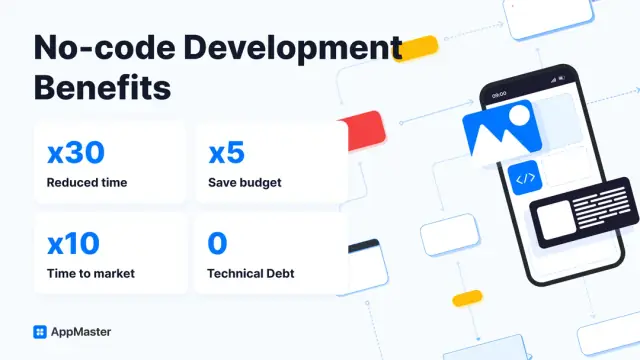
These benefits illustrate why app creator platforms are increasingly popular among those looking to develop apps without a technical background. With the democratizing power of such tools, the process of bringing a digital idea to life is more feasible than ever, providing an inviting environment for innovation and creativity in the app development space.
Embarking on app development can be an exciting endeavor, especially with the myriad of app creation tools available today. Yet, for beginners, the sheer number of options can be overwhelming. To ease the selection process, it's crucial to understand the core features that an ideal app creation platform should possess, ensuring that the tool you choose aligns with your project needs and goals.
Here are some essential features to look out for:
Each feature plays a significant role in determining the ease and success of your app development journey. By selecting an app creator tool that encompasses these crucial elements, you'll empower yourself to turn your app idea into reality, regardless of your background in software development.
When considering these features, it's important to look at specific platforms like AppMaster, which delivers on these fronts. It's designed to be approachable for beginners while providing powerful capabilities for seasoned professionals. Their platform harmoniously blends simplicity with functionality, making it a viable choice for anyone looking to venture into the world of app creation.
You're ready to embark on the exciting journey of creating your first app. Where do you begin? Let's dive into the steps necessary to initiate your project using app creator software, particularly for those new to the app development world. Remember, the key to success lies in planning, understanding your objectives, and selecting a suitable platform that aligns with your goals.
Firstly, brainstorm and define the purpose of your app. What problem will it solve? How will it add value for the user? Sketch out a rough idea of the features you envision, and who your target audience will be. This foundational step is crucial to guide your project in the right direction and to keep focused on the end user's needs.
Once you have a solid idea, it’s time to choose the right app creator software. For beginners, AppMaster offers a user-friendly comprehensive platform that requires no prior coding knowledge. With a drag-and-drop interface and visual programming tools, it makes app development accessible to everyone. Also, ensure the platform you choose provides plenty of resources for learning and troubleshooting.
With the right tool in hand, start by building a simple prototype. Begin with the core functionality crucial for your app and focus on making that work perfectly. This prototype is proof of concept and lays the foundation for future development. As you gain confidence, you can add more sophisticated features and design elements.
Along the way, utilize the templates and resources offered by your chosen app creator software. Many platforms, including AppMaster, come with pre-built templates that you can customize to fit your app's theme and functionality. These can save you time and deliver professional results even at an early stage of development.
Don't forget to seek feedback early and often. Share your prototype with friends, family, or potential users to gather opinions and identify areas for improvement. User feedback is invaluable and will help you refine the app to better meet the needs of your audience.
Lastly, remember that learning is an iterative process. Don’t feel discouraged if you face challenges along the way. Use them as stepping stones to increase your understanding and skills in app development. The resources and support community around app creator software are there to assist you throughout this journey.
Finding the perfect app creator software can be a turning point for any aspiring app developer. With many available platforms, each with its unique features and functionalities, making an informed decision is crucial to the success of your project. Here are essential factors to consider when selecting the right app creation tool:
Considering these points will help you navigate the numerous options and select an app creator software that is beginner-friendly and aligns with your long-term vision and objectives. Taking the time to evaluate your options thoroughly will pay off in the development process and the eventual success of your app.
As a beginner stepping into the vast domain of app building, the design may often feel like a complex puzzle. But with the right guidance and tools, you can transform your creative vision into a functional and aesthetically appealing application. Here, we provide practical design tips to help you confidently navigate the waters of app design, even as a novice.
App design is an ongoing process that involves constant learning and adaptation. As you become more familiar with app design's core principles and gain hands-on experience, your skills will naturally improve. Remember that every great app started from a single idea, and with dedication and the right approach, your app can evolve into something truly remarkable.
After the hard work of using an app creator software to build your first application, you may think the bulk of the journey is over. Yet, what follows is a critical phase that turns a good app into a great one: testing and improving. Testing is rigorously analyzing your app to ensure it's working as intended and providing a high-quality user experience. Here is how to approach this vital step in the app development process.
Begin with unit testing, which is the practice of testing the smallest parts of your app independently to ensure they function correctly. It's akin to checking the integrity of each brick before building a wall. Many app creator platforms include tools for unit testing, or at the very least, they will integrate with common testing frameworks.
Next, functional testing involves examining the complete functionality of your application. This step ensures that your app does what it's supposed to do from the end user's perspective. For example, if you've created an e-commerce app, test the checkout process thoroughly to confirm it's smooth and error-free.
User experience (UX) testing goes beyond functionality and looks at how users interact with your app. Is it intuitive? Is the design appealing? Platforms like AppMaster often come with built-in UX testing capabilities, allowing you to assess the user journey through various interactions within your application.
Your app needs to be not only functional but also fast and responsive. Performance testing evaluates the responsiveness of your app under various conditions, ensuring that it performs well even under high traffic or data load. Maintaining a seamless performance is essential, as users quickly become frustrated with slow applications.
Once you're satisfied with internal tests, it's time to launch a beta version. Beta testing is when a select group of users try your app in a real-world scenario. Their feedback is gold, offering insights into unexpected bugs, unclear features, and how the app performs on different devices.
After gathering all this information, the next step is to iterate and improve your app. This could mean refining features, adjusting the UI/UX, or optimizing performance based on feedback. The development process is iterative, and platforms like AppMaster simplify making changes by allowing you to regenerate your app from scratch, thereby implementing updates quickly and effectively.
Finally, consider accessibility testing to ensure that your app is usable by people with disabilities. This is a moral imperative and a legal requirement in many jurisdictions. Accessibility features can include screen reader support, text-to-speech functions, and alternative navigation options.
Testing is an ongoing process that doesn't end even after your app goes live. Constantly seeking improvements is key to keeping your users engaged and satisfied. With diligent testing and a commitment to excellence, your first app could be the start of an impressive portfolio or even a successful business.
After many hours of designing, testing, and perfecting your first app comes the crucial step of making it available to the world. Publishing and promoting your app can be as critical as the development process itself. It determines how your target audience receives your app and can vastly influence its success.
To begin, you must decide where to publish your app. If it's a mobile application, the primary choices are the Google Play Store for Android devices and the Apple App Store for iOS devices. You will need to deploy to a web server or hosting platform for web apps.
The publishing process for mobile apps involves setting up developer accounts on the respective stores, which usually comes with a fee. Afterward, you must prepare your app for submission, which includes compiling the final version, setting up its listing with a descriptive title, persuasive description, captivating screenshots, and relevant keywords. Depending on the platform's requirements, you might also need to create a privacy policy and comply with various guidelines.
Promotion, on the other hand, starts even before publishing. It's essential to create a marketing plan that can include various strategies:
Developing an engaging launch plan and maintaining a strong online presence through regular updates, blog posts, and customer interaction can further improve your app's traction post-launch. It's also valuable to measure how well your promotional efforts are working by using analytic tools to track user downloads, engagement, and feedback.
Remember, the journey doesn't end with the initial release. Continuously improving your app based on user feedback and market trends is essential for sustained success. Tools like AppMaster can facilitate this iterative process by enabling rapid updates and redeployment without additional complexities, thanks to its no-code platforms' capability of generating applications from scratch with each update.
In app development, visibility and active promotion are as important as the app's functionality. With the right combination of a great product and smart marketing strategies, your app can stand out in the crowded marketplace and achieve notable success.
The journey doesn't end there after you've successfully published your first application. The app development world is continuously changing, and as a beginner, you'll want to stay proactive to keep your app relevant and your skills sharp. Here are some strategies to help you learn and grow post-launch.
Creating your first app is an achievement, but the real success lies in what you do next. Continuous learning, user engagement, and iterative development are key to the evolution of both your app and your skills as an app creator. Embrace the process, and enjoy the journey of becoming a more seasoned developer with each new project you undertake.
 What is app creator software?
App creator software is a platform that enables users, irrespective of their coding knowledge, to design, develop, and deploy applications for various platforms such as web, mobile, and desktop.
Can beginners really create apps without coding?Yes, modern app creator tools often come with drag-and-drop interfaces and other user-friendly features that allow beginners to create apps without the need to write code.
Are all app creator platforms no-code?While many app creator platforms are no-code, some offer low-code options which give users the ability to customize their applications further with minimal coding.
What should I look for in app creator software as a beginner?As a beginner, you should look for software that offers a user-friendly interface, pre-built templates, extensive documentation, and a supportive community.
Is it possible to make a professional-looking app with an app creator?Absolutely. Many app creation platforms, such as AppMaster, allow you to create professional and fully functional applications.
How do I test the app I've created using app creation software?Most platforms have built-in testing tools or integrations with third-party services that allow you to test your app's functionality and user experience.
What kind of apps can I build with an app creator?Depending on the capabilities of the app creator software, you could build various types of apps, including e-commerce, productivity, social media, or custom business applications.
Is it expensive to use an app creator software?Cost varies by platform. Some, like AppMaster, offer free tiers for learning and exploration, while others might require a subscription or one-time fee.
How does AppMaster facilitate app creation for beginners?AppMaster streamlines the app creation process for beginners by offering visual programming, drag-and-drop design tools, and the generation of source code, making app development faster and more cost-effective.
Can I update my app after publishing it?Yes, most app creator platforms provide easy ways to update your app, and because AppMaster generates apps from scratch each time, updates can be made quickly without accruing technical debt.
Do I retain ownership of the app I create?Generally, you retain ownership of the app you create, including all the content and data, though you should review the terms of service of your chosen platform to confirm.
Can app creator software integrate with other tools and services?Yes, many app creator platforms support integrations with a wide range of tools and services to enhance the functionality and performance of your app.
Experiment with AppMaster with free plan.
When you will be ready you can choose the proper subscription.
 Jul 14, 20268 min
 Jul 13, 20268 min
 Jul 08, 20268 min