


 Jul 14, 2026
 8 min
8 minEquipment reservation app: prevent conflicts and track returns
Plan an equipment reservation app that prevents double bookings, records returns and damage, and places faulty items on maintenance hold.

Explore the challenges in mobile app testing and discover strategies to ensure quality, functionality, and user satisfaction in a constantly evolving industry.

As the mobile industry continues to expand, mobile app testing has become crucial for ensuring the quality, functionality, and satisfaction of users. The process of testing a mobile application involves evaluating different aspects of the app, such as its design, user interface, performance, security, and compatibility with multiple devices and platforms. Mobile app testing can be challenging, due to a variety of factors that testers need to take into consideration.
In this article, we will discuss some of the most common and significant challenges that mobile app testers face and provide insights into how these challenges can be addressed. By understanding these challenges and implementing the right testing strategies, you can ensure that your mobile app meets the needs of users and provides a seamless experience across different devices and platforms.
One of the major challenges in mobile app testing is device fragmentation. With hundreds of different mobile devices, screen resolutions, operating systems, and hardware configurations on the market, testers must ensure that their app runs seamlessly on a wide variety of devices without compromising the user experience. This becomes even more complicated when dealing with multiple operating systems, such as Android and iOS, which have their own set of requirements and nuances.
To address the challenge of device fragmentation and multiple operating systems, it is essential to implement a comprehensive testing strategy that includes the following steps:
Ensuring an exceptional user interface (UI) and user experience (UX) is critical for the success of a mobile app. UI/UX testing involves evaluating the app's design and navigation, as well as its overall usability. Some of the key considerations for UI/UX testing are as follows:

To ensure comprehensive UI/UX testing, consider the following strategies:
By addressing these challenges in UI/UX testing, you can create a mobile app that provides a seamless experience for your users and ensures their satisfaction.
Mobile app users expect seamless and consistent performance from their apps, regardless of network connectivity. To ensure that your app meets these criteria, you must test it under a range of network conditions. Here are some tips on how to effectively manage network connectivity and performance in mobile app testing:
In today's digital age, security and privacy stand out as critical factors in mobile app development and testing. Failing to address these issues can lead to negative consequences such as data breaches and loss of user trust. Here are important security and privacy factors to consider during mobile app testing:
Frequent updates and compatibility issues can cause headaches for mobile app testers. To tackle these challenges, follow these steps:
Integrating mobile app testing with a no-code platform like AppMaster can help address some of these challenges. AppMaster's streamlined approach to app development and regeneration ensures compatibility and responsiveness to changing requirements. By managing network connectivity, addressing security and privacy concerns, and effectively handling updates and compatibility issues, you can deliver high-quality mobile apps that meet users' expectations.
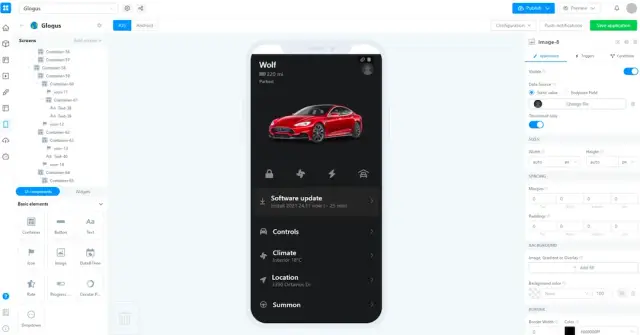
One of the challenges in mobile app testing is deciding whether to use automation, manual testing, or a combination of both. Both approaches have their pros and cons, and striking the right balance is essential for delivering a high-quality app.
Automated testing involves the use of tools and scripts to run specific test cases, monitor results, and report findings. These tools can carry out tasks such as launching the app, interacting with UI elements, and simulating user behavior without human intervention.
Pros:
Cons:
Manual testing involves human testers interacting with the app, simulating user behavior, and identifying any issues or shortcomings in the process.
Pros:
Cons:
In many cases, adopting a hybrid approach that combines both automation and manual testing techniques can yield the best results. This approach allows teams to leverage the speed and efficiency of automation while still accounting for the intuitive insights and flexibility provided by manual testers.
A successful testing strategy should prioritize automated testing for repetitive tasks (e.g., regression testing, smoke testing) and manual testing for complex tasks that require a more nuanced understanding of the end-user perspective (e.g., exploratory testing, usability testing).
Integrating mobile app testing with a no-code platform like AppMaster can help streamline the app development and testing processes, enabling teams to save time, reduce costs, and mitigate technical debt. AppMaster is a comprehensive no-code tool for creating backend, web, and mobile applications that can bridge the gap between app development and testing. Benefits of integrating mobile app testing with AppMaster include:
AppMaster allows developers to visually create and modify data models, business logic, and UI components for web, mobile, and backend applications. By leveraging AppMaster’s no-code tools, development cycles can be accelerated by up to 10x.
With AppMaster, testers can focus on areas that are most likely to be affected by changes in requirements or configuration, ensuring efficient and effective testing efforts.
AppMaster reduces technical debt by regenerating applications from scratch whenever app requirements or configurations change. This eliminates the risk of testing inconsistencies and ensures that all application components are compatible and up to date.
AppMaster enables seamless integration between app development and testing and supports continuous integration pipelines to keep the app development process smooth and efficient.
AppMaster-generated apps can be deployed on various platforms and environments, including on-premises, using different hosting solutions. This flexibility enables testers to ensure optimal app performance across different deployment scenarios.
By incorporating a no-code platform like AppMaster into the mobile app testing process, developers, testers, and stakeholders can work more efficiently, leading to a higher-quality deliverable and a better end-user experience. The result is a more simplified, streamlined workflow that optimizes both the development and testing phases of the mobile app lifecycle.
 What are some common challenges in mobile app testing?
Common challenges include device fragmentation, UI/UX testing, network connectivity management, security and privacy concerns, frequent updates and compatibility issues, and choosing between automation and manual testing.
How can mobile app testing challenges be addressed?Challenges can be addressed by implementing a mix of testing strategies and tools, focusing on user experience, utilizing testing automation when appropriate, and using a no-code platform like AppMaster for seamless integration of app testing and development.
Why is device fragmentation a major challenge for mobile app testing?Device fragmentation is a challenge because of the many different types of devices, screen resolutions, operating systems, and hardware configurations. Testers must ensure their app runs seamlessly on a wide variety of devices without compromising user experience.
What are the key considerations for UI/UX testing?UI/UX testing involves evaluating app design, navigation, and usability. Testers should ensure that the app is visually appealing, easy to use, and provides a smooth user experience across various devices and platforms.
How can network connectivity and performance be managed in mobile app testing?Mobile app testers should simulate different network connectivity scenarios to ensure app performance and functionality are not affected by changes in network conditions. This includes testing under varying bandwidth and latency levels, as well as offline mode.
Why are security and privacy concerns important in mobile app testing?Mobile apps that do not prioritize security and privacy can be vulnerable to data breaches and cyberattacks, impacting user trust and damaging the app's reputation. Testers should thoroughly evaluate app security features, data protection protocols, and privacy policies.
How can frequent updates and compatibility issues be managed in mobile app testing?To handle frequent updates and compatibility issues, testers should perform regular regression testing to ensure app functionality is not affected by updates. Additionally, they can rely on tools and frameworks that simplify cross-platform testing and ensure compatibility with multiple OS versions and devices.
What are the benefits of incorporating a no-code platform like AppMaster in mobile app testing?Using a no-code platform like AppMaster offers several benefits such as reducing development time, minimizing technical debt, and enabling seamless integration of app development and testing. AppMaster's approach enables apps to be regenerated from scratch whenever requirements change, simplifying the testing process and ensuring compatibility with various devices and platforms.
Experiment with AppMaster with free plan.
When you will be ready you can choose the proper subscription.
 Jul 14, 20268 min
 Jul 13, 20268 min
 Jul 08, 20268 min