


 Jul 14, 2026
 8 min
8 minEquipment reservation app: prevent conflicts and track returns
Plan an equipment reservation app that prevents double bookings, records returns and damage, and places faulty items on maintenance hold.

Discover how you can transform your idea into a functional application without prior coding experience. This guide provides insights on utilizing no-code platforms like AppMaster to create your custom app.

The rise of the no-code movement is a revolutionary step in the world of technology and entrepreneurship. It signifies a shift from the traditional need for in-depth programming knowledge to a more inclusive, accessible approach to creating software. At its heart, the no-code movement is about democratizing app development, allowing anyone with an idea to bring it to life without the barrier of learning complex coding languages.
The concept revolves around no-code platforms, which provide visual development environments where users can design, build, and deploy applications by simply dragging and dropping components onto a canvas. This means they can focus on the app's logic, user experience (UX), and design, rather than worrying about the underlying code that makes it all work.
No-code platforms are not a one-size-fits-all solution, but rather a spectrum of tools that cater to various needs, from simple website creation to complex business system development. These platforms are equipped with pre-built templates, user interface (UI) kits, and integrations with other services, which significantly speed up the development process. For those with some technical expertise, many no-code tools also provide the ability to add custom code, offering the best of both worlds.
The no-code approach has been a game-changer for businesses, entrepreneurs, and non-technical individuals who previously perceived creating a digital product as an unapproachable dream. Now, with a good idea and a clear vision, they can rapidly prototype, test, and validate their concepts without immense upfront costs or lengthy development cycles.
In addition to versatility and ease of use, no-code platforms align well with agile methodologies. As market demands shift at an unprecedented pace, adapting quickly is critical. The no-code approach empowers users to make changes on the fly and update their apps in real time, therefore maintaining relevance and responsiveness to user feedback.
It's not just about individual empowerment, though. Even within larger organizations, no-code tools are being embraced increasingly. They serve as a bridge between IT departments and business teams, expediting internal processes, and fostering innovation without overloading technical staff.
Platforms like AppMaster are at the forefront of the no-code revolution. With its comprehensive suite of development tools, AppMaster caters to users eager to convert their ideas into functional, scalable applications. It illustrates the no-code movement's promise by offering unprecedented control and customization, redefining what's possible without writing a single line of traditional code. In effect, no-code is leveling the playing field, enabling a surge of creativity and a new wave of digital product innovation.
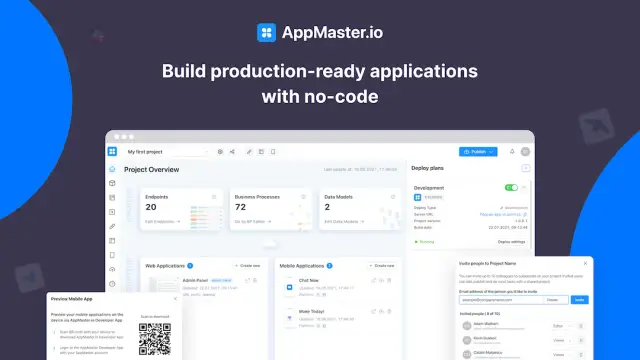
The no-code movement is a passing trend and a significant change in how society approaches software development. It has opened doors for many, and as the movement grows, it is poised to change how we think about software creation, problem-solving, and innovation at large.
Before you dive into the exciting journey of app creation, the foundational step is to define your app idea and establish clear goals. This preparatory phase is crucial as it will direct all subsequent decisions regarding design, functionality, and marketing strategy. Here's how to structure your planning:
Begin by understanding the 'why' behind your app. What problem does it solve? Who is it for? How does it distinguish itself from existing apps? A well-articulated purpose is your guiding star and aligns your development process with your vision.
An app that resonates with its users is tailored to their needs and preferences. Conceive a user persona, detailing demographics, behavioral patterns, and pain points. This exercise will empower you to design an app that appeals directly to the individuals you aim to serve.
Set Specific, Measurable, Achievable, Relevant, and Time-bound (SMART) goals for your app. Perhaps you're aiming for a certain number of downloads within the first quarter, or you want to achieve a set revenue target by the end of the year. SMART goals will provide quantifiable targets to aspire to.
Comprehend your competitive environment by conducting a thorough analysis. Identify direct and indirect competitors, analyze their strengths and weaknesses, and uncover opportunities for your app to fill a gap in the market.
What makes your app unique? Craft a compelling value proposition that articulates the distinct benefits your app provides. This will not only assist in differentiating your app but also serve as a cornerstone for your promotional activities.
Having a monetization strategy from the outset is key to ensuring the financial viability of your app. Will you utilize in-app purchases, subscriptions, ads, or a freemium model? Determine the most appropriate method that aligns with your app's functionality and user expectation.
While it's important to focus on the immediate steps of building and launching your app, also consider your long-term vision. Where do you see your app in a few years? How will it evolve? Thinking ahead can inform decisions that contribute to sustainable success.
Blending these strategic elements to solidify your app's concept is pivotal. Once you clearly understand your app's purpose and objectives, you can harness the power of no-code development platforms like AppMaster, which can help you transform your vision into a functional and scalable app without the need to delve into the complexity of coding.
The foundation of a successful app is choosing the right tools and resources to bring it to life. With myriad no-code platforms available, it might seem overwhelming to pick one. Yet, focusing on your specific app requirements, budget constraints, and long-term goals can make the selection process more manageable.
Start by assessing the feature set of potential platforms. Evaluate each no-code solution to ensure it covers all aspects of your app's development, including back-end services, user interface design, and deployment capabilities. Consider whether the platform allows for scalability and flexibility in terms of design and integration with other services. Moreover, pay attention to the platform's ability to generate native mobile apps or cross-platform applications if that's a part of your vision.
Another critical aspect to consider is the user experience of the no-code platform itself. It should be intuitive and user-friendly, so even those with minimal technical savvy can easily navigate it. The learning curve shouldn't be steep, and the platform should ideally offer tutorials, guides, or customer support to help you through any stumbling blocks.
From a budgetary perspective, consider the long-term costs associated with the platform. While some platforms may offer free versions, these often come with limitations that could hinder the growth of your app in the future. It's essential to understand the pricing structure and what each tier offers, especially if you anticipate needing more advanced features or scaling up your app down the line.
Lastly, community and support resources can be a treasure trove of information and assistance. A powerful community indicates an active user base which can be immensely helpful in sharing strategies, solving problems, and offering inspiration. Effective customer support from the platform provider is also invaluable, especially for troubleshooting and gaining insights into best practices.
Take note of platforms like AppMaster, which consistently leaves a mark in the no-code market. Its comprehensive backend, web, and mobile application development tools provide a unique selling proposition – the generation of actual source code for your applications. This feature facilitates easy deployment and maintenance and significantly saves time and investment.
By considering these factors meticulously, you can settle on a no-code platform that aligns well with your project needs and empowers you to turn your vision into a tangible, working app.
Embarking on the app creation journey requires a keen focus on the user interface (UI), where your users will interact with your application. A well-designed UI is crucial because it can greatly impact user adoption and satisfaction. Crafting an appealing and functional interface may seem challenging for those without a design background, but this task is significantly simplified with no-code platforms.
The design phase of your app is about translating the vision of what you want your app to accomplish into a visual, interactive experience. Consider the following steps to create an engaging and user-friendly app interface:
Start by sketching out a basic layout of your app's interface. Define where the key elements, such as buttons, images, and text, will be placed. Aim for a balance between aesthetic appeal and practical functionality. Ensure that your design is not cluttered and that users can intuitively navigate through your app.
The visual elements of your app should reflect your brand identity. This includes colors, fonts, and imagery that align with your brand’s tone and values. A consistent look and feel across the app reassures users of your brand's professionalism and can make the app more memorable.
One of the significant advantages of no-code platforms like AppMaster is the availability of pre-designed templates and UI components. These can be customized to suit your specific needs, saving you time and ensuring you use tried and tested design patterns.
Your app’s interface should be responsive and adapt well to various device screens, from smartphones to tablets and desktops. Testing your UI on multiple screen sizes ensures a consistent user experience across all devices.
Keep user comfort and accessibility in mind. Design buttons to be easily tappable, use fonts that are readable on small screens, and ensure that your app is navigable with one hand where possible. Also, consider the needs of users with disabilities by incorporating accessibility features.
After creating a preliminary design, seek feedback from potential users. Use this feedback to iterate and improve your design. Remember that the user's perspective is integral to creating a successful app. Often, you'll need to refine your design multiple times before arriving at the best solution.
Once you have a clear vision for your app's design, a no-code platform like AppMaster can make the implementation seamless. With its drag-and-drop interface and visual editor, you can transform your layout and design elements into a working app, seeing real-time changes and without ever needing to write a line of code.
Throughout the design process, it’s essential to focus on the end goal: providing a pleasant and efficient user experience. Leveraging the capabilities of no-code platforms not only simplifies the design process but also empowers you to bring a professional-level app to life with relative ease.
The true value of an app comes from its functionality - the operations it can perform and how it interacts with users. Setting up the functionality of your app can be one of the most exciting steps in the app development process. This is where your app idea transforms from a concept into a working product. Here’s how you can take advantage of a no-code platform like AppMaster to build the functionality of your app without writing a single line of code.
Before you begin adding features, it’s essential to understand the logic behind how your app will work. This means identifying the processes that will power your app - from the user logging in, to saving data, to processing transactions. On a platform like AppMaster, you can create 'Business Processes' that serve as the bedrock for these functionalities, using a visual BP (Business Process) Designer.
One of the greatest strengths of no-code development is that you don’t need to reinvent the wheel. AppMaster, for example, offers many pre-built functions and modules that you can use to add common app features such as user registration, profile management, notifications, and more. All these elements are essential for user interaction and can be customized to fit the specifics of your app.
Your app might need to interact with external services, like payment processors or data analytics tools. These integrations are crucial for enhancing the functionality of your app. With no-code platforms, you can often integrate these services without hassle through APIs. AppMaster supports REST API and WSS Endpoints, which means you can connect your app to virtually any third-party service that offers an API.
No-code platforms like AppMaster provide visual programming environments for more complex operations requiring custom logic. This feature enables you to define and manipulate data models, control workflows, and handle error states, all through a user-friendly interface. Even if your app requires sophisticated functions, these can be created visually and linked to your UI components.
As you build the functionality of your app, it’s important to test each function as it’s created. No-code platforms often have instant preview features that allow you to see how a function will perform in real-time. With AppMaster, you can run tests and see the results immediately, helping to identify and resolve any issues early in the development process.
No app is complete without a way to manage and store data. Your no-code platform should provide tools for setting up databases and managing data access. AppMaster allows you to visually create data models for your backend application and work with any PostgreSQL-compatible database as the primary database. This seamless integration of data storage ensures that your app can handle data securely and efficiently.
Longevity in application development means planning for growth. When building your app's functionality, consider how it might scale over time. AppMaster generates backend applications in Go, a language known for its scalability and performance. This ensures your app can handle increased loads and grow with your business.
In sum, no-code platforms significantly simplify the intricate process of building an app's functionality. By leveraging the intuitive interfaces, pre-built modules, third-party integrations, and powerful backend capabilities of platforms like AppMaster, you can bring sophisticated, scalable applications to market swiftly and effectively.
Creating an app is an evolving process, and testing is a critical stage that determines the quality and effectiveness of your product. Without proper testing, an app can suffer from bugs, poor user experience, and unsatisfactory performance, leading to its failure in the market. Iteration is the fine-tuning of your app based on feedback and test results, leading to improved versions over time.
Start with a thorough testing of each app component. Functional tests check if your app is running as expected, unit tests ensure each part of your app works individually, integration tests verify that different parts of the app work together, and user interface tests confirm that the user experience is intuitive and error-free.
Before full-scale deployment, User Acceptance Testing, or UAT, is important. This involves real users testing the app in conditions as close to real-life as possible. It offers invaluable insights into the app’s user friendliness and functionality. Tools integrated within no-code platforms can facilitate this testing stage, though external user testing services can also be utilized.
Also known as split testing, A/B testing is a method where you present two app variants to users to see which one performs better. This can range from different layouts, features, color schemes, or content. You can understand which elements resonate with your user base by analyzing metrics such as user engagement, retention, and conversion rates.
As feedback comes in, make iterative changes to your app. Implement adjustments based on user input and retest, ensuring the app evolves in line with user needs and preferences. The goal is constant improvement, making your app more intuitive, and valuable to your user base.
Effective use of analytics tools can help understand user behavior and areas of your app that may need improvements. Analytics can point you to issues like which features are being ignored, the user journey’s common drop-off points, and how to optimize the onboarding process.
The AppMaster platform can significantly assist in the testing and iteration phase. It generates test cases automatically and integrates seamlessly with CI/CD pipelines to facilitate continuous testing and deployment. Moreover, as you iterate on your app, AppMaster lets you regenerate and deploy updated versions rapidly, minimizing downtime and ensuring a consistent development flow.
By following these steps and best practices, you can ensure your app functions as intended and meets the high standards of today’s app users. Testing isn’t just a phase – it’s an integral part of the app creation journey, which continues even after launching your product.
After meticulous planning, designing, and building your app, the moment has arrived to introduce it to the world. Launching and marketing your application are crucial steps that can vastly influence its success. Here is a step-by-step guide on effectively launching and promoting your app to ensure it reaches its target audience and achieves your desired outcomes.
Before you officially launch your app, generating buzz and anticipation is crucial. Start by creating a landing page for your app with a compelling call-to-action (CTA) that encourages visitors to sign up for updates. You can also use social media channels, content marketing, and email campaigns to tease features and benefits, creating a sense of excitement.
Your app's visibility on app stores significantly affects its success. Optimize your listing by researching and using relevant keywords in your app’s title and description. High-quality app screenshots and a captivating preview video can also help to attract prospective users. Encourage satisfied customers to leave positive reviews as these improve your app's credibility and ranking.
Hosting a launch event or an online webinar can be a powerful way to gather your initial user base. This event is a platform to showcase the unique features of your app and engage directly with potential users. You can use it to gather feedback and answer queries, which can build trust and interest in your offering.
Partnering with influencers who resonate with your target audience can be a highly effective marketing strategy. Influencers can introduce your app to their followers through sponsored content or endorsements. Moreover, getting press coverage by reaching out to journalists and bloggers within your niche can increase your app’s credibility and reach.
Paid advertising through platforms such as Google Ads, Facebook, Instagram, or LinkedIn can help you reach a larger audience. Tailor your advertising campaign to target users based on demographics, interests, or behaviors that align with your app’s purpose.
After your app launch, track its performance closely using analytics tools. Monitor metrics such as download numbers, user engagement, and retention rates. Use this data to refine your marketing strategies and make any necessary adjustments to your app.
Through careful preparation and a strategic approach, launching and marketing your app can be a thrilling journey that leads to success in the app marketplace. Remember to leverage every tool and resource at your disposal, including no-code platforms like AppMaster, which assists in the development process and supports deployment and integration, adding professional value to your app’s release strategy.
After launching your app, the journey doesn't end— it evolves. The next critical phase is to ensure that your app can scale effectively to accommodate a growing user base and that it is maintained correctly to provide continuous value to its users. Scaling is about capability and capacity, while maintenance involves regular updates, bug fixes, and performance improvements. Here’s how you can effectively tackle both for your newly created app, without needing to delve into coding yourself.
Gathering and analyzing user feedback is paramount post-launch. Look for patterns in user behavior and feedback to understand what's working and what's not. Tools like in-app analytics can provide valuable insights into how users interact with your app. Based on this data, you can pinpoint areas requiring scaling or improvement.
Maintenance is about regularly updating your app to fix bugs, address security vulnerabilities, and add new features. Platforms like AppMaster automate much of this process by allowing you to revise and regenerate your app's backend or frontend smoothly and rapidly. Adopting an agile approach to updates ensures your app stays fresh and relevant.
As your app gains more users, its infrastructure needs to handle increased loads. This could involve scaling up server capacity or leveraging scalable cloud services. With AppMaster, you benefit from backend applications generated with Go, which demonstrate exceptional scalability. Depending on your subscription, you can deploy multiple backend microservices to ensure smooth performance during traffic spikes.
An app’s success hinges on its performance. Regularly monitor your app’s speed, stability, and resource usage. Optimization might require refining your data models or business processes, which you can accomplish directly within the AppMaster visual BP Designer without changing any code manually.
If your app is available on multiple platforms (iOS, Android, web), ensure that any updates or new features are consistently implemented across all versions. The no-code approach simplifies this process, as platforms like AppMaster let you design once and deploy everywhere, lessening the time and effort required to maintain cross-platform congruity.
As technology evolves, so should your app. Incorporate advanced features like AI, IoT, or third-party integrations to keep your app at the forefront of innovation. With AppMaster, you can utilize REST API and WSS Endpoints for seamless integration with other services and platforms.
A continuous delivery pipeline automates your release process, making it quicker and more reliable. With every change in the no-code blueprints, AppMaster allows you to generate a new version of your app in less than 30 seconds, ensuring that your app remains current and functional with minimal downtime.
An app is never truly "finished." It must evolve to meet changing market conditions, customer expectations, and technological advancements. Continuous planning and iteration are part of the maintenance cycle. With no-code platforms, adapting to change is less cumbersome, allowing you to evolve your app's features and design with market demands.
With meticulous planning and the right no-code tools, scaling and maintaining your app post-launch is manageable. AppMaster offers powerful features that simplify these processes, ensuring that your app is not just a one-hit wonder but a continuous success story in an ever-changing digital environment.
Entering the world of app creation might seem overwhelming, but with platforms like AppMaster, the journey from concept to deployment is streamlined and accessible even for those with limited technical expertise. Here’s how you can leverage AppMaster to make your app a reality:
The no-code revolution democratizes app development, and AppMaster stands at the forefront, ensuring that your journey in making your own app is equipped with the right tools, support, and scalability for long-term success.
 Can I really make an app without any coding experience?
Yes, you can create an app without coding knowledge by using no-code platforms like AppMaster. These platforms offer intuitive interfaces and tools to build your app's design and functionality.
How do I begin the process of creating my own app?Start by clearly defining your app idea and goals. Then, choose a suitable no-code platform that aligns with your needs, design the user interface, build the app's functionality, and use available resources for testing and iterating.
What are the benefits of using a no-code platform?No-code platforms are user-friendly and cost-effective, making them perfect for entrepreneurs, small businesses, and individuals who want to bring an app to market without the need for specialized technical skills.
Is it possible to create a professional-grade app with a no-code platform?Absolutely. No-code platforms like AppMaster are designed to help you build professional-grade applications that can scale and evolve with your business needs.
How do I design my app's user interface without design experience?No-code platforms often come with drag-and-drop interfaces and pre-designed templates, which simplify the design process and help you create an attractive and intuitive user interface.
What should I do after building my app?After building your app, you should thoroughly test it to identify and fix any issues. Then, prepare a launch strategy and marketing plan to reach your target audience effectively.
Can I update or scale my app after launching it?Yes, one of the advantages of no-code app development platforms is the flexibility to update and scale your app as needed. This includes adding new features, improving functionality, or expanding your app's user base.
Can AppMaster help me launch my app?AppMaster can provide guidance and tools throughout your app creation journey, from development to deployment, making the launch process smooth and successful.
What kind of support can I expect from no-code platforms?Most no-code platforms offer support resources such as documentation, tutorials, community forums, and customer service to assist you during the app development process.
Do I retain ownership of my app when using platforms like AppMaster?Yes, with AppMaster, you retain full ownership of your app, including the right to host it independently if you choose the appropriate subscription that allows for binary files or source code exports.
Experiment with AppMaster with free plan.
When you will be ready you can choose the proper subscription.
 Jul 14, 20268 min
 Jul 13, 20268 min
 Jul 08, 20268 min