


 Jul 14, 2026
 8 min
8 minEquipment reservation app: prevent conflicts and track returns
Plan an equipment reservation app that prevents double bookings, records returns and damage, and places faulty items on maintenance hold.

Explore the world of real-time systems architecture with in-depth comparisons and evaluation between WebSockets and SignalR for efficient, seamless communication for your applications.

Real-time systems are computing systems designed to respond to events and process data as it occurs in real-time. They ensure timely and accurate responses to external events, efficiently handling tasks in various domains, including finance, logistics, gaming, healthcare, and more. Real-time systems are crucial in modern software development, enabling seamless web and mobile application communication between clients and servers.
Various technologies and protocols are available for developers to implement real-time application features. Some of these protocols include WebSockets, SignalR, Server-Sent Events (SSE), and Long Polling that provide different performance levels, latency, and ease of implementation. Choosing the right technology for real-time communication can significantly impact the efficiency and responsiveness of your application. In this article, we'll explore two popular solutions for real-time systems architecture: WebSockets and SignalR. We'll dive into how they work, their advantages, use cases, and how you can choose the right solution for your application.
WebSocket is a communication protocol that enables true real-time, bi-directional communication between a client and server over a single, persistent connection. Unlike the traditional request-response model, WebSocket maintains a low-latency, full-duplex connection that allows continuous data transfer between the client and server. The WebSocket protocol is designed to work over the same ports as HTTP and HTTPS (ports 80 and 443, respectively), making it compatible with existing web infrastructure.
WebSockets use an initial HTTP handshake to establish the connection, followed by data transmission using WebSocket frames. Once the connection is established, data can flow both ways simultaneously, reducing latency and making it ideal for real-time applications like online chat, notifications, and live updates. Some benefits of using WebSockets include:
Still, WebSockets have potential drawbacks and may not be suitable for all scenarios. Some disadvantages of using WebSockets include:
SignalR is an open-source Microsoft library that simplifies building real-time web applications. It enables developers to add bi-directional communication between client and server, providing an abstraction over various transport protocols like WebSockets, Server-Sent Events, and Long Polling. SignalR automatically selects the best communication method based on the client and server capabilities, ensuring optimal performance and compatibility.
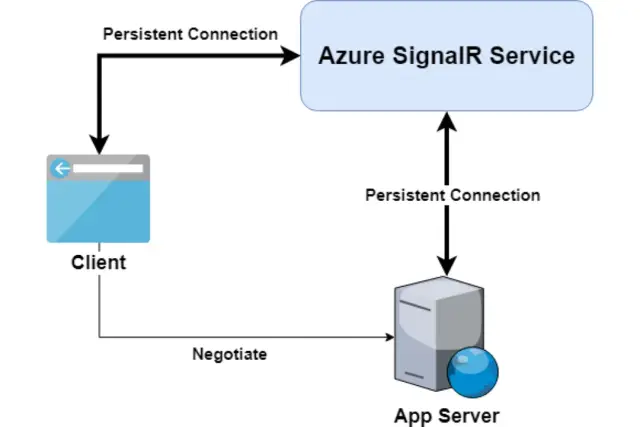
Image source: Microsoft Learn
SignalR offers an easy-to-use API to build real-time applications, leveraging the power of asynchronous programming in .NET. Developers can create server-side hubs that handle client connections, manage representations of clients, and broadcast messages to connected clients. Client-side libraries for SignalR are available for various platforms, including JavaScript, .NET, and Java. Some advantages of using SignalR include:
Nevertheless, SignalR has some potential downsides that developers should consider:
Although both WebSockets and SignalR are powerful technologies for enabling real-time communication in web applications, there are certain scenarios in which one might be more suitable than the other. In this section, we will discuss when WebSockets may be a better option compared to SignalR.
WebSockets offer more direct control over connections compared to SignalR. While SignalR provides high-level abstractions to simplify real-time communication, it may not offer the required granularity for some use cases. WebSockets might be better if you need lower-level control over your connections, including managing connection states, handling errors, and customizing data framing.
WebSocket connections offer lower latency than SignalR because they provide a direct, persistent, and bi-directional communication channel between the client and server. SignalR, while offering its own set of conveniences, can introduce slight additional latency due to the underlying transport mechanisms it uses, such as long polling and server-sent events.
While SignalR is an excellent solution for .NET-based applications, targeting platforms where SignalR is unavailable or fully supported, such as non-Windows environments may not be suitable. In these cases, WebSockets can provide a more universal solution that works across various platforms and environments.
Choosing WebSockets might be a better option if you want to minimize the number of external dependencies in your project. WebSockets are an integral part of the HTML5 standard and are natively supported by most modern browsers and server-side technologies. By contrast, using SignalR would require integrating an external library into your project.
To better understand the differences between WebSockets and SignalR in terms of performance, we must consider several factors.
WebSockets typically provide lower latency compared to SignalR. As previously mentioned, this is due to the direct, bi-directional, and persistent connection between the client and server that WebSocket provides. SignalR, while offering a range of transport mechanisms, can introduce minor additional latency for certain scenarios.
WebSocket connections can generally handle more messages per second compared to SignalR, as they incur less overhead per message. But this advantage might not be significant for most real-world scenarios, where a slight difference in message throughput isn't critical.
Resource consumption is another important factor to consider when comparing the performance of WebSockets and SignalR. WebSocket connections tend to consume fewer resources due to their lightweight protocol, while SignalR may consume more resources because of its reliance on multiple transports and features. Still, the actual difference in resource consumption may vary based on the specific implementation and use case.
Both WebSockets and SignalR support scaling to accommodate a growing number of clients, but they handle this differently. WebSockets require you to implement load balancing, horizontal scaling, and other techniques to ensure proper scalability. SignalR, on the other hand, features built-in support for scaling out across multiple servers using various methods such as message buses and backplanes.
AppMaster, a powerful no-code platform for creating web and mobile applications, enables seamless integration with both WebSocket and SignalR technologies. This empowers you to build real-time communication features into your applications without the need for extensive programming expertise. With AppMaster's visual, drag-and-drop interface, you can create data models, design business processes, and implement REST API and WSS endpoints, which can be backed by WebSocket or SignalR, depending on your requirements.
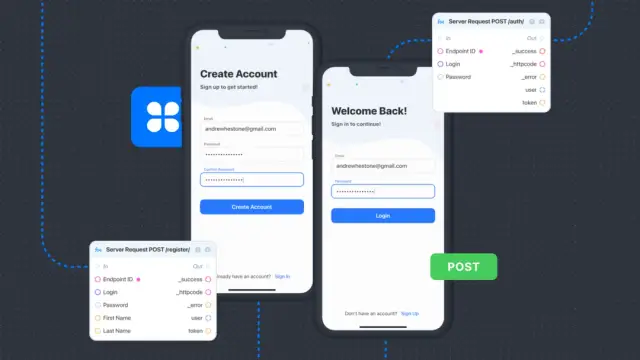
Moreover, AppMaster's platform generates source code for the applications and deploys them to the cloud, ensuring that your solution is scalable and optimized for performance. By integrating WebSocket and SignalR with AppMaster, you can rapidly develop real-time web and mobile applications that are both powerful and scalable. This allows your team to focus on delivering value to your users, rather than spending time on undifferentiated tasks such as writing boilerplate code and managing server infrastructure.
"Software isn’t about methodologies, languages, or even operating systems. It is about working applications," as wisely stated by Christopher Baus, an American software developer and engineering manager. Whether you decide to use WebSockets or SignalR in your applications, AppMaster provides a flexible, no-code solution that enables you to design, build, and launch real-time applications at scale. To get started, create a free account and explore the wide range of features and integrations that AppMaster offers.
 What are real-time systems?
Real-time systems are computing systems designed to respond to events and process data as it occurs in real-time, ensuring timely and accurate responses to external events.
What is WebSocket?WebSocket is a communication protocol that enables true real-time, bi-directional communication between a client and server over a single, persistent connection.
What is SignalR?SignalR is an open-source library that simplifies building real-time web applications and enables bi-directional communication between client and server via various protocols such as WebSockets, Server-Sent Events, and Long Polling.
When should I choose WebSockets over SignalR?Choose WebSockets over SignalR when you require direct and low-level control over the connection, lower latency, or when targeting platforms where SignalR is not available.
How do WebSockets and SignalR compare in performance?WebSocket has lower latency and overhead due to its direct connection. SignalR provides greater conveniences and abstractions, which may make it easier to use but can lead to slightly higher latency compared to a purely WebSocket-based implementation.
Can I integrate WebSockets and SignalR in AppMaster platform?Yes, AppMaster's no-code platform supports integration with both WebSockets and SignalR in your custom applications, making it easy to create interactive web and mobile apps with real-time features.
Is there a significant difference in resource consumption between WebSocket and SignalR?WebSocket tends to have lower resource consumption due to its lightweight protocol, while SignalR's reliance on several protocols and additional features may increase resource consumption depending on the implemented components.
Can I switch from using WebSockets to SignalR or vice versa?Yes, it is possible to switch between WebSockets and SignalR, but the transition may require some adjustments depending on the specific features and connection types you're using. Understanding the pros and cons of both technologies will help you make an informed decision.
Do both WebSockets and SignalR support scaling?Yes, both WebSockets and SignalR are designed to support scaling, but the approach depends on the specific technology. Scaling WebSockets can involve techniques such as load balancing and horizontal scaling, while SignalR offers built-in support for scaling out across multiple servers using a variety of methods.
Experiment with AppMaster with free plan.
When you will be ready you can choose the proper subscription.
 Jul 14, 20268 min
 Jul 13, 20268 min
 Jul 08, 20268 min