


 Jul 14, 2026
 8 min
8 minEquipment reservation app: prevent conflicts and track returns
Plan an equipment reservation app that prevents double bookings, records returns and damage, and places faulty items on maintenance hold.

Here is the blueprint if you want to own the next big mobile ticket-booking app. Follow the process and get your professional app.
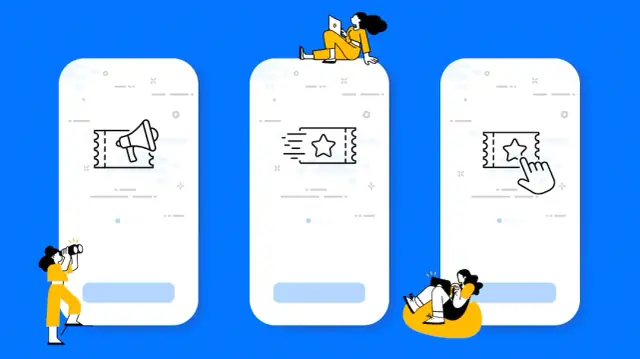
Technology has revolutionized the way we live, work, and play. Online ordering and ticketing apps have made it easier than ever to get what we want when we want it. We can now order food, groceries, and clothes without ever leaving our homes. And we can buy tickets to concerts and sporting events with just a few clicks.
Despite some risks, technological advancement has positively impacted our lives. It has made us more connected than ever before and has given us access to information and opportunities that were once out of reach. We will become more connected and empowered as we continue to use technology in new and innovative ways.
A ticket booking app is a mobile application that allows users to book tickets for events, concerts, movies, or travel. The app generally works by connecting to a ticketing provider, such as Ticketmaster, and allowing users to search for and purchase tickets directly from their phones.
Ticket booking mobile apps can be highly convenient, allowing users to book tickets without having to leave their current location. In addition, many mobile apps offer features such as viewing seat maps, seeing nearby events, and receiving notifications when new events are added. Some applications also offer rewards programs or discounts for frequent users.
To use a ticket booking app, simply download the app from your mobile app store and create an account. Once you have an account, you can begin searching for events. To find an event, you can typically either search by date or location. Once you have found an event, you would like to attend, simply select the number of tickets you would like to purchase and checkout.
Ticket booking mobile apps are a great way to buy event tickets without standing in line or going to a ticket office. They are also often more affordable than purchasing tickets from a traditional provider. However, it is essential to note that some ticket-booking apps may charge service fees, so check the terms and conditions before purchasing tickets.
Users should be able to create an account and log in. Without a customized profile, the app wouldn't have valid data about the user. It means the app won't be able to provide a seamless experience. Moreover, they should be able to view all the available events. It means more choices for the users and more opportunities for the app. If there are more options, the chance of a transaction is high. A search bar can also help users navigate through the pages effortlessly.
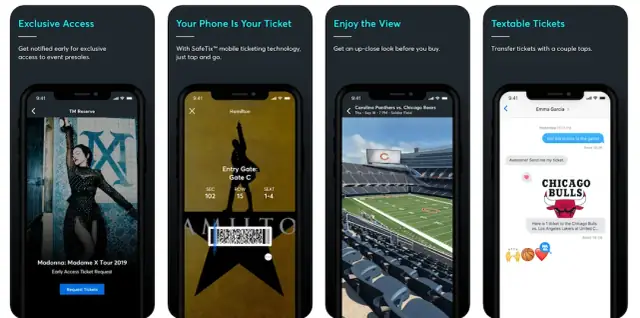
It's necessary to have multiple payment methods integrated into the app. If a user doesn't have one way, he should be able to pay through another method. Users should be able to view their booking history. Booking history is vital to minimize mistakes and errors on the part of the app as well as the user.
Users should be able to cancel their bookings. People make errors, and they usually want to get away with them. So, if someone makes a mistake in booking a ticket, he should be able to cancel that booking. Of course, the app may charge a minimum penalty.
Admin should be able to log in to monitor and manage things. With admin login access, they can add new events regularly to keep the app exciting and valuable. Moreover, the admins should delete past events. Follow-ups are good, but old events that have already happened should be deleted to keep the interface neat.
A ticket booking app can earn money by charging a service fee for each ticket sold. The service fee is generally a tiny percentage of the ticket price and helps offset the cost of operating the app. Additionally, many ticket-booking apps offer premium features or services for an additional fee, such as the ability to book tickets in advance or choose specific seats. Premium features can help generate additional revenue for the app while providing a better experience for users.
Finally, many ticket-booking apps also sell advertising space to businesses interested in reaching their user base. Advertising can be a significant source of revenue and allows the app to keep its prices low for users.
Since times have changed, coding is no more a prerequisite for mobile app development. If you're looking to develop your own app but don't have any coding experience, AppMaster is the perfect platform for you. It has made development 100x easier.
With AppMaster, you can create an app without writing a single line of code. All you need to do is drag-and-drop the different elements you want to include in your app, and AppMaster will take care of the rest.
You can also use AppMaster to quickly implement an app idea without investing significant time and resources into developing a fully-fledged app. So, if you're looking to create an app but want it cheaper, faster, and better, AppMaster is the solution for you. Now, app development isn't only easier but affordable.
 What does a ticket booking app do?
A ticket booking app lets people find events or travel options, choose tickets, pay, and receive confirmation from a phone. It usually connects to a ticket provider or an event inventory system to show current availability.
What features should a ticket booking app include first?Start with a simple flow: account creation, event search, event details, ticket selection, payment, confirmation, and booking management. Add extras such as rewards or deal alerts only after the purchase flow works smoothly.
How should users search for tickets?Let people filter by location, date, time, event type, and price. Clear filters reduce the time users spend scrolling through events they cannot attend.
Does a ticket app need a seat map?Show the seat map before payment whenever the venue supports one. Users should see which seats remain available and the full price for their selection before they check out.
How can a ticket booking app handle payments safely?Offer more than one trusted payment method and show all fees before users confirm the purchase. The payment flow should use a secure provider and return a clear success or failure message.
What should happen after someone books a ticket?Send an in-app confirmation and an email or message with the event details, ticket count, payment total, and booking reference. Users should also find the same information in their account.
Why do users need booking management?Give users a bookings area where they can view upcoming and past purchases, download or display tickets, and check cancellation rules. This also reduces support requests for common questions.
How should cancellations and refunds work?Set the cancellation and refund rules for each event, then show them before payment. If a cancellation is allowed, let users request it in the app and explain any fee or refund timing clearly.
What should an admin panel include?The admin panel should let staff add, edit, publish, and remove events, manage ticket inventory, review bookings, and respond to support issues. Keep past events out of the main customer view while retaining their records for reporting.
How can a ticket booking app make money?Common options include a per-ticket service fee, paid features such as early access or preferred seats, and relevant advertising. Make every charge clear so users understand what they pay for.
Experiment with AppMaster with free plan.
When you will be ready you can choose the proper subscription.
 Jul 14, 20268 min
 Jul 13, 20268 min
 Jul 08, 20268 min