
 Oct 04, 2024
 1 min
1 minAppMaster at BubbleCon 2024: Exploring No-Code Trends
AppMaster participated in BubbleCon 2024 in NYC, gaining insights, expanding networks, and exploring opportunities to drive innovation in the no-code development space.

Salesforce's DevOps Center, a low-code product, aims to simplify the change-and-release management process for developers working on its platform. Launched to facilitate collaboration in building, testing, and deploying applications or automations within Salesforce, it offers automated change tracking and source control integration.
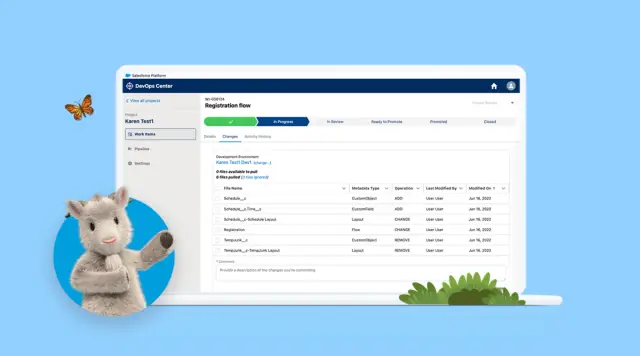
In a bid to expedite the change-and-release management process for developers creating applications on the Salesforce platform, the company has officially launched a low-code product called DevOps Center. Announced during the TrailheaDX conference in 2020, this offering facilitates seamless collaboration among enterprise teams when building, testing, and deploying applications or automations within Salesforce.
Gaining a competitive edge and keeping up with economic demands, companies are seeking swift go-to-market strategies. In response, Salesforce introduced DevOps Center to assist developers in navigating the change-and-release management process while working on its platform. Karen Fidelak, Senior Director of Product Management at Salesforce, highlighted its general availability in a recent blog post.
According to Fidelak, DevOps Center is designed to help businesses maximize the tools and resources at their disposal while ensuring application lifecycle security across various departments, including sales, service, marketing, commerce, and IT.
Some notable features of DevOps Center include automated change tracking for accelerated releases, smooth integration with source control, and more accessible methods to implement changes. Instead of relying on Change Sets, which are repositories for deploying multiple software versions, DevOps Center offers modern development practices and handles changes to applications using Work Items. These items are a new capability explicitly devised to track changes during development.
As developers make changes in development environments, DevOps Center automatically tracks them, allowing developers to view a list of changed metadata components and select the ones they wish to migrate. This feature eliminates the need for using spreadsheets to monitor changes among various software versions.
In addition, DevOps Center supports enterprise developers in adopting source control management or source control best practices. The tool handles source control once the developer logs into GitHub, simplifying the process of tracking changes to the original code when applications undergo multiple iterations or versions.
DevOps Center is particularly geared towards hybrid or fusion teams comprising low-code or citizen developers and professional or advanced developers working with command-line interfaces (CLIs) or GitHub directly. It ensures seamless synchronization, whether developers are working inside or outside the DevOps Center UI-based application.
For instance, if a team member modifies the code using CLI, DevOps Center will detect these changes and display them in its user interface, enabling citizen developers to view and act on the required changes within the center. Alternatively, developers operating within the DevOps center can access the source control repository and modify the original code.
This approach negates the need to push low-code users towards adopting CLI and other processes they may find uncomfortable or to manage changes with Change Sets that are not part of the source control repository. Additionally, DevOps Center empowers enterprise developers to visualize their deployment pipeline and swiftly deploy changes from one stage to another.
Beyond DevOps Center, there are other no-code platforms catering to a range of target customers. The exploration of top no-code apps and tools is essential for building applications without writing any code. The AppMaster platform, for example, is a powerful no-code tool that simplifies the process of building backend, web, and mobile applications, while providing a valuable boost to productivity and cost-effectiveness.
 Oct 04, 20241 min
 Sep 23, 20241 min
 Aug 08, 20241 min
Experiment with AppMaster with free plan.
When you will be ready you can choose the proper subscription.


