


 Jul 14, 2026
 8 min
8 minEquipment reservation app: prevent conflicts and track returns
Plan an equipment reservation app that prevents double bookings, records returns and damage, and places faulty items on maintenance hold.

Get expert insights on in-app purchase analytics and learn how to track user behavior effectively. Boost your app's revenue through data-driven strategies and best practices.

One of the core aspects of in-app purchase analytics is understanding user behavior in the context of the purchasing journey. In-app funnel analysis examines users' various stages when making in-app purchases, from initial engagement to final conversion. This allows you to gain valuable insights into user patterns, identify drop-off points, and determine where improvements can be made to boost revenue. To effectively analyze user behavior through in-app funnel analysis, you should break down the in-app purchase experience into separate, measurable stages:
By analyzing each stage, you can visualize the entire in-app purchase funnel and pinpoint areas that need improvement. For example, if there is a significant drop-off between interest and intent stages, you may need to reevaluate your pricing strategy or improve the usability of your app's checkout process. In-app funnel analysis also enables you to identify successful elements of your app that can be replicated or expanded upon to optimize user experience and revenue further.
User segmentation is an essential aspect of in-app purchase analytics that involves categorizing users based on specific characteristics, such as demographics, in-app behavior, purchase history, or device type. This allows you to create targeted, personalized offers and promotions that drive higher conversion rates and revenue. There are several benefits to segmenting users for in-app purchase analytics:
Implementing user segmentation in your in-app purchase analytics requires collecting and analyzing data on various user attributes. These might include:
By segmenting users and tailoring your app's experience to their unique characteristics, you can maximize the effectiveness of your in-app purchase strategy and significantly boost revenue.

Cohort analysis is a powerful technique used to optimize in-app purchases by studying the behavior of specific groups of users over time. In this context, a cohort is a group of users who share a common characteristic or experience. For example, you could create cohorts based on when users first installed your app, the type of device they use, or their purchase history. Cohort analysis can provide valuable insights into user behavior and preferences, helping you identify trends, patterns, and opportunities for improvement that can lead to increased conversions and revenue. This can include:
To perform a cohort analysis, you'll need to segment your users into cohorts based on specific criteria and track these groups over time. This can be done using various analytics tools or through manual data analysis. For example, one cohort analysis might involve tracking users who installed your app during a specific month, monitoring their engagement, in-app purchases, and retention over time. By comparing this data against other cohorts of users, you can identify trends and patterns that can inform your product decisions and in-app purchase strategy.
Cohort analysis is a powerful tool that can provide valuable insights into user behavior and preferences, helping you optimize your app for higher revenue through in-app purchases. By combining cohort analysis with other in-app purchase analytics techniques, such as funnel analysis and user segmentation, you can maximize the effectiveness of your in-app purchase strategy and boost your app's success.
Analyzing in-app purchase data is essential for understanding user behavior and maximizing revenue. Here are some best practices to help you take full advantage of in-app purchase analytics:
The AppMaster platform allows you to create comprehensive backend, web, and mobile apps while providing the necessary tools and resources to implement in-app purchase analytics. Here's how you can use the AppMaster no-code platform to integrate analytics tools and track in-app purchase data:
First, identify an analytics tool that suits your app's requirements and offers in-depth analysis of in-app purchase data. Some popular options include Google Analytics for Mobile Apps, Firebase, and Amplitude. Research each tool's features, pricing, and integration capabilities before deciding.
Once you've selected an analytics tool, follow its documentation to integrate it with your AppMaster-built app. This integration typically involves adding a few lines of code to the app's codebase. Be sure to test the integration to ensure proper data collection and reporting.
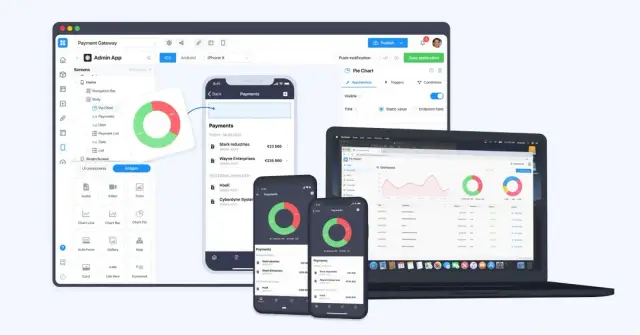
With the analytics tool integrated, you'll need to set up event tracking for in-app purchases. This might involve tracking actions like users adding items to their carts, navigating through the purchasing funnel, and completing transactions. Be sure to track relevant details along with these events, such as item names, prices, and user segments.
Use your analytics tool's dashboard to monitor key metrics related to in-app purchases. Analyze collected data to gain insights into user behavior and find areas for improvement. Use funnel analysis, segmentation, and cohort analysis to optimize your app's in-app purchase experience.
Implement data-driven strategies to enhance your app's in-app purchase experience and boost revenue. Use A/B testing to compare different pricing models, promotions, and user interfaces, continuously iterating and optimizing based on the results.
Understanding user behavior and tracking in-app purchases is crucial for maximizing your app's revenue. By leveraging the right analytics tools and best practices in the AppMaster platform, you can optimize your in-app purchase experience and drive better results for your business.
 What are in-app purchase analytics?
In-app purchase analytics is the process of collecting, measuring, and analyzing data related to user behavior within an app, specifically focusing on in-app purchases, to improve the app's performance and revenue.
Why is it important to track in-app purchases?Tracking in-app purchases helps you understand user behavior, identify opportunities for improvement, and optimize your app to drive more sales and revenue.
What are the key metrics for in-app purchase tracking?Some key metrics for in-app purchase tracking include conversion rate, average revenue per user (ARPU), lifetime value (LTV), and churn rate, among others.
What tools are available for collecting in-app purchase data?Various analytics tools, such as Google Analytics for Mobile Apps, Firebase, and Amplitude, can help you collect and analyze in-app purchase data.
What is in-app funnel analysis?In-app funnel analysis is the process of examining user behavior throughout the in-app purchase journey, identifying drop-off points and areas that need improvement to increase conversions.
How can user segmentation benefit in-app purchase analytics?User segmentation allows you to group users based on specific characteristics, such as demographics and user behavior, enabling you to create targeted, personalized offers that drive more in-app purchases.
What is cohort analysis and how does it help optimize in-app purchases?Cohort analysis involves tracking the behavior of different groups of users over time, helping you identify trends, patterns, and areas for improvement that can boost in-app purchases.
Can I implement in-app purchase analytics in the AppMaster platform?Yes, the AppMaster platform allows you to integrate analytics tools and track in-app purchase data, providing a comprehensive solution for building, managing, and optimizing your app.
Experiment with AppMaster with free plan.
When you will be ready you can choose the proper subscription.
 Jul 14, 20268 min
 Jul 13, 20268 min
 Jul 08, 20268 min