


 Jul 14, 2026
 8 min
8 minEquipment reservation app: prevent conflicts and track returns
Plan an equipment reservation app that prevents double bookings, records returns and damage, and places faulty items on maintenance hold.

Learn how to create a dispatch board that assigns service jobs by technician availability, location, skills, and priority for small teams.
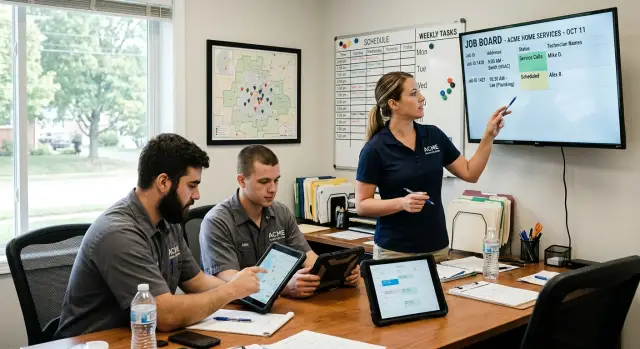
A small service team can receive work from several places in one morning. A customer calls about a leaking pipe, another sends photos by text, and a property manager emails a routine repair request. Someone may also walk into the office or mention an urgent job during a previous visit. Each request seems manageable alone. Together, they create a messy queue.
Many teams rely on paper notes, phone messages, and separate calendars for each technician. The dispatcher may know that Sam is near the north side of town, while the office calendar only says "afternoon visit." The customer's gate code sits in a chat thread. By the time staff check each place, the job is already behind schedule.
Handwritten notes also depend too much on memory. A note may say "boiler issue, Mrs. Lee, urgent" without an address, model number, or promised arrival time. If the person who took the call goes to lunch, the next person has to contact the customer again. That feels disorganized and wastes time.
Sending the wrong technician causes more than one bad appointment. A junior technician may arrive at work that needs a licensed specialist. Meanwhile, a qualified person may drive across town when another suitable technician was already nearby. The customer waits, the first visit may not solve the problem, and later jobs slip.
Late arrivals have a ripple effect. A missed two-hour window can lead to an unhappy customer, overtime, or work moving to the next day. For a small team, one delayed emergency repair can crowd out planned maintenance by mid-afternoon.
A dispatch board puts every request in one shared place. Each job needs a clear owner, planned time slot, contact details, location, required skills, and priority. The board should also show unassigned jobs, so no request depends on someone remembering a scrap of paper.
Every job should have one technician responsible for it and a realistic place in the day. When the team can see that information at a glance, field service scheduling becomes calmer and customers get clearer answers about when help will arrive.
A dispatch board only works when every new job includes enough detail to place it on the schedule. A vague note such as "customer has a leak" forces the dispatcher to make extra calls, guess at the visit length, and risk assigning the wrong person. Collect the same information for every request before assigning a technician.
Start with the customer's name, phone number, and full service address. Technicians need a street number, unit or apartment details, access instructions, and parking notes that could affect arrival time.
Record an appointment window, not simply a date. "Tuesday afternoon" may be enough for an early enquiry, but a usable scheduling board needs a range such as 1:00 to 3:00 p.m. Add the time the customer first contacted the team as well. It helps staff handle competing requests fairly.
Each job should state the service type in plain language. For a plumbing team, this could be a blocked drain, leaking pipe, water heater issue, or bathroom installation. The service type helps the dispatcher match the job with a technician who has the right skills and equipment.
An estimated job length protects the rest of the day. A small repair may take 30 minutes, while a diagnostic visit could take 90 minutes. If staff leave this blank, the board fills with appointments that look possible but overlap in real life. Include travel time when the team covers a wide area.
Useful job fields include:
Keep the status flow short so everyone reads it the same way. "New" means nobody has claimed the request. "Assigned" means a technician and time slot are set. "On site" tells the office that the technician has arrived. "Complete" closes the visit after staff record the outcome.
You can add statuses such as "waiting for parts" or "customer canceled" later. Do not start with too many options. Staff should spend their time moving work forward, not deciding which label fits best.
When you create a dispatch board in AppMaster, these fields can sit in a shared job record instead of across calls, texts, and spreadsheets. Dispatchers can review the request, update its status, and schedule a realistic visit in one place.
A dispatch board needs more than a list of names. Each technician profile should show the details a dispatcher uses to choose who can take a job. If those details live in memory, messages, or separate spreadsheets, assignments slow down and mistakes become common.
Start with availability. Record normal working hours, breaks, recurring meetings, and approved time off. A technician who works from 8:00 to 4:30 should not appear available for a 5:00 appointment. Add temporary coverage changes too, such as someone covering another district for a week.
Service areas matter just as much. A job may suit a technician's skills but still make little sense if it adds an hour of driving. Use clear areas the team already recognizes, such as Northside, downtown, or groups of postal codes. For a small team, a home area and current area are often enough.
Avoid broad labels such as "plumber" or "maintenance technician." List the work each person can do. For a plumbing team, that might include drain clearing, leak repair, water heater installation, gas line work, and commercial fixtures.
Add limits where they apply. An apprentice may handle routine repairs but need supervision for gas work. A technician may install a water heater but not diagnose an electrical fault. Clear profiles prevent an awkward call after someone assigns the wrong person.
A profile can include:
Equipment and vehicles can decide technician assignment. Someone may have the right skills but lack a drain camera, ladder rack, or van large enough to carry a replacement unit. Put these details on the profile rather than expecting dispatchers to remember them.
For example, a customer needs a same-day water heater replacement. Maya has an open afternoon and the needed certification, but her compact vehicle cannot carry the unit. Luis is finishing a nearby job and has a cargo van with the right tools. Luis is the better choice, even if Maya appears free first.
Update profiles when a role, certification, vehicle, or coverage plan changes. In AppMaster, a no-code dispatch board can keep this information in a technician record and show people who meet the job requirements.
A dispatch board works best when every new job receives a priority before anyone chooses a technician. Otherwise, the loudest phone call or newest request can push aside work with a tighter deadline.
Four levels usually give a small team enough control without making the board hard to scan:
Define each label in plain language. For a plumbing team, a burst pipe is an emergency. A leaking tap may be urgent if it affects a business, while a yearly boiler check is routine. A customer booked for 1:00 to 3:00 p.m. needs an appointment label even if the task is simple.
Add the promised arrival window directly to the job card. Dispatchers should see it without opening extra details. A card might show "Appointment, 1:00-3:00 p.m." beside the address and estimated job length.
Keep emergency jobs separate from work that can wait. A clear emergency lane shows the real disruption to the day and helps the dispatcher decide which routine visit to move. Do not place an emergency halfway down the normal queue.
Priority gives staff a normal order, but dispatchers still need judgment. A vulnerable customer without heat, a repeat repair that has failed twice, or a shop that cannot open may need faster attention than its standard label suggests.
When someone changes the order, record a short reason on the job. For example: "Moved ahead: customer has no water" or "Rescheduled: customer approved tomorrow." This prevents confusion later and helps the team handle similar calls consistently.
Every new request should enter the same visible intake area. A coordinator adds the customer name, address, requested time, problem, priority, and notes from the call. This keeps jobs out of notebooks, text messages, and one person's memory.
Use the same order for every technician assignment:
A simple status flow helps everyone see what happens next: new, scheduled, en route, on site, complete, or needs follow-up. Update the status throughout the day. If a technician finds extra work, the dispatcher can see the effect on later visits before promising a new time.
For example, a technician may have an opening at 2:00 p.m. but finish a job across town at 1:45 p.m. If travel takes 25 minutes, that slot is unavailable. Assigning a closer qualified technician protects the appointment and avoids a late-arrival call.
AppMaster can support this process in one no-code app. A team can store job records, technician skills, service areas, and availability together, then share updated assignments with the people who need them.
At 12:30 p.m., a plumbing company has three technicians on the road and five new requests. Maria handles residential repairs and has an open slot near Oak Street. Ben is certified for water heater work and is finishing a call across town. Dev is at a planned drain inspection near Pine Avenue.
The dispatcher adds each request to the board with its address, problem, promised time, skill needs, and priority. The new jobs are a ceiling leak on Oak Street, a water heater fault, a dripping tap, a blocked kitchen sink, and a routine toilet repair.
The ceiling leak gets top priority. The customer reports water spreading from an upstairs bathroom, and Maria is eight minutes away. She has the right skills and no urgent work booked, so the dispatcher assigns the leak to her immediately. Her status changes to "en route," and the customer receives an expected arrival time.
Dev's drain inspection on Pine Avenue should finish at 2:00 p.m. The blocked kitchen sink is three blocks away and needs the same equipment. Its customer can accept an afternoon visit, so the dispatcher places it after Dev's existing appointment. There is no need to send another technician across town for work that can wait.
Ben receives the water heater fault because it needs his certification. The dripping tap remains low priority, while the toilet repair has a requested window later that day.
At 1:40 p.m., Dev reports that the drain inspection has become more difficult than expected. He now expects to finish 45 minutes late. The dispatcher moves the routine toilet repair from Dev's afternoon slot to Maria, who has contained the leak and expects to finish soon. The blocked sink stays with Dev because the customer agreed to a later arrival.
The board changes as the work changes. The dispatcher updates each card when a technician starts travel, arrives, needs more time, finishes, or cannot complete a job. The office gets a current view of technician assignment and can contact affected customers before they need to ask.
By late afternoon, the team has handled the urgent leak first, kept specialist work with the right technician, and moved only the job with room to shift. The board records those small decisions as they happen.
A dispatch board only helps when it reflects the day as it happens. Schedule trouble often starts with small assumptions: every visit will finish on time, the closest person can handle any job, or a canceled appointment will sort itself out.
Do not fill every working hour with appointments. A repair expected to take 45 minutes can run longer when a technician needs a part, finds a second fault, or waits for property access. Traffic, parking, and distance between calls also change travel time.
Leave room between jobs, especially for urgent work or first visits at unfamiliar sites. A team that schedules six hours of work in an eight-hour shift has space for normal surprises. A team that schedules eight hours often spends the afternoon explaining delays.
Distance alone can create bad assignments. The nearest technician may lack the certification, product knowledge, or equipment for the job. Match skills first, then use location to choose between technicians who can complete the work.
A job marked "assigned" can hide a serious gap. If a technician calls in sick, declines a job, or cannot reach the customer, update the status straight away. Return the job to the unassigned queue or give it to someone else. Do not leave it attached to a person who will not complete it.
Urgent requests need a visible status. If a burst pipe, safety issue, or service outage lands in the same inbox as routine enquiries, staff may notice it too late. Give urgent jobs a clear priority and put them at the top of the board.
Technicians should update their status after every visit. A small set of choices works well: travelling, on site, waiting for parts, completed, or needs follow-up. Dispatchers can then see who is actually available instead of relying on the morning plan.
A plumber may finish a boiler check 30 minutes early. If they mark the job complete, the dispatcher can send a nearby urgent leak to them. If the board still shows them as busy, another technician may cross town while the customer waits.
Make status updates part of job closeout. The schedule stays useful only when the team treats it as the current plan rather than a record of what they hoped would happen that morning.
A dispatch board needs a short review before technicians leave. Ten focused minutes can prevent a missed appointment, wasted drive, or urgent repair without an owner.
Start with every open job. Each card needs a clear status, such as new, assigned, on the way, or complete. It also needs a priority. A leaking pipe at a restaurant should not sit in the same unmarked queue as a routine quote request.
Use a simple morning checklist:
Skill checks take little time and prevent awkward calls later. If a job needs a certified gas technician, do not assign it to the nearest available plumber and hope for a later swap. The board should show skills beside availability.
Travel time deserves the same attention. A technician may look free at 11:00, but a 10:30 appointment across town may make that slot impossible. Leave a reasonable gap for driving, parking, job notes, and customer conversations that run long.
Urgent work needs a person, not a vague plan. Mark one technician as responsible even if they must finish another job first. The dispatcher can then tell the customer who owns the work and when the team expects to respond.
Before the last person leaves, check the next day's board. Confirm early appointments, spot overloaded routes, and contact customers if the schedule needs to change. This gives the team time to fix conflicts before they become morning emergencies.
Start with one service type or small team. A plumbing crew gives you a clear first version: incoming jobs, technicians, time slots, service areas, and urgent calls. Trying to cover every department on day one usually creates fields nobody uses.
AppMaster lets you create a dispatch board without code and keep the work in one application. Use the Data Designer to create records for jobs, technicians, availability, skills, and assigned visits. A job record can hold the customer address, requested time, problem type, estimated duration, priority, and current status.
Create technician records with the details dispatchers check each day, including working hours, service area, skills, current workload, and time off. This replaces separate messages, calendars, and spreadsheets with one working view.
Build the simplest assignment process first. A dispatcher adds a request, checks which technician fits the work, assigns the visit, and updates the status when plans change. AppMaster's Business Process Editor can apply rules, such as directing urgent leak repairs to qualified technicians with open time nearby.
Use the board with real requests for a week. Ask dispatchers and technicians where they pause, search twice, or enter the same information again. Then adjust the fields. If technicians never use a "customer notes" field but always need parking instructions, replace it.
For the first week, add every new job before assigning it by phone or message. Record technicians' hours, skills, and planned absences. Check priority and travel area before confirming assignments, let technicians update job status from their phones, and review unassigned, late, and rescheduled jobs at the end of each day.
AppMaster can provide web views for dispatchers and mobile views for technicians in the same application. Dispatchers can use a larger board, while technicians can see assigned visits, customer details, and status actions on a phone. The platform generates backend code, web applications, and native mobile apps, so the tool can grow beyond a simple board when the team needs it.
Add automations after people follow the basic process consistently. Start with practical actions, such as notifying a technician about a new assignment or alerting a dispatcher when a high-priority job remains unassigned. Build more rules only when a repeated manual step causes real delays.
A dispatch board works when it matches the team's daily decisions. Start small, keep the information current, and improve the app as the team learns what it actually needs.
 What details should every service job include?
Put every request in one shared job record before anyone assigns it. Include the customer’s contact details, full address, appointment window, problem, priority, estimated duration, and access notes.
Which job statuses should a dispatch board use?Use a short set of labels: new, assigned, en route, on site, complete, waiting for parts, and canceled. Give each label one clear meaning so the office and technicians read the board the same way.
How do I choose the right technician for a job?Check skills and required equipment first. Then choose among qualified technicians by availability, travel time, service area, and the effect on their later appointments.
What counts as an emergency job?Treat a job as an emergency when it involves immediate safety risk, major property damage, or a full service outage. Put it in a separate visible lane and assign one named technician to own it.
How can we stop appointments from running late?Add travel time, parking, access delays, job notes, and a buffer between visits. A technician who ends one job at 1:45 p.m. cannot meet a 2:00 p.m. appointment 25 minutes away.
What should a technician profile show?Give each technician a profile with normal hours, time off, service areas, practical skills, certifications, vehicle details, and equipment carried. Update it whenever their role or coverage changes.
Why do live status updates matter?Change the job status as soon as plans change. If a technician runs late, calls in sick, cannot access the property, or needs parts, the dispatcher can reassign work and contact customers early.
What should we check each morning?Review open jobs, priorities, skills, travel gaps, and urgent-job owners before technicians leave. Then check the next day’s early appointments and overloaded routes before the office closes.
How can a small team start using a dispatch board?Start with one team or service type and create records for jobs, technicians, skills, availability, and visits. Build the basic flow first: add a request, select a suitable technician, assign a slot, and update the status.
How can AppMaster help build a dispatch board?AppMaster lets you build a shared no-code dispatch app with job and technician records, dispatcher web views, and technician mobile views. You can add rules later, such as alerting staff when an urgent job has no assignment.
Experiment with AppMaster with free plan.
When you will be ready you can choose the proper subscription.
 Jul 14, 20268 min
 Jul 13, 20268 min
 Jul 08, 20268 min