


 Jul 14, 2026
 8 min
8 minEquipment reservation app: prevent conflicts and track returns
Plan an equipment reservation app that prevents double bookings, records returns and damage, and places faulty items on maintenance hold.

Build a corrective action workflow that assigns inspection findings, tracks deadlines, collects evidence, and records a clear verification decision.
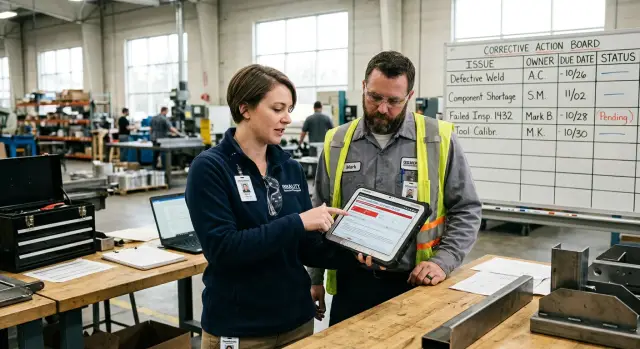
A failed inspection report records what went wrong, but a report alone rarely changes the work. Teams may file it, email it, or discuss it in a meeting, then return to urgent daily tasks. The same issue appears at the next inspection because nobody turned the finding into a task with an owner and a deadline.
A useful corrective action workflow gives every finding a clear path: someone receives it, takes action, provides proof, and another person checks the result. Without that process, failed inspection follow-up depends on memory and goodwill. That breaks down when several people, shifts, or locations are involved.
Vague wording causes many delays. A note such as "storage area is untidy" leaves too much open to interpretation. The supervisor may expect the warehouse team to fix it, while the warehouse team assumes facilities will handle it. Nobody knows the expected result, when it is due, or what proof the inspector needs.
A clearer finding states the condition and the required correction. For example: "Two emergency exits in the east storage area had blocked access. The warehouse lead must clear a 1-meter path and mark the floor boundary by Friday. Upload photos after completion." This turns an observation into an accountable corrective action task.
Some findings need an immediate control before anyone investigates the cause. If a machine guard is missing, take the machine out of service. If food storage temperature is unsafe, isolate the affected stock. These actions reduce immediate risk, but they do not explain why the issue occurred.
Keep urgent controls separate from work that prevents a repeat. For a missing machine guard, the short-term task might be to lock out the equipment and notify operators. Follow-up work could include ordering a replacement part, checking maintenance records, and updating the inspection routine that missed the damage.
For each finding, record:
Closure should mean a verified result, not a filed report.
Create one record for each inspection finding. Do not group unrelated problems under a broad label such as "maintenance issues." Separate records make ownership, deadlines, and closure decisions easier to manage.
Record the inspection date and exact location. Name the requirement that was missed, such as an internal procedure, safety rule, customer standard, or equipment instruction. Then describe the finding in plain language.
"Fire extinguisher issue" gives the assigned person little to work with. "The fire extinguisher by the loading door had no inspection tag for the current month" tells them what to check and correct. Include an asset number, room, shift, or area when it prevents confusion.
Use an urgency rating that reflects the actual risk. Ask whether someone could get hurt, whether a customer could receive unsafe or poor service, and whether the issue could happen again before the team fixes it.
Mark blocked emergency exits and exposed wiring as urgent. Set short deadlines for serious issues that could interrupt service or break a required rule. Minor issues can have a longer deadline, but they should remain visible until someone closes them.
Give the rating a written reason. For example: "High priority because the missing guard exposes operators to moving parts during every shift." That helps managers set a fair deadline and tells the assignee why the work cannot wait.
Attach supporting proof while the inspection is still fresh. Photos work well for visible conditions. Add meter readings for temperature, pressure, or noise issues. Use scanned forms, supplier documents, or screenshots when the finding concerns a record rather than a physical area.
Files should show context. A close-up photo can show a damaged cable, but a second photo showing its location near a workstation makes follow-up much easier. Add a short caption with the date and a description of what the file shows.
AppMaster can support this step with a finding form that requires location, requirement, urgency, and attachments. The form can create a corrective action task without anyone copying details by hand, so the assignee starts with the facts the inspector recorded.
Start with the inspection finding, then write the correction as work that one person can complete. A finding such as "emergency exit partly blocked" is too broad for an assignment. Break it into actions: remove stored items, mark the clear area on the floor, and tell the shift team where materials belong.
Give each action its own record. People can then see what remains open instead of treating one broad task as complete after the first small fix.
Use a short task title that starts with a verb. Add enough detail for the owner to act without chasing the inspector for an explanation. Include the finding reference, location, and expected result.
Each task should name one owner with the authority and time to move it forward. It should also state a due date, the person who verifies the work if approval is needed, and the evidence required before the owner requests closure.
Avoid assigning a task to a whole department. "Maintenance" does not identify who must act, and the work can sit untouched. Name one person, even when they delegate part of the job. That person remains responsible for progress and updates.
A serious safety issue may need attention before the next shift. A damaged notice board can reasonably wait a week. Giving every task the same deadline hides priorities.
Set the due date after the owner confirms what the work involves. If a repair needs a part or an outside contractor, record the expected delivery date and add an interim control. For example, keep a machine out of service until its replacement guard arrives.
Add a manager or reviewer when the correction changes a process, costs money, or needs another set of eyes. The reviewer should compare completed work with the original finding, rather than approving a task simply because the owner marked it done.
A no-code app can route overdue work to a manager and keep the finding, owner, deadline, and approval history in one place. AppMaster supports internal workflows with forms, business rules, and role-based task views.
A task is not complete because someone marks it done. The owner must show what changed and provide enough proof for the reviewer to judge the result. Set that requirement when you create the task, not after the due date passes.
Match the proof to the finding. A missing machine guard needs clear photos after installation. An expired calibration may need a current certificate and a test result. If a worker missed a safety procedure, ask for a training record, signed attendance sheet, and a supervisor's observation of the person doing the job correctly.
State both what proof the assignee must provide and what it must show. "Upload a photo" leaves room for doubt. "Upload two dated photos showing the guard fixed in place and the warning label visible" gives the assignee a clear target.
Common evidence includes:
Set file rules as well. Ask teams to use a consistent name, such as Finding-024_guard-installation_2025-04-18.jpg. Require readable dates where they matter. A shared pattern saves reviewers from opening every attachment to find the correct record.
Keep every file attached to the inspection finding and corrective action task. Do not leave evidence in email threads, personal folders, or chat messages. A reviewer should be able to open one record and see the finding, assigned owner, deadline, action taken, and proof.
In AppMaster, teams can add evidence-type fields, file uploads, and completion dates to each task. They can also require evidence before a task moves to review. This prevents a familiar problem: a closed task with nothing to show that the correction happened.
Evidence should show a completed correction, not a promise to act. A repair quote does not prove the repair took place. Ask for a final invoice, photos of completed work, or a follow-up test that confirms the issue no longer exists.
Closing a finding should mean someone checked the result. The reviewer needs the original finding, assigned action, and agreed evidence in one record. A photo, revised form, training log, or maintenance receipt may prove that work happened, but it does not always prove that the problem stopped.
Compare the completed action with the stated cause. If operators skipped a safety check because the form was unclear, replacing one damaged sign treats the symptom. A clearer form, updated work instruction, and a check that staff use both address the actual issue.
Give reviewers clear decisions to choose from. This avoids vague notes such as "looks good" and makes incomplete work visible.
The reviewer should record their name, review date, and decision. They should explain returned or escalated items in plain language. "Photo confirms the guard was installed, but the team has not tested the revised start-up check" gives the owner a specific next step.
When the finding involves work people do repeatedly, inspect the corrected process after the change. A supervisor can observe a few shifts, sample completed records, or run a controlled test. Match the test to the original failure as closely as practical.
For example, an inspection finds that warehouse staff repeatedly store temperature-sensitive stock in the wrong area. The manager adds shelf labels and provides refresher training. Before closure, the reviewer checks storage records over several days and observes staff receiving a delivery. If staff still hesitate over where items belong, the action needs revision.
Keep test notes, photos, sampled records, and final approval with the finding. In an AppMaster app, a reviewer can require those fields before the workflow permits closure. The record then helps teams identify repeat problems during future inspections.
A warehouse inspector finds pallets stacked in front of an emergency eyewash station. Staff can see the station but cannot reach it quickly. The inspector records the location, inspection date, photo, and safety risk: delayed access during an eye injury.
Moving the pallets fixes today's obstruction but does not change the storage habit. The workflow should separate the immediate fix from the work that prevents the issue from returning.
The shift lead receives one task: clear the space around the eyewash station before the end of the shift. The task states the clearance distance required by site safety rules and names the exact aisle.
The warehouse supervisor receives a second task: update storage rules, mark the clear area on the floor, and explain the rule during the next team briefing. The shift lead controls the pallets now. The supervisor controls how the team stores goods.
Clearing the route may need completion within hours. Floor marking and the briefing may allow two working days. A named owner and due date prevent the common assumption that someone else will handle it.
The shift lead uploads a dated photo showing the clear station and surrounding floor. The supervisor adds a photo of the floor marking and a note with the briefing date and attendees. These records show what people did instead of merely claiming completion.
A safety supervisor checks the evidence in person. They confirm that the eyewash station is reachable, the marking is visible, and nearby pallets do not cross into the marked space. If any part fails, they return the relevant task with a clear comment.
The finding stays open until a follow-up inspection confirms that staff kept the area clear during normal warehouse activity. Check at a different time of day, when stock movement is active. If pallets block the station again, the supervisor may need a stronger control, such as changing the storage layout or adding the area to each shift's safety check.
A completed task does not always mean a solved problem. The evidence proves the first correction. The follow-up inspection tests whether the new rule works in daily use.
A corrective action workflow fails when it turns a specific finding into a vague promise. The record may look complete, yet nobody knows who must act, what proves success, or when the risk has ended.
Do not assign a finding to "Maintenance," "Operations," or another department. A department can support the work, but one person must own the next action. They can ask for help, report delays, and provide required evidence.
Deadlines need the same care. "Fix this by Friday" causes confusion when several sites or shifts are involved. Record a full date, time, and relevant time zone for teams in different locations. If work has several stages, give each stage its own deadline.
A weak record might list an owner as "Facilities team," a due date as "end of week," an action as "repair damaged guard," and proof as "fixed." A stronger record names the responsible employee, exact completion time, specific guard and location, and evidence that a reviewer can check.
A worker may honestly say they repaired a problem, but a statement does not show that the correction works. Someone should inspect the result against the original finding before closure. For a damaged machine guard, that may mean an installation photo, maintenance record, and a supervisor's check that the guard fits and operates correctly.
Separate immediate containment from work that prevents a repeat. Taking unsafe equipment out of service and posting a warning controls today's risk. It does not explain why the guard failed, who checks similar equipment, or how the site will avoid the same issue next month.
Keep both actions in the record, with separate owners and dates when needed. The containment task may need completion within an hour. The preventive task might involve updating an inspection checklist, ordering a better part, or training staff within two weeks.
AppMaster can help teams create a no-code internal tool that assigns each corrective action task to one person, records exact deadlines, collects photos or documents, and requires verifier approval before closure.
Test the workflow with two recent findings before using it across every inspection. Choose one simple fix and one issue involving several people. This exposes unclear fields and approval gaps while the process is still easy to adjust.
Every user should be able to tell who must act, what they must provide, and who can close the record. If any answer depends on a phone call or private spreadsheet, tighten the form.
Before launch, make sure every finding has one named owner, a due date, and a status. State the required evidence, whether that is a dated photo, training sign-off, invoice, maintenance log, or revised procedure. Name the reviewer and require them to record an approval or rejection, date, and brief reason.
Set reminders before the deadline and an escalation rule for overdue work. For example, notify the owner three days before the due date, then send overdue items to their manager after two days. Review late tasks and repeated findings weekly. A recurring issue can point to weak process controls, unclear training, or a temporary repair that did not last.
Test permissions too. Owners should update their tasks and upload evidence. Reviewers should make verification decisions. People who only need visibility, such as site managers, should not be able to edit records by accident.
Keep the first version plain. A facilities finding might read: "Replace damaged exit sign in warehouse aisle 4 by May 14." The assigned technician attaches a photo of the installed sign and work order. The safety lead checks that the sign works and records either "verified" or a reason for rejection.
If you build the process in AppMaster, create required fields for owner, deadline, evidence type, reviewer decision, and repeat-finding flag. Add a simple dashboard for overdue items. Test that a finding can move from inspection to verified closure without anyone filling in missing details outside the application.
Start with one inspection type that happens often, such as a weekly safety walk or equipment check. Run the workflow for a few reports before expanding it across the business.
Real use exposes issues that a diagram misses. An inspector may need a photo field at the time of reporting. A task owner may need a clearer due-date rule. Make changes after reviewing real reports, then keep the form stable long enough for people to learn it.
Use statuses that show each person what to do next:
A simple status set makes daily follow-up easier. Supervisors can filter overdue action-needed records each morning. Inspectors can review items after their next site visit. Task owners can see whether a photo, invoice, test reading, or note is still missing.
AppMaster can turn this corrective action workflow into an application without code. Teams can create a finding record, connect it to a task, set due dates, collect verification evidence, and let reviewers approve the correction or return it for more work.
Keep daily screens short. An inspector should record a finding in a minute or two. A task owner should see the issue, due date, required evidence, and current status on one screen. Put detailed reports and administrative settings elsewhere.
Set one routine for missed deadlines. For example, remind the owner two days before the due date, notify the supervisor on the due date, and keep the finding visible until someone records a decision. The process works when people use it during normal work, rather than trying to catch up at the end of the month.
After a month, review a sample of closed findings. Check whether owners attached the required evidence, reviewers recorded why they accepted it, and repeated issues received stronger actions. Use those results to adjust the fields and rules before expanding the application.
 What should a corrective action record include?
Create a separate record for each finding. Include the exact location, missed requirement, risk level, named owner, due date, required evidence, and reviewer. This gives the team one clear place to track the issue from report to closure.
How do I separate an immediate fix from a long-term correction?Record an immediate containment task and a preventive action as separate items. Containment reduces today's risk, such as locking out unsafe equipment. Preventive work addresses why the problem happened and helps stop it from returning.
Who should own a corrective action task?Assign one named person who has the authority and time to move the work forward. Other people or departments can help, but the named owner must report progress, raise delays, and submit the evidence.
How should I set due dates after a failed inspection?Use the actual risk to set the deadline. Issues that could injure someone, break a rule, or disrupt service need short deadlines. Record a full date and time, and add an interim control if a repair or contractor will take longer.
What evidence should a task owner provide?Define the evidence when you create the task. Ask for proof that matches the work, such as dated photos for a repair, a calibration certificate for equipment, or attendance and observation records for training.
Can I close a finding when the owner says the work is done?No. A reviewer should compare the completed work and evidence with the original finding before closing it. If the correction only removes the visible symptom, return the task and ask for work that addresses the cause.
What should a reviewer check before approving a corrective action?Use clear decisions: approve and close, return for more work, extend the due date, or escalate the issue. The reviewer should record their name, date, decision, and a short reason, especially when they reject the evidence.
How do I know whether the correction prevented the problem from happening again?Test the changed process during normal work. A supervisor can observe several shifts, review a sample of records, or inspect the area at a busy time. Keep those test notes with the original finding so the team can spot repeat issues later.
Which statuses work well for corrective action workflows?Start with a small set that shows the next step clearly: New finding, Action needed, Evidence needed, Review needed, and Closed. These statuses show owners, reviewers, and managers what they need to do without adding unnecessary steps.
Can AppMaster help us manage inspection corrective actions without code?AppMaster lets teams build a no-code internal app with finding forms, assigned tasks, deadlines, file uploads, role-based views, reminders, and approval rules. You can require an owner, evidence, and reviewer decision before the app allows closure.
Experiment with AppMaster with free plan.
When you will be ready you can choose the proper subscription.
 Jul 14, 20268 min
 Jul 13, 20268 min
 Jul 08, 20268 min