
 Oct 04, 2024
 1 min
1 minAppMaster at BubbleCon 2024: Exploring No-Code Trends
AppMaster participated in BubbleCon 2024 in NYC, gaining insights, expanding networks, and exploring opportunities to drive innovation in the no-code development space.

Microsoft Teams is set to enhance user experience by introducing green screen technology for virtual backgrounds, promising improved detail and accuracy without additional software or hardware.
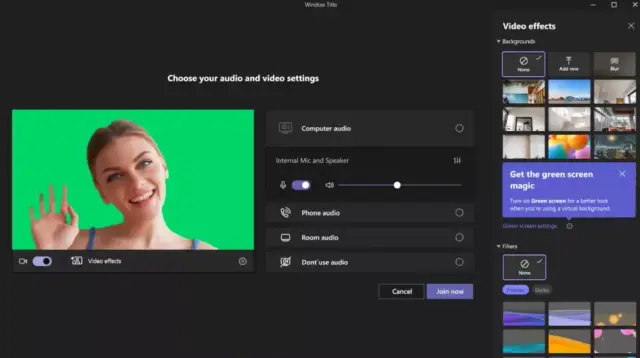
Microsoft Teams is set to elevate virtual backgrounds by introducing green screen technology, promising enhanced detail and accuracy without any need for a separate software or hardware. Recently released information provides insights into how this new feature will improve the experience of Microsoft Teams users.
In a Microsoft Tech Community blog post, Jan Steberl, a company expert, reveals how the green screen feature, now in public preview, can significantly improve the virtual background effect. Steberl points out that the green screen brings enhanced sharpness and definition to the virtual background around users' faces, heads, ears, and hair. Additionally, objects, such as props held in the user's hand, will appear more clearly to other participants in the meeting.
To take advantage of the green screen feature, users must ensure a solid color screen or background wall behind them devoid of any stains or irregularities. It is also crucial to select the appropriate backdrop color for the best quality background or blur effect.
Steberl offers guidance on activating the green screen effect within a Microsoft Teams meeting. First, users must apply a background effect before enabling the green screen. After joining the call, click the 'More' icon in the meeting toolbar, proceed to Video effects > Green Screen Settings in the Backgrounds section, and toggle the option under Teams settings > Devices > Green screen. However, activating the green screen will automatically disable background blur and Together Mode, but it is compatible with several Presenter modes, including Standout, Side-by-Side, and Reporter, PowerPoint Live Standout, and background replacement (JPEG/PNG).
It is important to note that the green screen feature is currently available only for Windows and macOS devices with Intel and AMD chips. Apple Macs with M1/M2 hardware will not be able to access the feature for now.
As no-code platforms like AppMaster.io continue to empower businesses with accessible and cost-effective backend, web, and mobile application development, incorporating advanced features like these green screen enhancements can create even more impressive results. In the era of remote work, the integration of intuitive and visually appealing tools has a significant impact on business communication and productivity. With the rapidly evolving tech industry and platforms like AppMaster.io, organizations can safely explore and adopt new technologies to remain at the forefront of innovation.
 Oct 04, 20241 min
 Sep 23, 20241 min
 Aug 08, 20241 min
Experiment with AppMaster with free plan.
When you will be ready you can choose the proper subscription.


