


 Jul 14, 2026
 8 min
8 minEquipment reservation app: prevent conflicts and track returns
Plan an equipment reservation app that prevents double bookings, records returns and damage, and places faulty items on maintenance hold.

Build a warehouse bin location catalog and generate mobile pick lists sorted by aisle and bin to cut walking time, reduce misses, and speed fulfillment.
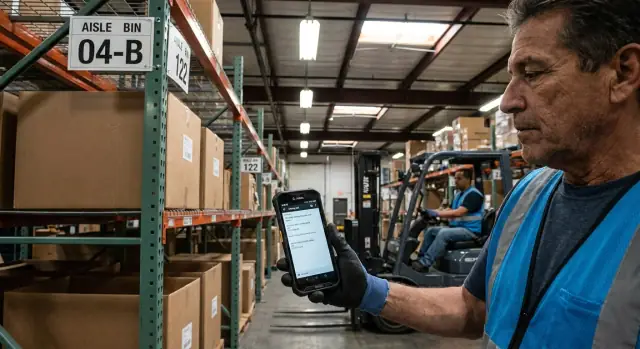
Picking stays fast when every item has a clear home and everyone trusts the location. It slows down the moment locations get vague, outdated, or split across three places (a spreadsheet, a notebook, and "tribal knowledge"). Then every pick turns into a small search.
You can see the time loss on the floor. A picker walks to the right aisle, but the bin label is unclear, so they scan nearby shelves. They find the SKU in a different spot, jot a note on paper, and move on. Later, another order sends them back to the original aisle anyway because the system still thinks the item is there.
Messy locations usually create the same problems:
Faster fulfillment isn’t about rushing. It’s about removing wasted motion and preventable mistakes: fewer steps, less searching, fewer short picks, and fewer re-picks after a pack error.
The fix is straightforward: one source of truth for locations, plus pick lists that follow the warehouse layout instead of whatever order the sales system outputs. A warehouse bin location catalog should answer one question instantly: "Where do I go to pick this SKU right now?"
Imagine a small morning wave: 18 lines across 6 orders. Two SKUs were moved from A-02 to C-14, and only one person knows. Every picker loses time hunting, and the next shift repeats it. Update the catalog once, sort the mobile pick list by aisle and bin, and the work becomes predictable.
Picking gets faster when everyone uses the same "map" of the building. You don’t need a perfect map on day one, but you do need clear, shared definitions.
Use plain words your team already uses:
Think of a bin as the address you want printed on a label and shown on a phone. If you’re building a warehouse bin location catalog, the bin is the unit that matters most because it’s what a picker scans and confirms.
On the item side, a SKU is the sellable unit you count, pick, and ship (for example: "Black T-shirt, Medium"). One SKU can have multiple locations in real life: a primary pick bin, an overflow bin, a case-pick location, or a quarantine spot.
That’s normal warehouse behavior. Overflow appears after a big receipt. Seasonal items move closer to packing. Returns land in a "to be checked" area. Fast movers get re-slotted. Plan for that reality without overcomplicating your first version.
A simple starting rule works well: give each SKU one primary pick bin, and allow optional secondary locations with a clear status like "Overflow" or "Returns hold". Add more rules only after the team trusts the basics and the data stays clean.
A bin location catalog only works if the data model stays simple. You want enough structure to keep locations accurate and pick lists predictable, without turning every update into a project.
Most teams can start with four core records that match how the floor actually works: Products (SKUs), Locations (bins), Inventory (how much is where), and Pick Tasks (what someone needs to grab right now).
Focus on the fields that change picking speed and reduce confusion.
Products (SKUs) should cover identification and basic handling: SKU code, name, barcode/UPC, unit of measure, active/inactive status, and a default pick quantity if you often pick in standard packs.
Locations (bins) should capture how people navigate: zone, aisle, bin code, a pick sequence (a number used for ordering), and a status such as active, blocked, empty, or quarantine.
Inventory is the reality check: SKU, location, on-hand quantity, reserved quantity, last counted date, and a count status (ok, needs recount).
Pick Tasks tie work to a person and a place: order or wave ID, SKU, required quantity, assigned picker, task status (open, in progress, picked, exception), and the chosen pick location.
Many SKUs live in more than one place (forward pick plus overstock). Handle this with one clear rule: keep one primary location per SKU, and allow secondary locations with a priority.
A practical setup is a separate SKU-Location mapping with: priority (1, 2, 3), optional min/max levels for the forward bin, and a replenishment flag. When the primary bin is short, the pick task can fall back to the next priority.
Build in auditing from day one. Record who changed a SKU location, what changed, and when. One wrong edit can slow picking for days, so changes should be traceable and easy to review.
A bin label only helps when everyone reads it the same way, and the system stores it the same way. The goal is a name that works on a small phone screen, prints cleanly on a label, and sorts correctly.
A simple approach that holds up is a fixed pattern with fixed lengths, so A2 and A10 don’t sort strangely. A common pattern is Zone-Aisle-Bay-Level-Bin, where each part has one job:
That gives IDs like Z01-A03-B12-L02-S05. Even if you don’t use every part today, keeping the slots makes expansion easier later.
Plan for exceptions early, but keep them inside the same structure so they’re obvious and sortable. Examples include bulk pallets (Z01-BULK-P01), cages (Z02-CAGE-07), returns (Z01-RTN-01), or QA hold (Z01-QA-01).
Consistency usually breaks because of duplicates and typos. Add validation so bad locations can’t be saved in the first place. Keep it strict in the stored ID, and optional in a separate display name.
Validation guardrails that pay off quickly:
When location names are predictable, scanning is faster, training is easier, and pick list sorting stays reliable.
A pick list should come from a simple chain: orders become order lines, and order lines become pick tasks. When that chain is consistent, the bin catalog stops being "data you maintain" and starts saving real walking time.
A flow that works in most warehouses:
Choosing the right location per SKU is where teams often lose time. A practical rule set is simple:
Sorting should match how people walk. A reliable default is zone, then aisle, then bin, with item name as a tie-breaker.
Batching is the final decision. Single-order picks work for urgent orders. Wave picks work for scheduled runs. Cluster picking works when one picker can grab items for several small orders in one trip without confusion.
The goal isn’t a perfect route. It’s a pick order that makes sense to a human and cuts the biggest waste: back-and-forth walking.
Most warehouses get a big win from a straightforward sort like zone, then aisle, then bin. If your location codes are consistent, a simple text sort can work well.
If you need a more explicit sort order, keep it readable:
Add special rules only when the building demands it. One-way aisles are the classic case: odd aisles top to bottom, even aisles bottom to top, so pickers don’t fight the traffic pattern. Mezzanines and cold storage also justify special handling because they add time to enter, gear up, or go upstairs. Keep these as clear switches, not a complex routing engine.
Split picks matter in real life. If an order needs 12 units and the primary bin has 8, the pick list should show two lines in the correct walking order: pick 8 from the primary, then pick 4 from the next preferred bin.
When a bin is empty, the picker shouldn’t have to decide where to look next. Use a fallback location automatically, and create a replenishment alert so the same problem doesn’t hit the next run.
A picker shouldn’t hunt for info while walking. The best mobile pick list screens feel boring: one clear next action, big text, and nothing extra. If the bin catalog is accurate, the app’s job is to guide the picker to the next bin and make confirmation fast.
Keep the screen set small and aligned to what happens on the floor:
On the pick details screen, make the bin code the biggest element, then the quantity, then the SKU name. Add a small product image only when it helps with look-alike items. Keep notes short and specific (for example: "Top shelf, left").
If you can, support both tap and barcode scan. Taps are faster when labels are missing. Scans reduce errors when SKUs look similar.
Exception actions should be one tap and always visible:
Treat exceptions as real data, not side notes. That’s how supervisors spot patterns and fix root causes instead of hearing about issues after the shift.
Start small. You can build something useful with one aisle and one product family, then expand once the flow feels natural on the floor.
A build order that avoids rework:
Set up the location catalog first. Create a record for each bin (warehouse, zone, aisle, bay, level, position). Import what you already have from a spreadsheet, even if it’s imperfect. You can clean naming later, but you need stable IDs now.
Add SKUs and map where they live. Give each SKU a primary pick location, then allow optional secondary locations for overflow. This prevents "it’s empty" moments from stopping the run.
Turn orders into pick tasks. Keep order intake simple: order header, order lines, and a generated pick task per line.
Sort for walking, not perfection. Start with a clear rule: sort by zone, then aisle, then bay, then level. If two lines share a bin, group them.
Add confirmations and exceptions. Require a quick confirm (tap or scan). If the bin is empty, let the picker report the issue and continue, while the system captures the reason for follow-up.
Example: a picker hits Bin A-03-02, finds only 1 of 3 units, confirms the partial, switches to the secondary bin, and the system records the exception so you can fix replenishment later.
It’s 9:05 a.m. and three orders drop in at once, totaling 12 line items. The catalog has each SKU mapped to a primary bin, plus an overflow bin when stock is split.
Order A needs: 4x SKU-101, 1x SKU-205, 2x SKU-330.
Order B needs: 1x SKU-101, 3x SKU-118, 1x SKU-712, 1x SKU-330.
Order C needs: 2x SKU-205, 1x SKU-118, 1x SKU-990.
Locations follow a simple rule: take from the primary bin first, then spill into overflow only if the primary doesn’t cover the quantity.
The mobile list sorts by aisle and bin so the route is predictable:
Halfway through, the picker reaches Bin 06-02 for SKU-205 and finds it empty. On the same screen, they tap "Short pick," enter the actual count (0), and add a short note like "bin empty, check pallet in receiving." The app shifts the remaining quantity to the overflow bin 06-18 if it’s available.
After the run, the supervisor sees a clean summary: which lines were short, which bins caused the issue, and a restock signal for 06-02.
A bin location catalog only helps if people trust it. Slowdowns usually start small: a new bin name here, a quick "temporary" move there, and soon pickers stop following the list.
The most common mistakes:
A simple example: a picker sees "SKU 1142" on the list, but the bin is empty. With no exception button and no history, they walk to a supervisor, then backtrack to a "maybe" overflow shelf. One issue like that can derail a whole run.
A few guardrails keep the system fast in practice:
Before you hand phones to pickers, make sure the basics can’t fail. The catalog only helps when the data matches what’s on the racks.
Start with coverage and labeling. Walk each aisle and spot-check: can you find the bin code in seconds, and does it match the system exactly?
After the checklist, run a 15-minute dry run with two real orders. Ask a picker to follow the list exactly while a lead watches for hesitation points: unclear bin names, duplicate locations, tiny buttons, or missing exception paths.
If something goes wrong, you want a simple trail: who picked it, which bin they were sent to, what they confirmed, and why they couldn’t complete a line.
Pick one zone (like Aisle 1-3) or one product category that represents a normal day, not a special case. A tight pilot makes issues obvious without disrupting the whole floor. The goal is to prove two things: the location data stays accurate, and the pick list order reduces walking.
Define what "better" means before the first pilot shift. Track a few simple numbers so comparisons are easy:
Keep governance lightweight but real. Choose one owner for bin changes and set a cadence (daily for fast movers, weekly for slow movers). Most picking slowdowns start when everyone can move product, but no one updates locations.
If you want to build this without heavy coding, AppMaster (appmaster.io) is one option to model your bin and SKU data, add pick and exception logic with visual workflows, and generate an admin tool plus a mobile app from the same setup.
Once the pilot is stable, expand one zone at a time. Add features in this order: replenishment prompts when pick-facing stock drops below a threshold, simple cycle counts tied to high-error bins, role-based access for who can edit bins/SKUs/orders, and tighter exception flows (damaged, substitute, split bin).
 What’s the main reason messy bin locations slow down picking?
Start with one clear source of truth for locations and require that every pick confirms a bin. The fastest win is making the system’s bin match the physical label, so pickers stop “searching around” and trusting memory.
How should we name bin locations so they sort correctly on a pick list?Use a consistent pattern that matches how people navigate, and keep the parts fixed length so sorting works. A good default is Zone-Aisle-Bay-Level-Bin, and you can leave unused parts as placeholders so you can expand later without renaming everything.
Should each SKU have one bin, or can it have multiple locations?Give each SKU one primary pick bin, then allow secondary locations with a clear purpose like overflow or returns hold. This keeps the “where do I pick right now?” answer simple while still handling real-life split stock.
What data do we need to store to build a bin catalog and pick list system?Keep it simple with four records: SKUs, Locations (bins), Inventory (SKU-location quantities), and Pick Tasks (who picks what from where). That structure is enough to generate pick lists, support confirmations, and capture exceptions without a complicated system.
How do you decide which bin a pick task should use?Resolve each order line to a specific pick location using a simple rule: pick from the primary bin if it has enough stock, otherwise split across the next best bins. Always exclude bins that should not be picked, like quarantine, blocked, or damaged locations.
What’s the simplest sorting logic that actually reduces walking?Sort by the same path people walk: zone, then aisle, then bay/section, then level/bin. If your layout has one-way aisles or special areas like cold storage, add a simple rule switch for those areas instead of trying to build a perfect routing engine.
What should be on a mobile pick screen to keep pickers fast?Show one next action with the bin code in the biggest text, then the quantity, then the SKU name. Add fast confirmation (tap or scan) and keep exceptions visible on the same screen so pickers don’t leave the flow when something goes wrong.
What should happen when the picker reaches an empty bin?Treat exceptions as required data, not side notes. When something isn’t found, the picker should record what happened, confirm what they did pick, and the system should either offer the next location or flag replenishment so the same issue doesn’t repeat.
How do we prevent duplicates and typos from ruining the bin catalog?Validate location IDs before saving them, block duplicates, and log every bin/SKU move with who and when. Also limit who can create or edit bins, because a few inconsistent edits quickly destroy trust in the pick list.
How do we roll this out without disrupting the whole warehouse?Pilot one zone or one product family first and measure pick time per line, short picks, and re-walks. If you want to avoid heavy coding, you can build the data model, pick workflows, and an admin plus mobile app in AppMaster, then refine rules as the team uses it.
Experiment with AppMaster with free plan.
When you will be ready you can choose the proper subscription.
 Jul 14, 20268 min
 Jul 13, 20268 min
 Jul 08, 20268 min