


 Jul 14, 2026
 8 min
8 minEquipment reservation app: prevent conflicts and track returns
Plan an equipment reservation app that prevents double bookings, records returns and damage, and places faulty items on maintenance hold.

Use this source code export vs managed cloud deployment checklist to decide between self-hosting and a managed runtime based on compliance, skills, and updates.
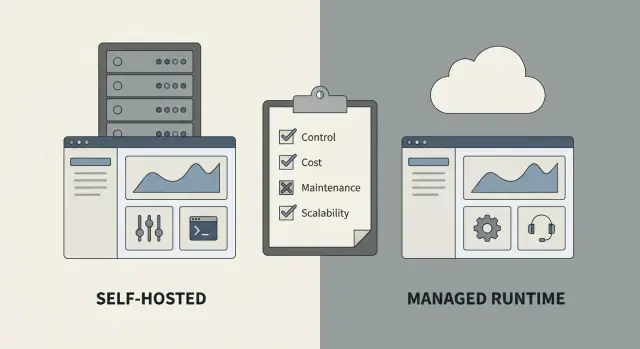
Choosing between source code export and a managed cloud deployment isn't only about where your app runs. It's about who owns the day-to-day work of keeping it healthy.
With a managed runtime, the platform hosts the application for you. You deploy, and the provider takes care of much of the underlying work: maintaining the runtime, basic monitoring, and the environment your app needs.
With source code export and self-hosting, you take the generated code and run it in your own infrastructure (or inside your own cloud account). You get control over servers, networks, and policies, and you also take on the work that comes with that control.
That choice affects three things right away: speed (how fast you can ship), risk (what can break and who fixes it), and cost (not only hosting bills, but staff time).
In practice, the biggest differences usually show up in infrastructure ownership, monitoring and backups, incident response, update flow (one-click deploy vs a DevOps-style release process), access control to logs and databases, and how you produce compliance evidence.
If you're using a platform like AppMaster, the difference is very practical: the app can be regenerated when requirements change. In a managed setup, the runtime side is largely handled for you. In a self-hosted setup, you decide how regeneration, testing, and rollout happen in your environment.
There isn't one right answer. A startup shipping fast might choose managed hosting to reduce ops work. A regulated team might export code to meet strict controls. The better choice is the one that matches your constraints and your ability to operate the system every week, not just launch it once.
The fastest way to decide is to start with what you can't compromise on. Preferences change. Constraints usually don't.
Write down the controls you must keep in your hands. These are often driven by customer contracts, regulators, or your own risk tolerance. If any of these are truly non-negotiable, they often point to exporting and self-hosting.
Common "must control" constraints include where data lives (country, region, or a specific cloud account), who holds encryption keys and how they're rotated, network boundaries (private subnets, VPNs, allowlists), log access and retention rules (auditing, SIEM, immutable storage), and change approval requirements (reviews, sign-offs, evidence).
Then be honest about what you're happy to outsource. Many teams don't need to own every operational detail, and managed runtimes can remove a lot of ongoing work, like uptime monitoring, basic incident response, OS and dependency patching, backups and routine restore testing, and handling traffic spikes.
One question settles a lot of debates: who owns incidents at 2 a.m.? If your team can't reliably cover after-hours support, self-hosting can turn into stress fast. If you do self-host, name an owner, define escalation, and decide what "service restored" means.
Example: a small ops team is building an internal portal. They want "full control," but they can't commit to patching and on-call. Unless a compliance rule forces self-hosting, managed hosting is often the safer constraint-based choice. With AppMaster, you can keep the option open: deploy to a managed cloud now and export source code later if a new customer or audit makes it necessary.
If your app touches regulated or sensitive data, start here. Compliance needs often decide the export-vs-managed choice because they set hard rules on where data can live and what evidence you must keep.
Be clear on what data you store and what rules apply. "Customer emails" and "health data" trigger very different requirements. Also decide how long you must keep records and who is allowed to delete them. Retention rules can affect database settings, backups, and even how you design admin screens.
These questions help you surface non-negotiables before you compare platforms:
If you can't confidently answer the evidence question, pause. Many teams only discover this gap when an auditor asks for proof of access, changes, and deletions.
Security isn't only prevention. It's also being able to prove what happened.
Decide what logs you need (login attempts, permission changes, data exports, admin actions) and where they must be stored. Some organizations require logs to be immutable and retained for a fixed period.
Example: an HR internal tool may store employee records. If your company requires SSO, strict access roles, and a yearly audit, you might prefer self-hosting after exporting source code so your security team can manage network controls and log retention. If your needs are lighter, a managed runtime can reduce the burden while still supporting common controls like authentication and access rules.
The hardest part of this decision isn't technology. It's whether your team can run the app safely every day, including nights, weekends, and vacations.
Start by being realistic about what "24-7 operation" means for you. If the app supports customers, payments, or critical internal work, downtime becomes a people problem: someone must notice, respond, and fix it.
Self-hosting usually requires at least basic strength in cloud operations (servers, networking, firewalls, load balancers), database operations (backups, restores, upgrades, performance), security operations (secrets management, access control, incident response), reliability work (monitoring, alerts, logs, capacity planning), and an on-call owner.
Then list the "small but constant" tasks that pile up over time: OS and dependency patches, TLS certificates, secret rotation, and audit logging. If those sound simple, imagine doing them during a production outage.
Managed runtimes reduce that burden, but they don't remove ownership entirely. Someone still manages environments, reviews changes, and decides when to release. Platforms like AppMaster can make updates easier because the application can be regenerated and redeployed cleanly when requirements change, but the operational work doesn't disappear if you self-host exported code.
Finally, watch for key-person risk. If one person knows the deployment steps, database recovery process, and where secrets live, you don't have a team. You have a single point of failure.
Ask these before you commit:
Release workflow is where this choice becomes real. The better option is usually the one that lets you ship changes safely and fix issues fast, without turning every release into a mini project.
Be honest about how often you'll release. If you expect weekly improvements and same-day hotfixes, you need a path that makes publishing and rollback routine. Managed runtimes often make this simpler because the deployment surface is smaller. If you export and self-host, you can still move quickly, but only if you already have a strong process and someone who can execute it under pressure.
Write down how deployments will be approved and what happens when something breaks. A simple policy beats a perfect one that nobody follows.
If you self-host exported code, make sure rollbacks include data changes. A code rollback is easy; an incompatible database change is not.
Many "emergency releases" are really config updates: API keys, connection strings, email/SMS settings, or payment settings like Stripe. Separate these from code so you can change them without rebuilding and redeploying everything.
Regardless of where you run, define a single place for configuration (and who can edit it), how secrets are stored and rotated, and how you audit changes (who changed what and when).
Keep dev, staging, and prod consistent. Small differences in environment settings can cause issues that only appear in production. If you use a platform like AppMaster, decide how you'll mirror environment variables and external integrations across environments before the first release.
Example: a customer support portal needs a same-day fix for a login issue. With managed hosting, you might ship the fix and roll back quickly if needed. With self-hosting, you can do the same, but only if build, deploy, and rollback steps are already scripted and tested.
Money is only half the story. The real cost often shows up as time: who is responsible when something breaks at 2 a.m., and how quickly you can recover.
Self-hosting can look cheaper on paper because infrastructure bills are visible and easy to compare. But you're also taking on responsibility. Managed hosting can cost more per month, yet it can save many people-hours because patching, basic reliability, and routine ops are handled for you.
Teams often miss these cost buckets:
Scaling is similar. If your load is predictable, self-hosting can be efficient and stable. If you expect spikes (a marketing campaign, seasonal peaks, or "everyone logs in at 9:00"), managed environments usually handle surprises with less planning. When you self-host, you need to design for spikes ahead of time, test it, and pay for capacity or accept risk.
Support and contracts matter most when the app becomes business-critical. Ask what you need to promise internally or to customers: uptime targets, response times, and clear ownership. In a managed setup (for example, deploying to AppMaster Cloud or a major cloud provider), you may get clearer boundaries for infrastructure issues. With self-hosting, ownership is simpler on paper (it's yours), but the burden of proof and the workload also become yours.
A useful rule: if downtime costs more than the managed fee, you're not only buying servers. You're buying sleep.
Treat this as a fast workshop. You're deciding who owns day-to-day operations.
A scoring shortcut that keeps things honest: if you can't clearly describe your patching, monitoring, backups, and rollback plan, self-hosting is probably a later step, not a day-one step.
Example: a small ops team building an internal tool might start on managed hosting to ship weekly updates safely. If an audit later requires full control over network boundaries, they can export and self-host once they have owners for updates, incident response, and change approvals.
If you're building with a no-code platform like AppMaster, add one pilot check: how exports fit your release process (who builds, who deploys, and how fast you can regenerate and ship changes).
The biggest regret is treating deployment like a preference instead of an operating model. Teams often pick what feels familiar, then discover hidden work only after users depend on the app.
A common mistake is assuming self-hosting is automatically cheaper. Cloud bills are easy to see, but the labor isn't: patching servers, rotating secrets, watching logs, handling incidents, and answering security questionnaires. If your team has to stop product work to keep the lights on, "cheaper" gets expensive fast.
The opposite mistake happens too: choosing a managed runtime and later needing deep infrastructure control (custom network rules, special identity providers, unusual monitoring agents, or strict residency rules). If those needs are likely, validate them early or plan for export and self-hosting from day one.
Backups and disaster recovery are where many self-hosted projects quietly fail. Backups that are never restored are just hope. Schedule restore tests and document who does what when something breaks.
Release workflow issues also cause outages. Teams deploy without a clear changelog, without a rollback plan, or with hot fixes that nobody tracks. Whether you deploy on a managed runtime or self-host, you need a simple release routine that people follow even on busy weeks.
The problems that most often trigger a forced switch later:
Example: a small ops team launches an internal portal quickly, then a contractor leaves and still has access to the admin panel because offboarding was never formalized. That single gap can turn into a compliance incident.
If you build with AppMaster, decide early who owns runtime operations and write down your day-2 tasks (access reviews, backup tests, release steps) before the first real users arrive.
Mark each line with Yes, No, or Not sure. If you have more than two "Not sure" answers, fill the gaps before you commit.
If most of these are strict requirements and you already operate compliant infrastructure, exporting and self-hosting often fits. If you mostly need good security without heavy proof, managed hosting is usually simpler.
Self-hosting only works well when these answers are solid. Managed deployment works best when you want the platform to handle the ongoing operational work.
Decide how you'd move later if you need to.
Example: if you build an internal tool in AppMaster and expect audits next year, you might export and run it inside your controlled environment. If your main risk is slow releases, managed hosting with a clear rollback routine can be the safer choice.
A small operations team wants an internal admin tool for customer support: search customers, reset passwords, refund payments, and view audit history. They can build the UI and logic quickly in a no-code tool like AppMaster, but they still have to choose between exporting and self-hosting versus using a managed runtime.
Their constraints are clear. Customer data is sensitive, and they have a compliance review that requires clear residency, access control, and audit trails. At the same time, they have limited ops time. No one wants to be on call for database tuning, patching servers, or chasing 2 a.m. alerts.
They run the checklist and land on a practical split:
In this case, the compliance officer says production must live in the company cloud account with private database access and strict IAM policies. So they export source code for production, but keep a fallback plan: use a managed runtime for a staging environment so product changes can be tested without waiting on internal infrastructure.
To avoid chaos later, they document four things from day one: target region and data stores, required logs and audit events, release steps (who approves, who deploys, rollback rules), and what is configuration vs code. They also keep an inventory of integrations (Stripe, email/SMS, Telegram) and where secrets live, so a future switch (self-hosted to managed, or the reverse) is a controlled migration, not a rebuild.
A deployment decision only helps if you can repeat it under pressure. Before you build more features, write the decision down on one page: what you chose, why, what you're not doing, and what would make you reconsider.
Keep it practical: your top 3 reasons (for example, compliance needs, existing ops capacity, or speed of updates) and your top 3 risks (for example, on-call load, slower patches, or vendor limits). That page becomes a tie-breaker when opinions shift later.
Next, create a small runbook that a new teammate could follow without guessing:
Pick a review date after your first real release cycle. A good time is 2 to 4 weeks after users start relying on the app. Ask: did updates feel safe, did incidents get handled smoothly, and did the team spend more time shipping or babysitting?
If you're using AppMaster, do a direct comparison between exporting for self-hosting and deploying to a managed runtime using the same checklist, especially around compliance evidence, who owns patching, and how fast you need to ship. If you want a quick way to pilot both paths, AppMaster (appmaster.io) is designed to let you build a full app and then choose between managed deployment and source export based on your operating constraints.
Finally, run a small pilot end to end: build one simple app, deploy it, roll it back once, and restore from backup once. If that feels painful, your deployment choice probably needs adjusting.
 What’s the best default choice if we just want to launch quickly?
Managed cloud deployment is usually the best default when you want to ship fast and don’t have dedicated time for patching, monitoring, and on-call. It reduces the number of moving parts you personally maintain, which often lowers operational risk in the first few months.
What am I really deciding between export + self-hosting and managed deployment?Self-hosting means you own the runtime and the work around it: servers, networks, security updates, monitoring, backups, restores, and incident response. Managed deployment shifts much of that day-to-day infrastructure work to the provider, while you still own the app behavior and release decisions.
Which compliance requirements usually push teams toward self-hosting?If you must control data residency in a specific country or a specific cloud account, manage your own encryption keys, enforce private networking rules, or meet strict audit evidence requirements, exporting and self-hosting is often the safer fit. When those constraints are truly non-negotiable, start there and plan the operational ownership upfront.
What logs should we plan for so we can prove what happened during an incident?Start by listing the exact events you must capture, such as logins, permission changes, admin actions, data exports, and deletions. Then decide retention, who can access logs, and whether logs must be immutable, because those details affect storage, access controls, and how you answer audits.
How do we know if our team can realistically self-host?The simplest test is to name who responds to a 2 a.m. outage and how service gets restored. If you can’t cover alerts, patching, and database recovery reliably, managed deployment is usually the healthier choice until you have clear ownership and a runbook.
Which option makes weekly updates and hotfixes easier?Managed deployments tend to make releases and rollbacks more routine because there’s less infrastructure to coordinate. Self-hosting can be just as fast, but only if you already have a reliable build, deploy, and rollback process that’s scripted, tested, and repeatable under pressure.
How should we handle secrets and configuration in either setup?Treat configuration as separate from code so you can change keys and settings without rebuilding everything. Define one source of truth for environment variables and secrets, restrict who can edit them, and keep dev, staging, and production aligned to avoid “works in staging” surprises.
Is self-hosting actually cheaper than managed deployment?Managed hosting can cost more in monthly fees, but it often saves staff time on patching, monitoring, backups, and incident response. Self-hosting can look cheaper on paper, but the hidden cost is labor and the risk of slow recovery when something breaks.
What’s the biggest operational mistake teams make after choosing self-hosting?Backups that are never restored are not a plan, so schedule restore tests and write a short recovery runbook. Also define rollback rules that include database changes, because reverting code is easy while reverting incompatible data changes can be painful.
Can we start managed and switch to self-hosting later without starting over?Build a small pilot and time how long it takes to deploy, roll back, and restore from backup once. With AppMaster, you can build the app with no-code tools and keep flexibility by deploying to a managed runtime first, then exporting source code later if new compliance needs require self-hosting.
Experiment with AppMaster with free plan.
When you will be ready you can choose the proper subscription.
 Jul 14, 20268 min
 Jul 13, 20268 min
 Jul 08, 20268 min