


 Jul 14, 2026
 8 min
8 minEquipment reservation app: prevent conflicts and track returns
Plan an equipment reservation app that prevents double bookings, records returns and damage, and places faulty items on maintenance hold.

Learn how to design a secure internal admin panel for payments with clear roles, masked data, and practical workflows for refunds, disputes, and chargebacks.
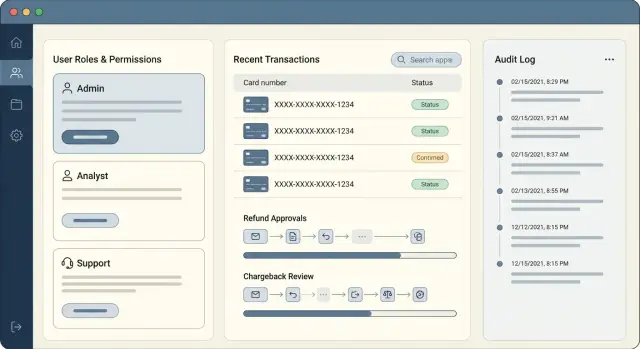
A payments admin panel is powerful because it can move money, expose sensitive details, and override normal customer flows. That combination makes it a high-risk internal tool. The biggest issues usually come from ordinary work done under pressure: a support agent clicks the wrong refund type, a finance ops teammate approves something without enough context, or someone copies data into a spreadsheet that should never leave the system.
Most problems fall into three buckets: mistakes, fraud, and leaks.
Mistakes include double refunds, refunding the wrong customer, or changing a status that triggers an automated payout. Fraud includes insiders issuing refunds to their own cards, helping a friend bypass checks, or quietly editing records to hide a bad decision. Leaks include showing full card or bank details on screen, sharing screenshots in chat, or letting too many people export data.
Refunds, disputes, and chargebacks need stricter controls than normal admin actions because they’re high-impact and time-sensitive. They often involve partial information, strict deadlines, and back-and-forth with a processor. One bad action can create direct loss (money out), indirect loss (fees), and compliance issues.
Day to day, “secure” comes down to three things you can actually verify:
This matters most when support, finance ops, and risk need to collaborate, and engineering needs to make rules real without slowing everyone down.
A secure payments admin panel starts with a simple question: who touches a payment issue from start to finish?
If one person can view everything, change anything, and approve their own actions, you’re one mistake (or one bad actor) away from a costly incident.
Most teams end up with a few common roles:
A practical separation of duties is to split permissions into three types: view, act, and approve.
Support can view what they need to help the customer, but can’t execute refunds. Payments ops can act, but certain actions require approval. Auditors should be read-only, with access to logs and reports, not buttons.
Define four-eyes rules early, before you build screens. Good candidates include high-value refunds, repeated refunds for the same customer, refunds after a dispute is filed, and changing bank or payout details. Keep the rest single-step, or your team will work around the tool.
Escalation paths should be explicit and fast. For example:
Payments admin panels usually fail in the boring moments: someone is out sick, a new hire starts, a manager needs a one-off report, or a support agent needs to check a transaction quickly. If your access model is hard to operate, people will work around it.
Start with roles, not people. Define a small set of roles that match real jobs (Support Agent, Payments Ops, Finance Manager, Admin). Then assign users to roles. When someone changes teams, move them between roles instead of editing a long list of custom permissions.
After that, add fine-grained permissions only where risk is real. A simple pattern is to separate read, change, and approval. Many teams also split “export” into its own permission because it’s a common leakage path.
For rare tasks, use temporary elevated access instead of permanent power. Example: a support lead needs export access for 30 minutes to answer a regulator request. Grant it with an expiry time and auto-revoke it.
Access changes also need a clear workflow so it doesn’t become a backchannel:
A payments admin panel should treat sensitive fields as “never show” by default. Some data simply isn’t needed for operations, and showing it only creates risk.
Payment secrets like full card number (PAN) and CVV should never appear in your admin UI, logs, or exports. If your system stores tokens, treat them like secrets too. They can be misused if copied into the wrong place.
For everything else, mask first and reveal only when there’s a clear reason. Support should see what they need to identify a customer and a transaction, but not enough to create a data spill.
A practical default view:
When someone must see more, make “reveal” an action, not a page layout. Require a short reason, re-check permissions, and consider an extra step for high-risk reveals (re-auth or supervisor approval). Time-limit reveals so the value re-masks after a minute.
Exports are where masking often breaks. If you allow CSV export for refunds reporting, export masked fields by default and require a separate permission for any unmasked export. You can’t fully stop screenshots or copying, but you can reduce accidents by watermarking sensitive views, limiting who can reveal, and making every reveal and export show up in audit logs.
Payments operations get easier when the data model is boring and consistent. The goal is to make every case readable in one place, even months later.
Start with a small set of core records you can reuse across flows:
Add two supporting objects that keep history clear without stuffing everything into one field: Evidence (files, text, deadlines) and Notes (internal comments, handoffs, decisions).
Statuses are where teams get messy. Keep a small shared vocabulary across Refund, Dispute, and Chargeback so dashboards and filters behave the same way. Common states include draft, pending approval, submitted, won, lost, and reversed. If you need extra detail, add a separate reason field instead of adding 20 statuses.
Every case should have a timeline that shows what happened in order. Don’t rely on “last updated” alone. Model an Event table and write events whenever something important changes:
Store external references as first-class fields: PSP/processor IDs, Stripe payment or dispute IDs, and any case number from the network. This keeps support fast and makes audits cleaner when someone asks, “Which exact processor case was this?”
A good workflow keeps speed where it’s safe, and adds friction where money can be lost. Treat refunds, disputes, and chargebacks as different tracks, even if they share the same payment record.
Refunds usually start as a request from support or operations. The next step is validation: check the original capture, refund window, available balance, and whether the customer already has an open dispute.
After validation, add an approval step that depends on the amount and risk. Small refunds can be auto-approved, while larger ones require a second person. Then submit the refund through your payment provider, reconcile it when the provider confirms, and notify the customer and the internal team.
Example: a support agent requests a $25 refund for a duplicate order. The system sees it’s under the auto-approve limit, confirms no dispute exists, submits it, and records the provider refund ID for reconciliation.
Disputes are time-boxed. Design the flow around deadlines and evidence. Start with intake (from a provider webhook or an ops form), then evidence collection (order details, delivery proof, customer messages), internal review, and submission. When an outcome arrives, update status, post accounting notes, and decide whether to retry delivery, refund, or close.
Chargebacks are stricter. Bake in representment steps and write-off rules. If the deadline is too close or evidence is weak, route to a write-off decision with documented reason codes.
Guardrails that make workflows safer:
A payments admin panel is mostly about the logic between clicks: who can do what, when they can do it, and what must be true before a change is accepted.
Start by mapping each workflow on a single page: refund, dispute response, chargeback follow-up. For each one, list actions and decision points. Keep it tied to real roles (Support, Risk, Finance, Admin) so you can spot gaps like “who is allowed to cancel a refund after it was approved?”
Put permission checks on every action, not just on screens. Someone might hit an endpoint from an old bookmark, an export flow, or another internal tool. The rule should live with the action itself: approve refund, upload evidence, edit customer email, mark as paid.
Add validations that stop bad states early:
Then design approvals and queues. Decide who sees what next: Support creates a request, Finance approves above a threshold, Risk reviews anything flagged, and the system routes the case to the right queue.
Finally, define notifications and timers, especially for disputes where deadlines are strict:
A payments admin panel lives or dies by its audit trail. When something goes wrong, you need answers in minutes, not a debate about what probably happened.
Treat the audit log as a product feature, not a debug tool. Every sensitive action should create an append-only event that can’t be edited or deleted from the admin UI. If someone needs to correct a mistake, they do it with a new action that references the old one.
At minimum, capture these fields for every event:
Monitoring should focus on signals that indicate real risk, not noise. Pick a few alerts you’ll actually respond to, route them to the right channel, and review them weekly to tune thresholds.
Good triggers to start with:
Add simple operational reports that support daily work: approvals waiting, aging queues (refunds/disputes/chargebacks), and missed deadlines.
Most problems in payment ops tools aren’t caused by hackers. They come from small shortcuts that build up until a refund or dispute goes wrong, and nobody can clearly explain what happened.
One trap is “temporary” access that never gets removed. A teammate covers a weekend shift, gets elevated permissions, and months later they still have them. Fix this with time-bound access (expiry dates) and a simple review schedule.
Another common mistake is relying on UI hiding instead of real permission checks. If the backend accepts an action, hiding a button isn’t security. Enforce permissions on every write action server-side, not just in the page layout.
Editing core payment facts is also risky. Support work often needs corrections, but changing amounts, currencies, customer IDs, or processor references without a trace creates accounting and legal issues. Make these fields immutable after capture, and use explicit adjustment records when something must change.
Traps that show up again and again:
Example: an agent marks a case as “resolved” to clear the list, but the processor dispute is still “needs evidence.” Without separate internal and processor statuses, the deadline can pass silently.
Before you roll a payments admin panel into daily use, do a final pass focused on what people will actually do under pressure. The goal isn’t perfect security on paper. It’s fewer bad clicks, fewer surprises, and clearer accountability.
Start with roles. Make sure every permission maps to a real job need, not a title that sounded right months ago. Review roles at least quarterly, and include edge cases (new support tier, contractor access, temporary coverage).
Mask sensitive data by default. If someone needs to reveal it, require a reason that will be saved (like “verify last 4 digits for customer callback”). Keep reveals short-lived, and make it obvious on screen when data is unmasked so screenshots don’t quietly become a data leak.
A short sanity check before launch:
Test permissions like a user, not like an admin. Write simple test cases for each role covering both “can view” and “can act.” For example, a support agent can view a dispute and add notes, but can’t submit evidence or issue a high-value refund.
A customer writes in asking for a refund for a $79 subscription renewal they say they didn’t expect. A good payments admin panel should make this boring and repeatable, not a hero moment.
Support (Tier 1) opens a case and searches by email. They can see order status, timestamps, and the payment fingerprint, but card data is masked (card brand plus last 4 only). Support can also see whether the payment was already refunded and whether a dispute exists, but not full billing details.
Ops (Payments) picks up the case next. They can see more: the processor transaction ID, AVS/CVV result codes, and refund eligibility rules. They still don’t see full card numbers. Ops issues a refund and marks the case as “Refunded - waiting period,” adding a note: “Refunded in processor, expected to settle in 3-5 business days.”
Two weeks later, a dispute arrives for the same transaction. The case automatically re-opens and moves to Ops with a “Dispute received” status. A team lead reviews the timeline and approves evidence submission because there is now financial and compliance risk.
The handoff stays clean because:
Final outcome: the dispute is resolved in the customer’s favor because the refund posted after the dispute was filed. Ops reconciles it as “refund + dispute loss,” updates ledger fields, and Support sends a plain message confirming the refund timeline and that no further action is needed.
Write your rules in plain language first, then turn them into something you can build and review. A simple roles-to-actions matrix keeps you honest and makes approvals easier.
A compact format that fits on one page:
Prototype screens around how work arrives and gets resolved. Queues and timelines usually beat raw tables. For example, a refund queue with filters (pending approval, waiting on customer, blocked) plus a case timeline of events (request, approval, payout, reversal) helps the team act fast without exposing extra data.
Build one workflow end to end before you add more. Refunds are a good first choice because they touch most of the moving parts: role checks, masked data, approvals, notes, and an audit trail. Once refunds feel solid, expand the same patterns to disputes and chargebacks.
If you want to build without heavy coding, a no-code platform like AppMaster (appmaster.io) can be a practical fit for this kind of internal tool: you can model a PostgreSQL database, define roles, and enforce approval flows as visual business processes, then generate production-ready web and mobile apps.
Keep the first version thin: one queue, one case page with a timeline, and one safe action button that enforces approvals. When that works under pressure, you can add the “nice to have” screens without rebuilding the core logic.
 Why is a payments admin panel considered a high-risk internal tool?
Treat it as high risk because it can move money and expose sensitive data. Start with least access by role, add approval steps for high-impact actions, and make every critical action auditable so you can quickly see what happened and why.
What’s a simple way to separate duties without making work slow?Split permissions into view, act, and approve. Support can view context and create requests, payments ops can execute low-risk actions, and finance or risk approves high-value or suspicious actions so one person can’t both initiate and finalize a risky change.
How do I design roles and permissions that won’t be bypassed under pressure?Default to a small set of job-based roles and assign people to roles, not custom permission bundles. Add fine-grained permissions only for truly risky actions like refunds, exporting, and changing payout details, and use temporary elevated access for rare cases.
Is hiding admin buttons enough to secure actions?Don’t rely on hiding buttons; enforce permissions on the action itself (server-side) for every write operation. This prevents someone from triggering an old endpoint, bookmarked flow, or alternative tool path that skips your UI checks.
What payment data should never appear in the admin panel?Never show full card numbers or CVV, and avoid exposing any secrets or tokens in the UI, logs, or exports. Mask sensitive fields by default and allow a time-limited “reveal” only when needed, with a required reason and an audit log entry.
How can support view enough details without creating a data leak?Make “reveal” a deliberate action rather than a default view. Require the right permission, capture a short reason, re-mask automatically after a short time, and record the reveal in audit logs so sensitive access is visible and reviewable.
What’s the minimum data model needed to manage refunds and disputes cleanly?Use a boring, consistent model with separate records for Payment, Refund, Dispute, and Chargeback, plus Notes and an Event timeline. Keeping history as append-only events makes cases readable months later and avoids losing context in free-text fields.
What guardrails should I add to prevent bad refunds?Refunds should be fast for low-risk cases and stricter for high-value or unusual patterns. Build validations first (eligibility, time windows, duplicate checks), then route to approvals by amount or risk, and lock or limit edits once a refund is submitted.
What should an audit log include for payment operations?Capture who did it, what they changed, when and from where, what the before/after values were, and why they did it for high-risk actions. Make the log append-only in the admin UI so mistakes are corrected with new events, not edits.
What are the most common security mistakes teams make with payment ops tools?Start with expiry-based elevated access and regular access reviews so “temporary” permissions don’t stick around. Also avoid editing core payment facts after capture; use adjustment records instead so accounting and investigations have a clear, trusted trail.
Experiment with AppMaster with free plan.
When you will be ready you can choose the proper subscription.
 Jul 14, 20268 min
 Jul 13, 20268 min
 Jul 08, 20268 min