


 Jul 14, 2026
 8 min
8 minEquipment reservation app: prevent conflicts and track returns
Plan an equipment reservation app that prevents double bookings, records returns and damage, and places faulty items on maintenance hold.

A clear repair shop estimate workflow helps you collect issue notes, photos, parts costs, approvals, and customer updates in one place.
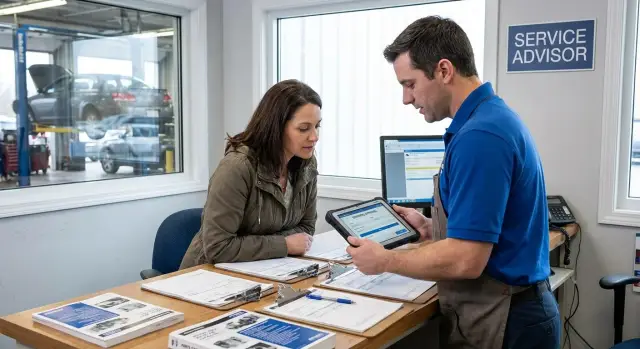
Most repair shops do not lose time because the repair itself is difficult. They lose time because the job starts with scattered information.
A few notes sit on a paper check-in sheet. Photos stay on one employee's phone. Parts prices live in a browser tab. Customer updates happen through calls and text messages that no one else can see. Each piece looks small on its own, but together they create gaps at the start of the job.
Those gaps show up later. If the intake note says "screen issue" but does not say when it happens, how severe it is, or whether there was previous damage, the estimate takes longer to build. Someone has to stop, ask again, and confirm details that should have been captured once.
A common example makes the problem clear. A customer drops off a device and mentions two issues at the counter. One gets written down. The second appears later in a text. A technician finds related damage and takes photos, but the service advisor never sees them before sending the estimate. The quote goes out incomplete, approval slows down, and the customer gets mixed messages.
When this happens often, the whole shop feels it. Front desk staff repeat the same questions, technicians wait for missing details, managers chase updates across calls and messages, and customers start wondering why the price changed or why the job is taking longer than expected.
The real problem is not just messy information. It is the lack of one shared process. If every job is captured differently, estimates depend on memory instead of a system. That makes it harder to price parts, explain labor, get quick approvals, and keep a clear record of what the customer actually agreed to.
A single workflow fixes a lot of this. When the team has one place to log the issue, attach photos, build the estimate, and track customer replies, estimates move faster and fewer details get lost.
A reliable estimate workflow starts with a simple rule: every important detail for the job should live in the same record.
That record begins with the basics. Capture the customer name, phone, email, preferred contact method, and the full item or vehicle details your shop needs. For auto repair, that usually means make, model, year, VIN, mileage, and plate number when relevant. These details seem routine, but they prevent mix-ups when two vehicles look similar or one customer has more than one car.
The issue description should be written in plain language. Use the customer's own words when possible, such as "brake noise when turning" or "AC blows warm after 10 minutes." That gives the team a clear starting point and makes it easier to compare the original complaint with what the inspection later confirms.
Photos, videos, and inspection notes should sit inside the same job record. A few clear images of damage, worn parts, warning lights, leaks, or visible wear can save a lot of back-and-forth. If a technician finds something new, that update should be attached to the same job right away.
Estimate details need the same structure. The record should show parts, quantities, expected cost, labor lines, labor hours, rates, taxes, fees, discounts, and the current total. It should also make a clear distinction between urgent work and optional recommendations, and it should preserve changes made after the first estimate instead of replacing them without context.
Approval status matters just as much as the numbers. Everyone in the shop should be able to tell whether an estimate is pending, approved, partially approved, or declined. If the customer approves brake pads but not rotors, that decision should be visible at a glance.
Communication history belongs there too. Calls, texts, emailed estimates, follow-up questions, updated totals, and approval messages should stay attached to the same record. If the customer later asks why the price changed, the team should be able to see the original estimate, the revised part cost, and the message that explained it.
When all of this lives in one place, the desk moves faster, technicians get better context, and customers get fewer surprises.
A clean intake-to-estimate flow starts before anyone opens the hood or takes apart a device. At check-in, confirm the customer's contact details and the best way to reach them. One wrong phone number or old email address can stall the entire job.
Then record the problem in the customer's own words. "Grinding noise when braking at low speed" is much more useful than "check brakes." Add mileage, warning lights, arrival time, and any quick observations from the front desk so the technician starts with a clear picture.
As soon as inspection begins, add photos and technician notes to the job record. A few clear images of worn parts, leaks, cracked components, or visible damage can replace a long phone call later.
The notes should stay short and concrete: what was tested, what was found, and what needs approval before work continues. The goal is not to write a long report. It is to leave the next person enough context to act quickly.
This is where many shops lose time. Photos stay on one phone, notes stay on a clipboard, and the advisor has to rebuild the story from memory. Keeping everything in one system makes handoffs much easier.
Once the findings are clear, turn them into estimate lines for labor and parts. Include quantities, prices, taxes, and part status if something is still being sourced. It also helps to separate must-fix items from optional work so the customer can make a decision faster.
When the estimate is ready, send it through the customer's preferred channel and log exactly what was sent. Then record the response in a specific way: approved, declined, or approved up to a certain amount. A note like "approved brake service, hold off on rotors until callback" is far more useful than a vague "customer said okay."
The goal is simple: one record from check-in to approval, with no missing steps and no hidden details.
Speed matters at check-in, but missing details cost more time later. The best intake process stays short for the front desk while giving technicians and estimators enough context to trust what was captured.
Start with a simple issue form that asks only for what the team needs right away. Focus on the customer concern, when it started, what the item or vehicle is doing now, and whether the problem stops normal use. If staff have to type long notes for every job, they will skip steps or write something too vague to be useful.
A practical intake form usually combines a few fixed fields with one short notes box. It should capture the customer-reported issue, any warning signs or visible damage at drop-off, the urgency level, any approved diagnostic limit if your shop uses one, and any parts or accessories left with the job.
Photos help, but only when the shop follows the same rules each time. Ask for a small set of standard images first, such as a front view, a close-up of the damage, a serial number or plate, and any visible wear the customer should know about. That is better than taking ten random pictures that no one uses later.
It also helps to separate urgent work from optional work at intake. If the item is unsafe, unusable, or likely to get worse quickly, mark that clearly so it appears first in the record. Cosmetic fixes, maintenance suggestions, and "while we're here" items should still be visible, but they should not compete with the main problem.
Keep parts requests inside the same job record as well. Do not let them drift into separate texts, sticky notes, or vendor emails. When a part is requested, the team should be able to see which repair line it supports, who asked for it, the quoted cost, and whether customer approval is still pending.
A small example shows why this works. If a customer drops off a mower that will not start, the desk can log "won't start after sitting two weeks," add four standard photos, mark the job as urgent if it is needed that day, and attach a carburetor quote to that same record. The technician sees the full picture right away, and the customer gets a faster, cleaner path to approval.
If you are building your own system, keep the intake screen short and mobile-friendly. Front desk staff should be able to finish the first pass in about two minutes, then add detail only when the job needs it.
A trustworthy estimate tells a simple story: what is wrong, how you know, what it takes to fix it, and what might still change. That only works when photos, parts, and prices are tied to the issue they support.
Start with photos. Do not leave them in the order they were taken on a phone. Group them by problem, such as front bumper damage, brake wear, or water leak under the sink. When someone opens the job later, they should not have to scroll through a mixed camera roll and guess what belongs where.
Estimate lines should follow the same pattern. If one issue needs diagnosis, one part, and one labor charge, keep those items together under that issue. That makes the estimate easier for the team to build and easier for the customer to understand.
Each issue record should show a short description, the related photos, the part number if needed, the supplier note, the labor and parts price, and a status such as confirmed or pending.
Part details need more than a name. Save the exact part number, the supplier, and a short note like "aftermarket option available" or "local supplier quoted, delivery tomorrow." This prevents repeat calls and helps the next person understand why a certain option was chosen.
Prices also need room for uncertainty. If the final cost may change, show a range instead of pretending the number is fixed. A part might be listed at $180 to $240 if stock is limited or teardown could reveal a different version. That sets expectations early and reduces disputes later.
Clear status labels make the whole estimate easier to explain. Mark items as confirmed when the issue, part, and price are known. Mark them as pending when you are waiting on supplier response, more inspection, or customer choice. With that simple split, the front desk can explain the estimate quickly and the customer can see what is ready now versus what still needs an update.
A clean estimate workflow depends on simple, consistent communication. Customers do not want scattered updates from different people. They want to know what was found, what it will cost, and what you need from them next.
The easiest way to keep communication under control is to send updates at the same points every time: when check-in is complete, when inspection is finished, when the estimate is ready, when you are waiting on approval or parts, and when the repair is done. That routine helps your team and makes the process feel more predictable for customers.
Each message should be short and easy to answer. If a customer has to read a long paragraph, open an attachment, and call back, the process slows down. A message like "We found a cracked screen and battery wear. Estimate is $185. Reply APPROVE to continue" is much easier to act on.
When the customer replies, that response should go straight into the job record. The same record should hold call notes, text history, email summaries, and any formal approval. That way, the front desk, technician, and manager all see the same story without hunting through inboxes or asking each other what happened.
This matters most when the estimate changes. A technician may find extra damage after opening the device, or a part price may increase. If the updated estimate, the customer reply, and the timestamp all live in one place, there is less room for confusion and fewer disputes at pickup.
A simple status view helps too. If the team can immediately see "awaiting customer approval" or "part ordered, arrival Friday," they can answer questions in seconds instead of piecing together the job history.
A customer arrives with a brake squeal and a warning light that came on that morning. At the front desk, the advisor opens one job record and writes down the symptoms in plain language: when the noise happens, whether it gets worse while braking, and whether the warning light stays on or flashes.
Before the car goes into the bay, the advisor adds a few clear photos to the same record. A quick shot of each front wheel, one close-up of the brake area, and a dashboard photo showing the warning light are usually enough. That matters later because the technician, service advisor, and customer are all working from the same evidence instead of memory.
Once inspection starts, the technician notes that the front pads are worn down and the rotors are scored. The estimate is built in that same record with separate lines for brake pads, rotors, shop supplies, and labor. There is no need to re-enter the job somewhere else or copy notes into a message later.
The advisor then sends a short message explaining the urgent work, the total estimate, and the expected finish time. The customer replies approving that part of the job. The approval is saved in the record with the exact time, the approved amount, and the wording of the message.
By the time the work is finished, the shop has one clear timeline. It shows the original complaint, the photos from drop-off, the estimate lines that were created, the approval message, and when that approval came in.
That final record helps everyone. The customer can see what they agreed to, the advisor can answer questions quickly, and the shop has a useful history if the vehicle comes back later for related work.
Most delays come from a handful of repeat mistakes.
One of the biggest is taking photos too late. If the item moves to the back before its condition is documented, you can miss visible damage, lose context, or end up arguing later about what was present at drop-off.
Another problem is mixing technician notes with customer-facing wording. A technician may write short internal notes or rough assumptions that make perfect sense in the bay. The customer needs a clear explanation of the issue, the likely fix, and what is still being checked. When both types of notes live in the same field, estimates become harder to read and the front desk ends up rewriting them.
Sending an estimate before parts are checked creates another avoidable delay. If the price goes out before stock, lead times, or part options are confirmed, the customer approves one number and then gets a second message with a different total. That hurts trust and slows the job.
Verbal approvals are another weak spot. If a customer approves work over the phone but no one logs the time, amount, and scope, the shop is relying on memory instead of a record. That becomes a problem when the bill is questioned or extra work gets added.
Using too many tools makes all of this worse. Photos in one app, notes in another, parts in a spreadsheet, and approvals in text messages force staff to rebuild the story every time they open the ticket.
A simple health check can reveal whether your process still has gaps. If photos are often missing at check-in, notes need to be rewritten before sending, estimates go out before parts are confirmed, phone approvals are not logged right away, or staff keep asking "Where was that saved?" then the workflow is still doing too much work in too many places.
Before switching the whole shop to a new process, test the basics first. If the right details are easy to enter and easy to find, the team will use the system. If they are not, people will fall back to paper, personal phones, and memory.
Check these points before you go live:
Then run a short test with real jobs for two or three days. Choose a few common repairs and watch where people pause. If someone needs to retype notes, ask where a photo went, or search for the latest customer reply, the process still has weak points.
A short pilot usually exposes the real problems quickly. You might find that intake notes are fine, but approval status is buried in a separate tool. Or the estimate is clear, but part requests are still happening through text. Those small gaps are exactly what slow handoffs later.
Start small. The best workflow is usually the one your team can use right away without extra training or workarounds.
Begin with one intake form and one approval path. If the front desk has to choose between several versions of the same process, people will skip fields, write notes on paper, or send updates from personal phones. Keep the first version focused on customer details, item or vehicle details, the reported issue, photos, estimate lines, and approval status.
Then test that process on a few common jobs. Pick repair types your shop sees every week, not rare exceptions. That gives you faster feedback and shows where the form is too long, where estimate lines are unclear, or where approvals stall.
It also helps to assign ownership at each stage. Decide who owns intake, estimate review, approval requests, and follow-up with the customer. When ownership is clear, fewer jobs sit in limbo.
If your current process is spread across paper forms, spreadsheets, messages, and separate estimate tools, it may be worth bringing everything into one internal app. A no-code platform like AppMaster can be a practical option for that because it is built for full business applications, not just simple pages, and can support shared records, workflow logic, web apps, and mobile apps in one system.
Keep the first version focused. Get one clean flow working, prove that the team will use it, and then expand. That approach is easier to train, easier to maintain, and much more likely to stick.
 Why should intake and estimates be in one system?
Because it cuts down on rework. When notes, photos, parts pricing, estimate lines, and customer replies all live in one record, your team does not have to chase details across phones, paper, and inboxes.
What should we capture at check-in?Start with contact details, the full item or vehicle details, and the problem in the customer's own words. Then add basic context such as warning lights, visible damage, urgency, mileage or serial details, and anything left with the job.
How many photos do we really need?Take a small standard set every time. A few clear photos are better than many random ones, as long as they show the overall condition, the specific damage or symptom, and an identifying detail like a plate or serial number when needed.
How do we keep check-in fast without missing details?Use a short intake form with fixed fields and one notes box. The front desk should capture the main complaint, timing, urgency, and visible issues in about two minutes, then add more detail only if the job needs it.
What should an estimate include?Each line should make the job easy to understand. Include the issue it belongs to, parts, quantities, labor, hours or rate, taxes or fees, and whether the item is confirmed or still pending.
How should we handle urgent work versus optional work?Show urgent work first and optional work separately. That helps the customer approve the important repair quickly without getting stuck on cosmetic fixes or extra recommendations.
What is the best way to log customer approval?Record the exact scope, amount, time, and customer response in the job record right away. A clear note such as "approved brake pads, declined rotors" is much safer than relying on memory or a verbal okay.
What usually slows estimates down?Late photos, vague notes, unchecked parts pricing, and verbal approvals that never get written down cause most delays. Using too many tools also slows the team because people have to rebuild the story every time.
Should parts requests be tracked in the same record too?Yes, they should stay with the same job. That way everyone can see which repair line the part supports, who requested it, the quoted cost, and whether customer approval is still pending.
Can we build this workflow with a no-code platform like AppMaster?Yes, if your team wants one internal app for intake, estimates, approvals, and communication. AppMaster can be used to create a no-code business app with shared records, workflow logic, web apps, and mobile apps, which fits this kind of process well.
Experiment with AppMaster with free plan.
When you will be ready you can choose the proper subscription.
 Jul 14, 20268 min
 Jul 13, 20268 min
 Jul 08, 20268 min