


 Jul 14, 2026
 8 min
8 minEquipment reservation app: prevent conflicts and track returns
Plan an equipment reservation app that prevents double bookings, records returns and damage, and places faulty items on maintenance hold.

Privacy deletion vs audit needs can be balanced with practical patterns like anonymization, tombstones, and restricted history views without breaking operations.
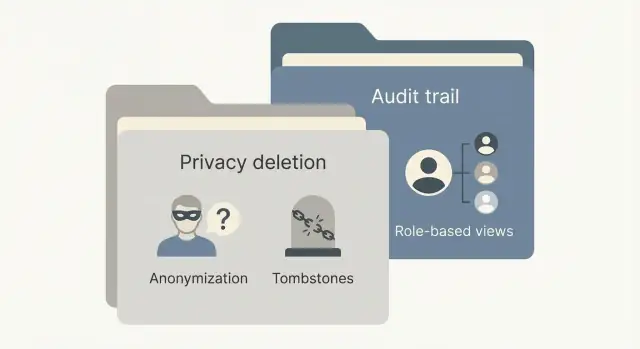
People have a real right to ask for their data to be deleted. Teams also have real reasons to keep records they can trust. The tension shows up when "delete everything" collides with day-to-day work like refunds, fraud checks, tax audits, chargebacks, and support follow-ups.
Audit and reporting depend on the idea that the past should not change. Finance needs totals to match last month’s close. Security needs to understand what happened during an incident. Operations needs to explain why an order was canceled or why access was granted. If a deletion request removes or changes key fields, those stories can break and reports can stop matching what was previously approved.
This conflict usually appears in small, messy places:
"Good enough" is rarely "keep everything forever" or "erase every trace." A practical target is to delete or de-identify personal data you don’t need anymore, while keeping a minimal, defensible record for legal obligations and system integrity. The trick is separating what you need to prove (an event happened, a payment was made, a policy was accepted) from what identifies a person (name, email, phone, address, device identifiers).
A few questions help set the bar:
This isn’t a product-only decision. Legal defines retention and deletion rules. Security defines what logs are needed and who can see them. Operations and finance define what must remain workable. Product and engineering decide how to implement it without creating loopholes.
Teams often mix up different data types and different kinds of "history." Getting the words straight early prevents a process that looks compliant but breaks reporting, support, or finance.
Personal data is anything that can identify a person directly or indirectly. That includes obvious fields like name, email, phone, and address, but also device IDs, IP addresses, and free-text notes that mention someone. Even unique customer IDs can be personal data if they can be mapped back to a person.
Business records are documents you may need to keep for operations or legal reasons, like invoices, payment confirmations, shipment records, or contract metadata. These records often include personal data, which is why "keep the invoice" usually means "keep the invoice, but remove or replace what identifies the person."
Common deletion-related terms:
Audit logs, activity history, and analytics tables are also different.
Retention windows are the time limits you set for keeping data. A legal hold is an exception that pauses deletion because of an investigation, dispute, or regulatory need.
A simple decision test is: what must still be provable after deletion (payments, approvals, access), and what can be removed or generalized without breaking that proof?
Sometimes you can’t fully delete a record without breaking operations. Invoices may be required for tax. Support tickets may be needed for quality reviews. Security events may be required for incident response. In those cases, replacing personal data can be safer than removing the entire row.
Anonymization means you can’t realistically get back to a person. Pseudonymization means you can, but only with extra data (like a mapping table). For many teams, pseudonymization is the practical middle ground, but it must be treated as sensitive because it keeps a path back to identity.
Start with fields that identify someone directly, then handle the fields that "leak" identity through content.
Focus on direct identifiers (names, emails, phone numbers, addresses) and common indirect identifiers (device IDs, advertising IDs, IP addresses, precise location). Then deal with the hardest category: free text.
Free text is where many deletion plans fail. Even if you blank out structured fields, a support note can still say, "John from ACME called from +1..." If you keep free text, consider redaction rules or moving it to a separate store with a shorter retention window. Attachments and images need the same caution: faces, IDs, and signatures often end up in places nobody planned for.
Reporting and deduping often need stability: "is this the same customer as before?" without knowing who that customer is. Common options include hashing with a secret salt, tokenization (random tokens), or a mapping table.
If you keep a mapping table, treat it like a high-risk asset. Limit access, log every access, and consider splitting control so re-identification requires explicit approval. Otherwise the pattern collapses into "we can see everything anyway," which defeats the purpose.
A concrete example: keep an order record, but replace customer_name and email with a token. Keep country for tax reporting, and store a salted hash of the original email for deduping.
The key test is practical: after the change, can a normal operator still do their job (finance totals, ticket counts, fraud rates) without being able to identify a person?
A tombstone record is a deliberately empty version of a deleted record that keeps a stub row so other data can still point to it. This prevents broken references while removing personal data.
If you hard-delete a customer, invoices, tickets, messages, and logs that reference that customer can fail in reports or apps. A tombstone keeps relationships intact so totals still add up, tickets still open, and audit trails still show that something existed, without exposing who the person was.
A good tombstone is minimal: enough to keep systems working and to prove that a deletion happened, but not enough to re-identify someone. In practice, that usually means a deleted status, a deleted timestamp (sometimes who approved it), a reason code, and the internal identifier needed for integrity. What it should not include is names, emails, phone numbers, addresses, message bodies, attachments, or free-text notes.
Most systems keep primary keys and foreign keys but wipe or null personal fields. Invoices can continue to reference the same customer_id, while the UI displays something like "Deleted customer" instead of a name.
Tickets and messages need extra care because personal data often appears inside the content. A safe approach is to keep relational pointers so reports and joins still work, and then redact or delete content fields (message text, attachments) that may contain personal data. If you truly need some details for compliance, store them separately with tighter access controls.
Tombstones are a bad fit when the record itself is inherently sensitive or heavily regulated, such as health details, government IDs, biometrics, or precise location history. In those cases you may need full deletion plus a separate, non-identifying audit event (for example, "record deleted at time X" without the original row).
Auditors usually want proof of control, not the personal data. Document what gets wiped, what remains, and why. Be clear about who can view deleted records, how they appear in reports, and how you prevent re-identification (for example, prohibiting free-text "reason" notes and using reason codes instead).
Sometimes you don’t need personal data forever. You need evidence that an action happened. This pattern separates audit evidence from convenience views.
A practical split is to keep an audit log of events like "invoice approved" or "refund issued" while user-facing history shows the who and the details. After a deletion request, the audit log can remain, but personal fields shown in history are redacted or hidden based on role.
Treat sensitive history like a controlled room, not a shared hallway. Decide access based on real need. Support might need ticket status and timestamps, finance might need transaction IDs, and neither needs a full profile.
A small set of rules is usually enough: most staff see redacted history by default; a small privacy or security role can see more, but only with a reason; engineers see technical fields (request IDs, error codes), not user text; and "admin" should not automatically mean "can see everything."
Structured fields are easy to blank out. Free text and files are where privacy leaks happen. Write explicit rules for free text (remove emails, phone numbers, addresses), attachments (delete, or keep only a non-viewable hash plus file type/size), internal notes, and search. Search is a common leak: if someone can still search by a deleted email, hiding it in the UI doesn’t matter.
Time-boxed access helps during investigations. If someone needs unredacted history for an incident, grant access that expires automatically, require a reason code, and record it.
Also log access to the log. Viewing sensitive history should create its own audit event: who viewed, what record, what was revealed, when, and why.
A reality check: if a support agent can copy-paste a deleted email from an old note, your "deletion" is cosmetic.
A good workflow is less about one big "delete" button and more about making clear choices, then proving you made them.
Start by mapping where personal data actually exists. It’s rarely just a few database tables. It shows up in logs, analytics events, exports, attachments, and backups.
Then define outcomes by data type. Some fields must be deleted. Some can be anonymized. Some can be kept for legal or financial reasons, but should be minimized and locked down.
A sequence most products can run consistently:
That last point is where many teams slip. A "deletion certificate" should not include the old email, full name, address, or free-text notes. Prefer a case ID, affected internal IDs, actions executed, who approved, and the time window.
Even with a good database workflow, personal data leaks into side channels. Pay attention to the places that tend to get messy: CSV exports, email inboxes and forwarded threads, spreadsheets used by ops or sales, support tickets and attachments, and third-party tools fed by webhooks.
A customer asks you to delete their account. You also have paid invoices (needed for tax and chargeback disputes) and a year of support tickets (needed for quality metrics and recurring bug analysis). This is the classic "privacy deletion vs audit needs" conflict.
A practical split often looks like this (assuming your legal basis allows limited finance retention for a defined period): remove profile details (name, email, phone), saved addresses, marketing preferences, device fingerprints, and free-form notes that may contain personal info; anonymize customer identifiers in support tickets and analytics using a random, non-reversible token; keep invoices, payment status, tax fields, and minimal references needed to prove what happened, with restricted access.
Support tickets are where people feel the pain first. If you hard-delete the customer record, the timeline breaks: "Ticket assigned" events lose context, metrics drop records, and supervisors can’t review how a case was handled. A common fix is a tombstone record: keep the customer row, wipe personal fields, and mark it as deleted.
Auditors still need evidence that the deletion happened, but most staff should not see identity data. Use restricted history views: normal agents see redacted fields, while a small privacy plus finance role can view retention reasons and what was changed.
The final audit entry should be readable by a non-engineer, like this:
2026-01-25 14:32 UTC: Deletion request completed for Customer ID 18429.
Personal fields removed (name, email, phone, address). Support tickets re-linked to Anon ID A9F3K.
Invoices retained for 7 years due to accounting obligations; access limited to Finance role.
Action approved by Privacy Officer (user: m.lee). Export of retained fields stored.
One of the biggest traps is treating "soft delete" as a legal shield. Hiding a row with a flag still leaves personal data in your database, backups, exports, and logs. If your policy says "delete," regulators often expect personal fields to be removed or irreversibly changed, not just hidden from the UI.
Another common problem is building a "secret" lookup table that maps anonymized IDs back to real people, then letting too many roles access it. If you truly need a re-identification path (for example, during a short dispute window), keep it tightly scoped: limited time, limited access, and strong logging.
Problems that show up repeatedly:
Free text is especially tricky because it spreads personal data into places you didn’t plan for. Plan early: limit what can be entered, add redaction tools, and push details into structured fields where you can control retention.
Be careful with deletion that removes keys your business relies on. If an invoice row joins to a customer record, deleting the customer ID can wreck month-end totals. Tombstones and non-personal reference keys preserve reporting without keeping identity.
Don’t skip "prove it" design. When a regulator asks what happened to someone’s data, you need an answer that doesn’t depend on guesswork.
Before you publish a deletion policy, do a dry run. Policies fail when they read clearly but can’t be executed consistently.
Make sure you can actually find the data. Personal data hides in notes, support tickets, event logs, attachments, and custom fields added over time.
A short checklist that catches most issues:
If any answer is "sort of," pause and tighten the design. "Sort of" usually means someone will later discover a forgotten export, an old analytics table, or a support attachment that still contains personal data.
A practical test is to pick one real user and trace their data end to end. Write down every place it appears, then simulate the request: what changes immediately, what changes later (like backups), and what stays. If your team can’t do this in under an hour, the workflow isn’t ready.
Turn the rules into something small, visible, and testable. A one-page decision table works well: data type -> action -> retention -> who can view what after deletion. Keep wording plain and keep the number of actions limited so people don’t invent new behaviors under pressure.
A lightweight plan:
If you’re implementing this in AppMaster (appmaster.io), it helps to model retention choices directly in your data schema and enforce them with Business Processes and role-based screens, so deletion doesn’t rely on manual exceptions. Because AppMaster regenerates real source code when requirements change, it’s easier to iterate on retention rules without leaving old logic behind.
 How can we honor a deletion request without breaking finance and audit reporting?
Aim to remove or irreversibly de-identify personal data you no longer need, while preserving a minimal record that proves key business events (payments, approvals, access) and keeps reporting consistent. The practical split is “prove the event” vs “identify the person.”
What’s the real difference between hard delete and soft delete for privacy?Hard delete removes the row entirely, which can break foreign keys, reports, and historical references. Soft delete hides the row but usually leaves personal data intact, so it often fails the privacy goal unless you also wipe or transform identifying fields.
When should we use anonymization vs pseudonymization?Pseudonymization replaces identifiers but keeps a way to re-identify later (like a mapping table or key), so it must be treated as sensitive data with strict access controls. Anonymization removes identifiers so re-identification isn’t reasonably possible, which is safer but can be harder to do correctly when data includes free text or unique patterns.
Why do support notes and free-text fields cause so many deletion failures?Free text tends to contain names, emails, phone numbers, addresses, and other context that bypasses your structured-field deletion rules. If you keep the text, you usually need redaction rules or a separate storage approach with shorter retention and tighter access, otherwise the “deletion” is mostly cosmetic.
What is a tombstone record, and why would we keep one?A tombstone is a minimal placeholder record that keeps relationships intact while stripping personal data. It lets invoices, tickets, and logs still join to a stable ID and remain usable, while the UI can show a neutral label like “Deleted customer.”
What should a tombstone contain (and not contain)?Keep only what’s needed for integrity and proof: a deleted flag, timestamps, a reason code, and internal identifiers required for joins and reconciliation. Avoid anything that can identify a person directly or indirectly, including message bodies, attachments, and free-form “reason” notes.
How do we restrict history views without blocking support and security teams?Start by defining which roles actually need which history fields to do their job, and make redaction the default for everyone else. If someone needs more detail for an investigation, grant time-limited access with a reason code and record that access as its own audit event.
How are audit logs different from activity history, and why does it matter for deletion?Audit logs answer “who did what and when” and are typically append-only, while user-facing history is designed for convenience and often contains identity details. Keeping a minimal, event-focused audit trail while redacting identity in history after deletion is a common way to preserve accountability without keeping personal data everywhere.
What should a “deletion completion record” include so it’s defensible?A good completion record proves actions taken without reintroducing personal data. Use a case ID, internal record IDs, what actions were executed, timestamps, approvals, and retention justifications, and avoid storing the old email, full name, address, or screenshots of the data you deleted.
How can we implement these patterns in a product workflow without constant manual work?Model retention outcomes directly in your data schema, then implement the deletion workflow as an auditable process that wipes or transforms specific fields while preserving required business records. In AppMaster, teams often enforce this with Business Processes and role-based screens so deletion is consistent, logged, and not dependent on manual exceptions.
Experiment with AppMaster with free plan.
When you will be ready you can choose the proper subscription.
 Jul 14, 20268 min
 Jul 13, 20268 min
 Jul 08, 20268 min