


 Jul 14, 2026
 8 min
8 minEquipment reservation app: prevent conflicts and track returns
Plan an equipment reservation app that prevents double bookings, records returns and damage, and places faulty items on maintenance hold.

Learn PostgreSQL row-level security with practical patterns for tenant isolation and role rules, so access is enforced in the database, not just the app.
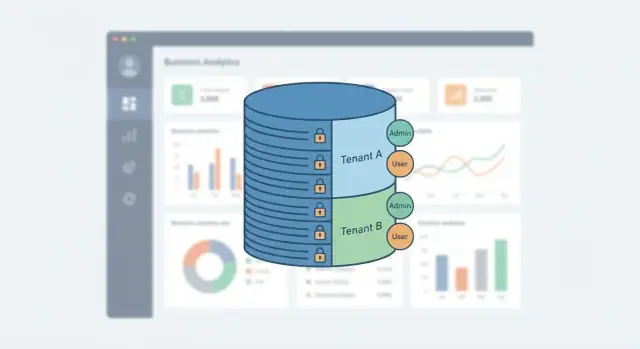
Business apps usually have rules like “users can only see their company’s records” and “only managers can approve refunds.” Many teams enforce those rules in the UI or the API and assume that’s enough. The problem is that every extra path to the database becomes another chance to leak data: an internal admin tool, a background job, an analytics query, a forgotten endpoint, or a bug that skips one check.
Tenant isolation means one customer (tenant) can never read or change another customer’s data, even by accident. Role-based access means people inside the same tenant still have different powers, like agents vs managers vs finance. These rules are easy to describe, but hard to keep perfectly consistent when they live in many places.
PostgreSQL row-level security (RLS) is a database feature that lets the database decide which rows a request can see or change. Instead of hoping every query in your app remembers the right WHERE clause, the database applies policies automatically.
RLS isn’t a magic shield for everything. It won’t design your schema, replace authentication, or protect you from someone who already has a powerful database role (like a superuser). It also won’t prevent logic mistakes such as “someone can update a row they can’t select” unless you write policies for both read and write.
What you do get is a strong safety net:
There’s a small setup cost. You need a consistent way to pass “who is this user” and “which tenant” into the database, and you need to maintain policies as your app grows. The payoff is big, especially for SaaS and internal tools where sensitive customer data is on the line.
Row-Level Security (RLS) automatically filters which rows a query can see or change. Instead of relying on every screen, API endpoint, or report to “remember” the rules, the database applies them for you.
With PostgreSQL row-level security, you write policies that are checked on every SELECT, INSERT, UPDATE, and DELETE. If the policy says “this user can only see rows for tenant A,” then a forgotten admin page, a new query, or a rushed hotfix still gets the same guardrails.
RLS is different from GRANT/REVOKE. GRANT decides whether a role can touch a table at all (or specific columns). RLS decides which rows inside that table are allowed. In practice, you often use both: GRANT to limit who can access the table, and RLS to limit what they can access.
It also holds up in the messy real world. Views generally obey RLS because the underlying table access still triggers the policy. Joins and subqueries still get filtered, so a user can’t “join their way” into someone else’s data. And the policy applies no matter which client runs the query: app code, a SQL console, a background job, or a reporting tool.
RLS is a good fit when you have strong tenant isolation needs, multiple ways to query the same data, or many roles that share tables (common in SaaS and internal tools). It can be too much for tiny apps with one trusted backend, or for data that isn’t sensitive and never leaves a single controlled service. The moment you have more than one entry point (admin tools, exports, BI, scripts), RLS usually pays for itself.
Before you write a single policy, get clear on who owns what. PostgreSQL row-level security works best when your data model already reflects tenants, roles, and ownership.
Start with tenants. In most SaaS apps, the simplest rule is: every shared table that contains customer data has a tenant_id. That includes “obvious” tables like invoices, but also things people forget, like attachments, comments, audit logs, and background jobs.
Next, name the roles people actually use. Keep the set small and human: owner, manager, agent, read-only. These are business roles you’ll later map to policy checks (they’re not the same thing as database roles).
Then decide how records are owned. Some tables are owned by a single user (for example, a private note). Others are team-owned (for example, a shared inbox). Mixing the two without a plan leads to policies that are hard to read and easy to bypass.
A simple way to document your rules is to answer the same questions for each table:
Example: “Invoices” might allow managers to view all tenant invoices, agents to view invoices for assigned customers, and read-only users to view but never edit. Decide upfront which rules must be strict (tenant isolation, deletes) and which can be flexible (extra visibility for managers). If you build in a no-code tool like AppMaster, this mapping also helps keep UI expectations and database rules aligned.
Multi-tenant RLS works best when your tables look predictable. If every table stores the tenant in a different way, your policies turn into a puzzle. A consistent shape makes PostgreSQL row-level security easier to read, test, and keep correct over time.
Start by picking one tenant identifier and using it everywhere. UUIDs are common because they’re hard to guess and easy to generate in many systems. Integers are fine too, especially for internal apps. Slugs (like "acme") are human-friendly, but they can change, so treat them as a display field, not your core key.
For tenant-scoped data, add a tenant_id column to every table that belongs to a tenant, and make it NOT NULL whenever possible. If a row can exist without a tenant, that’s usually a smell. It often means you’re mixing global and tenant data in one table, which makes RLS policies harder and more fragile.
Indexing is simple but important. Most queries in a SaaS app filter by tenant first, then by a business field like status or date. A good default is an index on tenant_id, and for high-traffic tables a composite index like (tenant_id, created_at) or (tenant_id, status) based on your common filters.
Decide early which tables are global and which are tenant-scoped. Common global tables include countries, currency codes, or plan definitions. Tenant-scoped tables include customers, invoices, tickets, and anything the tenant owns.
If you want a rule set that stays maintainable, keep it narrow:
tenant_id NOT NULL, RLS enabled, policies always check tenant_id.tenant_id, no tenant policies, read-only for most roles.If you’re building with a tool like AppMaster, this consistency pays off in the data model too. Once tenant_id is a standard field, you can reuse the same patterns across modules without surprises.
A good first win with PostgreSQL row-level security is a single table that is readable only inside the current tenant. The point is simple: even if someone forgets a WHERE clause in the API, the database refuses to return rows from other tenants.
Start with a table that includes a tenant_id column:
ALTER TABLE invoices ENABLE ROW LEVEL SECURITY;
Once RLS is enabled, the default behavior often surprises people: if a role is subject to RLS and there is no matching policy, SELECT returns zero rows (and writes fail). That’s what you want at the start.
Now add a minimal read policy. This example assumes your app sets a session variable like app.tenant_id after login:
CREATE POLICY invoices_tenant_read
ON invoices
FOR SELECT
USING (tenant_id = current_setting('app.tenant_id')::uuid);
Next, add write rules. In RLS, USING controls which existing rows you can touch, and WITH CHECK controls what new values you’re allowed to write.
CREATE POLICY invoices_tenant_insert
ON invoices
FOR INSERT
WITH CHECK (tenant_id = current_setting('app.tenant_id')::uuid);

CREATE POLICY invoices_tenant_update
ON invoices
FOR UPDATE
USING (tenant_id = current_setting('app.tenant_id')::uuid)
WITH CHECK (tenant_id = current_setting('app.tenant_id')::uuid);

CREATE POLICY invoices_tenant_delete
ON invoices
FOR DELETE
USING (tenant_id = current_setting('app.tenant_id')::uuid);
Policies are PERMISSIVE by default, meaning any one policy can allow access. Choose RESTRICTIVE when you want rules that must all pass (useful for adding a second guard like “only active accounts”).
Keep policies small and role-focused. Instead of one giant rule with lots of ORs, create separate policies per audience (for example, invoices_tenant_read_app_user and invoices_tenant_read_support_agent). It’s easier to test, easier to review, and safer to change later.
For PostgreSQL row-level security to work, the database needs to know “who is calling” and “which tenant they belong to.” RLS policies can only compare rows to values the database can read at query time, so you must pass that context into the session.
A common pattern is to set session variables after authentication, then let policies read them with current_setting(). The app proves identity (for example by validating a JWT), then writes the tenant and user IDs into the database connection.
-- Run once per request (or per transaction)
SELECT set_config('app.tenant_id', '3f2a0c3e-9c7b-4d3f-9c5c-3c5e9c5d1a11', true);
SELECT set_config('app.user_id',   '8d9c6b1a-6b6d-4e32-9c0d-2bfe6f6c1111', true);
SELECT set_config('app.role',      'support_agent', true);

-- In a policy
-- tenant_id column is a UUID
USING (tenant_id = current_setting('app.tenant_id', true)::uuid);
Using the third argument true makes it “local” to the current transaction. That matters if you use connection pooling: a pooled connection can be reused by another request, so you don’t want yesterday’s tenant context lingering.
If your API uses JWTs, treat claims as input, not truth. Verify the token signature and expiry first, then copy only the fields you need (tenant_id, user_id, role) into session settings. Avoid letting clients send these values directly as headers or query params.
Design policies so that missing settings result in no rows.
Use current_setting('app.tenant_id', true) so missing values return NULL. Cast to the right type (like ::uuid) so invalid formats fail fast. And fail the request if tenant/user context can’t be set, rather than guessing a default.
This keeps access control consistent even when a query bypasses the UI or a new endpoint is added later.
The easiest way to keep PostgreSQL row-level security policies readable is to separate identity from permissions. A solid baseline is a users table plus a memberships table that connects a user to a tenant and a role (or several roles). Then your policies can answer one question: “Does the current user have the right membership for this row?”
Keep role names tied to real actions, not job titles. “invoice_viewer” and “invoice_approver” tend to age better than “manager,” because the policy can be written in plain words.
Here are a few role patterns that stay simple as your app grows:
created_by_user_id (or owner_user_id) and access checks that exact match.team_id, and the policy checks the user is a member of that team inside the same tenant.status = 'approved', and writes are restricted to approvers.Cross-tenant admins are where many teams get into trouble. Handle them explicitly, not as a hidden “superuser” shortcut. Create a separate concept like platform_admin (global) and require a deliberate check in the policy. Better yet, keep cross-tenant access read-only by default and make writes require a higher bar.
Documentation matters more than it sounds. Put a short comment above each policy that explains the intent, not the SQL. “Approvers can change status. Viewers can only read approved invoices.” Six months later, that note is what keeps policy edits safe.
If you build with a no-code tool like AppMaster, these patterns still apply. Your UI and API can move quickly, but the database rules stay stable because they rely on memberships and clear role meaning.
Imagine a small SaaS that serves multiple companies. Each company is a tenant. The app has invoices (money) and support tickets (day-to-day help). Users can be agents, managers, or support.
Data model (simplified): every invoice and ticket row has a tenant_id. Tickets also have assignee_user_id. The app sets the current tenant and user in the database session right after login.
Here’s how PostgreSQL row-level security changes the day-to-day risk.
A user from Tenant A opens the invoices screen and tries to guess an invoice ID from Tenant B (or the UI accidentally sends it). The query still runs, but the database returns zero rows because the policy requires invoice.tenant_id = current_tenant_id. There’s no “access denied” leak, just an empty result.
Inside one tenant, roles narrow access further. A manager can see all invoices and all tickets for their tenant. An agent can only see tickets assigned to them, plus maybe their own drafts. This is where teams often get it wrong in the API, especially when filters are optional.
Support is a special case. They might need to view invoices to help customers, but they shouldn’t be able to change sensitive fields like amount, bank_account, or tax_id. A practical pattern is:
SELECT on invoices for the support role (still tenant-scoped).UPDATE only through a “safe” path (for example, a view that exposes editable columns, or a strict update policy that rejects changes to protected fields).Now the “accidental API bug” scenario: an endpoint forgets to apply the tenant filter during a refactor. Without RLS, it can leak cross-tenant invoices. With RLS, the database refuses to return rows outside the session tenant, so the bug becomes a broken screen, not a data breach.
If you build this kind of SaaS in AppMaster, you still want these rules in the database. UI checks are helpful, but database rules are what hold when something slips.
PostgreSQL row-level security is powerful, but small slips can quietly turn “secure” into “surprising.” Most problems show up when a new table gets added, a role changes, or someone tests with the wrong database user.
A common failure is forgetting to enable RLS on a new table. You might write careful policies for your core tables, then add a “notes” or “attachments” table later and ship it with full access. Make it a habit: new table means RLS enabled, plus at least one policy.
Another frequent trap is mismatched policies across actions. A policy that allows INSERT but blocks SELECT can look like “data disappears” right after it’s created. The opposite is also painful: users can read rows they can’t create, so they work around it in the UI. Think in flows: “create then view,” “update then re-open,” “delete then list.”
Be careful with SECURITY DEFINER functions. They run with the function owner’s privileges, which can bypass RLS if you’re not strict. If you use them, keep them small, validate inputs, and avoid dynamic SQL unless you truly need it.
Also avoid relying on app-side filtering while leaving database access open. Even well-built APIs grow new endpoints, background jobs, and admin scripts. If the database role can read everything, sooner or later something will.
To catch issues early, keep the checks practical:
SELECT, INSERT, UPDATE, DELETE.SECURITY DEFINER usage and document why it’s needed.Example: if a support agent creates an invoice note but can’t read it back, it’s often an INSERT policy without a matching SELECT policy (or tenant context not being set for that session).
Row-Level Security can look correct in review and still fail in real use. Validation is less about reading policies and more about trying to break them with realistic accounts and queries. Test it the way your app will use it, not the way you hope it works.
Create a small set of test identities first. Use at least two tenants (Tenant A and Tenant B). For each tenant, add a normal user and an admin or manager role. If you support “support agent” or “read-only” roles, add one of those too.
Then pressure-test PostgreSQL row-level security with a small, repeatable set of checks:
tenant_id plus whatever you sort or search by).If any test surprises you, fix the policy or the context-setting first. Don’t patch it in the UI or API and hope the database rules will “mostly hold.”
Treat PostgreSQL row-level security like a safety system: introduce it carefully, verify it often, and keep the rules simple enough that your team follows them.
Start small. Pick the tables where a leak would hurt most (payments, invoices, HR data, customer messages), and enable RLS there first. Early wins beat a huge rollout that nobody fully understands.
A practical rollout order often looks like this:
Make testing non-optional. Automated tests should run the same queries as different tenants and roles and confirm what changes. Include both “should allow” and “should deny” checks, because the most expensive bugs are silent over-permission.
Keep one clear place in your request flow where session context is set before any queries run. Tenant id, user id, and role should be applied once, early, and never guessed later. If you set context in the middle of a transaction, you’ll eventually run a query with missing or stale values.
When you build with AppMaster, plan for consistency between your generated backend APIs and your PostgreSQL policies. Standardize how tenant and role context is passed into the database (for example, the same session variables for every endpoint) so policies behave the same way everywhere. If you’re using AppMaster at appmaster.io, RLS is still worth treating as the final authority for tenant isolation, even if you also gate access in the UI.
Finally, watch what fails. Authorization failures are useful signals, especially right after rollout. Track repeated denials and investigate whether they point to a real attack, a broken client flow, or a policy that’s too strict.
A short habit list that helps RLS stay healthy:
 What is PostgreSQL row-level security?
RLS lets PostgreSQL filter rows for every query based on policies you define. It protects tenant data even when an API endpoint, report, or background job forgets a tenant filter.
Why not enforce tenant access only in the API?UI and API checks help, but each new query path can miss a rule. RLS puts the tenant check in the database, so the same rule applies wherever the query starts.
How should I structure tables for multi-tenant RLS?Give each tenant-owned table a non-null tenant_id, then write policies that compare it with the tenant stored in the current database session. Index tenant_id too, especially on busy tables.
How is RLS different from GRANT and REVOKE?Use GRANT and REVOKE to decide who may access a table or column. Use RLS to decide which rows that role may read or change. Most applications need both layers.
How do I pass tenant and user context to RLS policies?After authentication, your backend should set trusted session values such as app.tenant_id, app.user_id, and app.role. Set them locally for the current transaction so a pooled connection cannot reuse another request's context.
What is the difference between USING and WITH CHECK?Use USING to control which existing rows a user may read, update, or delete. Use WITH CHECK to control the values a user may insert or write during an update. For tenant data, both checks should normally enforce the same tenant ID.
Does RLS protect everything automatically?No. RLS does not replace authentication, schema design, or careful permissions. Powerful database roles, such as superusers and some table owners, may bypass it, so your application should use a restricted database role.
What is a simple way to manage roles with RLS?Model roles through memberships that connect users, tenants, and permissions. Keep policies small and action-specific, such as separate read and update rules, instead of building one long condition with many exceptions.
How do I test that tenant isolation really works?Test with at least two tenants and the same restricted database role your app uses. Try list, single-record, insert, update, and delete actions for allowed and blocked cases, including joins and requests with missing session context.
How should I roll out RLS without breaking the app?Start with tables that hold payments, invoices, customer messages, or personal data. Enable RLS, add policies for every action your app needs, deploy with automated allow and deny tests, then expand table by table.
Experiment with AppMaster with free plan.
When you will be ready you can choose the proper subscription.
 Jul 14, 20268 min
 Jul 13, 20268 min
 Jul 08, 20268 min