


 Jul 14, 2026
 8 min
8 minEquipment reservation app: prevent conflicts and track returns
Plan an equipment reservation app that prevents double bookings, records returns and damage, and places faulty items on maintenance hold.

Pet grooming notes app to store coat preferences, temperament, allergies, and do-not-do warnings, so any groomer can deliver consistent results.
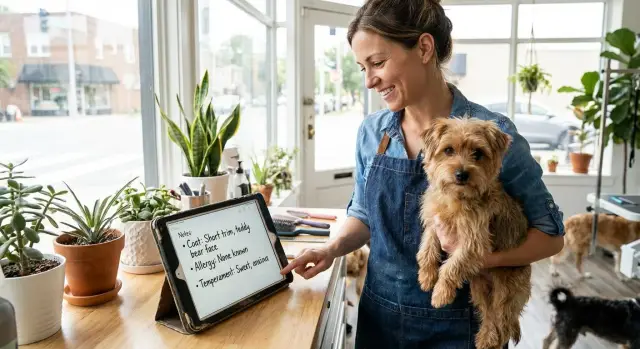
When groomers rely on memory or quick handoffs, the same dog can leave with two very different results. One person remembers the “teddy bear” face the owner loves. Another trims tighter because the coat mats easily. Without shared notes, small choices add up: clipper length, scissor finish, shampoo type, how ears are cleaned, and even how long the pet is allowed to rest.
“Consistent results” doesn’t mean every visit looks identical. It means the outcome matches the plan for that pet: the same overall silhouette, the same comfort limits, and the same safety boundaries. Owners notice fast when the plan is repeatable, especially when they see different staff over time.
Allergy and warning details are where inconsistency turns into an incident. Missing a note like “reacts to fragranced shampoo” or “no latex” can lead to itching, hives, or a panicked pet that’s hard to handle. Even simple “do not do” items matter, like “do not express glands” or “do not use a muzzle unless owner approves.”
Paper cards and scattered texts work until they don’t. As you add clients, staff, and last-minute schedule swaps, information disappears or arrives too late. A pet grooming notes app keeps the same facts visible every time, even when the groomer changes.
Consistency protects a few key things on a busy day: the owner’s style preferences, the pet’s comfort limits, health risks (like allergies), and clear “do not do” rules that prevent avoidable stress.
If you later build a simple internal tool for this in AppMaster, the goal stays the same: one reliable source of truth that any groomer can trust in the moment.
A good groomer client profile is short enough to use mid-appointment, but specific enough that another groomer can match the same result. The point is consistency and safety, not writing a diary.
Start with the facts that change the outcome most:
Keep notes observable and calm. Instead of “aggressive,” write “snaps when rear legs are lifted; use support under belly and keep session under 90 minutes.”
If you’re building a pet grooming notes app, make these fields quick to tap and easy to scan, with warnings pinned at the top.
A useful profile fits on one page and answers the same questions every time. Think of it as five parts:
Use action-based wording so it helps in the moment. Instead of "reactive," write "snaps when rear legs lifted; support belly." Instead of "allergy," write "breaks out with oatmeal shampoo; use hypoallergenic." That reduces guesswork.
A realistic example: "Luna, 4yo doodle mix, 45 to 50 lb, curly coat. Allergy: scented sprays (itching). Handling: hates nail dremel, tolerates clippers with breaks. Recipe: 5F body, scissor legs, hand-dry low heat, no perfume, finish with detangle comb." One glance tells the next groomer what to do and what to avoid.
To keep profiles consistent across staff, keep each field to what someone can use during the appointment. Write in short phrases, put safety items first, and date-stamp any change to warnings or behavior.
The best time to update a pet grooming notes app is right after the groom, before the next dog comes in. If you wait until the end of the day, details blur and the notes stop being trusted.
Keep the update under 2 minutes by mixing quick pick lists (for repeatable details) with one short free-text line (for the odd stuff). Aim for 90% taps, 10% typing.
If something changes, say what changed and whether it worked. “Switched to hypoallergenic shampoo, no redness” is more useful than “Used hypo shampoo.”
Sharing only works when the next groomer can understand the plan in 10 seconds at check-in. Keep the most important details on one screen: coat goal, owner must-haves, and safety warnings. Everything else can sit behind a tap.
Fixed fields (instead of long paragraphs) and a consistent order make notes readable at a glance. Highlight “do not do” items so they stand out even when the lobby is busy.
To share across staff without oversharing, separate care instructions from personal details. Most groomers need handling limits and a pet allergy and warning log, not the owner’s full address or payment history. Use roles so front desk can see contact info, while groomers see coat and safety notes.
When a pet switches groomers, a short handoff note prevents mistakes. It should cover what the owner expects today, what the pet tolerates, what to avoid, what worked last time, and what changed since the last visit.
Owner-requested changes also need a change history. Instead of overwriting “Keep ears natural,” add a dated update like “Jan 12: owner wants ears trimmed shorter.” If the owner later says “go back to last time,” you’ll know what “last time” was.
Plan for spotty Wi-Fi. Keep a cached quick view on the device with the latest coat plan and warnings, then sync the full record when you’re back online.
If you build your own tool in AppMaster, you can model these fields, add staff roles, and create a fast check-in view without writing code.
Grooming notes often include health details, handling limits, and owner contact info. Treat them like a client file: only the right people should see them, and even fewer should be able to change them.
A practical rule: everyone who touches the dog can read the notes, but only a small set of staff can change the “truth” of the profile. That reduces accidental edits on a busy day.
Keep sensitive health info minimal and relevant. You usually don’t need a full medical history. Stick to what changes grooming decisions: allergies (and the reaction), vet restrictions, skin issues you can see, and products to avoid.
For “do not do” items (example: “No muzzle, triggers panic” or “No oatmeal shampoo, causes hives”), add a confirmation step. A quick checkbox like “Reviewed warnings today” can be required at check-in and again before the service starts. It stops the classic problem where everyone assumes someone else read the note.
Mix-ups happen most with similar names. Store more than a name: a clear photo, breed/coat color, and a unique client ID. If there are two “Lunas,” the app should require a second identifier before edits are saved.
Also plan for lost phones and broken tablets. Use automatic backups and role-based sign-in so the allergy and warning log isn’t trapped on one device. If you build a pet grooming notes app in a tool like AppMaster, set up basic permissions and backups from day one so records stay consistent and recoverable.
Good notes only help if they show up at the exact moment you need them. When the phone is ringing and a dog is wiggling on the table, you can’t hunt through paragraphs. A pet grooming notes app should feel like a quick check-in card, not a diary.
A “Today” check-in screen should answer three questions fast: Who is next, what are we doing, and what could go wrong. Each appointment should open to a single pet summary with the most important items pinned to the top.
Make critical warnings impossible to miss. Put them in one dedicated area with clear labels, not buried in coat notes. Keep it short and specific: “No muzzle,” “Allergy: oatmeal shampoo,” “Do not blow-dry face,” “Bites if paws touched.”
To avoid confusion between groomers, standardize common terms. Define “teddy bear face” once (length, roundness, visor preference), then let staff pick it from a set list. You can still add a short free-text detail, but the main style stays consistent.
A small “Owner pickup notes” field also prevents end-of-day surprises. Use it for communication reminders like “Call when ready, owner arrives in 10 minutes,” or “Owner wants ears left natural, no thinning.”
Tags can help you spot patterns across pets and across time, but keep them limited so people actually use them. A short set like mats, ear sensitivity, senior pet, high anxiety, and skin issues is usually enough.
If you’re building this as a real tool, platforms like AppMaster make it easier to design the check-in screen, the warning block, and the tag list so every groomer sees the same layout on web or mobile.
Milo is a 5-year-old mini doodle who comes in every 6 weeks. After one visit, his owner reported red, itchy skin the same night. He also panics with a high-heat dryer and will try to jump off the table if pushed.
Here’s what the note could look like after that first visit, before Milo ever sees a different groomer. In a pet grooming notes app, this should sit at the top of his profile so it’s hard to miss.
PET: Milo (Mini Doodle) | Owner: Sam | Weight: 18 lb
STYLE GOAL: Teddy bear face, 1/2" body, clean feet, round ears
ALLERGY / REACTIONS: Redness + scratching after "Oat" shampoo (avoid)
DO NOT DO: High-heat dryer; no face blast; no tight muzzle hold
HANDLING: Needs slow approach, chin support OK, hates paws held long
COMFORT: Towel dry + low-air, breaks every 5 min, treats between steps
OWNER NOTES: Call if any matting requires shorter cut
Two months later, a new groomer, Lina, gets Milo on her schedule. She scans the first three lines and changes her plan before she starts: fragrance-free shampoo, towel-first drying, and a calm stop-and-go finish instead of forcing the dryer.
Because the style goal is specific, Lina can match the look even if she’s never groomed Milo. She keeps the teddy bear face and the same body length, then notes any small differences (like seasonal coat thickness) rather than guessing.
After the appointment, Lina updates the record while details are fresh: which shampoo was used and whether there was a reaction, the lowest dryer setting Milo tolerated (and for how long), what helped with handling (like a lick mat), any matting spots, and the exact clipper comb and scissor finish used.
At the next pickup, the owner notices two things right away: Milo looks the same as last time, and he isn’t stressed or itchy later that day. That’s what “consistent” looks like.
Most grooming notes fail because they’re hard to use when the table is full and the dog is wiggling. Dog coat preference tracking only works if the key details are obvious in seconds, not buried in a story.
Long paragraphs are the usual culprit. They feel complete, but they hide the facts. Notes work better as short lines that answer: what to do, what to avoid, and what to watch.
Vague wording also causes inconsistent coats. “Short” can mean anything from a tight #10 to a fluffy trim. Use something measurable like guard comb length, mm, or a clear reference point (for example, “leave 1/2 inch on body, tidy legs only”). Photos help, but the text should still stand on its own.
Safety problems happen when warnings blend into general notes. Allergies, bite risk, and “do not do” items need to be separate and loud, not a sentence near the bottom.
Common failure points:
Temperament notes for grooming matter as much as haircut notes. “Hates dryer near ears” and “calms with slow approach and chin hold” can prevent a bad visit.
Don’t let stale info hang around. Add a “last confirmed” date and update it when the owner says, “We’re growing him out now.” If you build your own system in AppMaster, a simple required confirmation field and a clear safety banner can help stop outdated notes from slipping into the next appointment.
A consistent routine keeps pets safer and helps every groomer deliver the same look. This check takes a minute, but it prevents most mix-ups before they happen.
Keep the checklist visible inside your pet grooming notes app so you don’t rely on memory when the day gets busy:
One habit that helps: ask one clarifying question before the bath and one after the haircut. Before: “Same trim as last time, or are we changing the length?” After: “Did anything feel harder today, like nails, dryer, or paws?”
Write notes in plain words another groomer can act on. “Hates dryer on face, towel dry only” is better than “nervous.” If you’re building a custom tool in AppMaster, consider making “Alerts” a separate, always-visible block so warnings never get buried under style details.
First, decide where the notes will live. If you’re a single salon, one shared system is usually enough. If owners should see parts of the record (like coat preferences and home care tips), plan a shared view that hides internal-only handling notes.
Keep the first version simple. A pet grooming notes app only works when everyone actually uses it, so don’t add dozens of fields on day one. Add new fields only after you hear the same question come up again and again.
A practical rollout:
Once the template feels stable, you can scale into a real tool with search, alerts, and visit history. Before building, sketch the screens you need so notes don’t scatter: pet profile, alerts, visit notes, and quick search.
If you want a custom solution without coding, you can build the full web and mobile app in AppMaster (appmaster.io) and keep adjusting it as your process evolves. It’s a good fit when you need real business logic, like blocking a booking if an allergy alert is active, and you want a consistent system that any groomer can trust.
 Why do grooming notes matter if we already talk at handoff?
Because small choices add up. If clipper length, face shape, products, or handling rules change from visit to visit, owners notice and pets can get stressed. A shared note makes the plan repeatable even when different staff work the appointment.
What are the most important things to record for each pet?Record the coat plan (length and style), any product reactions, handling limits, and clear “do not do” rules. Add a short owner preference line that prevents common complaints, like fragrance, bandanas, bows, and photo permission.
How do I write notes so another groomer gets the same result?Write what someone can act on. Use measurable details like guard length, comb size, or “leave 1/2 inch on body,” and describe the finish like “teddy bear face” plus one clarifier. Replace labels like “aggressive” with observable behavior and what helps.
When should we update notes, and how often?Keep the main profile stable and update the visit note right after the groom while details are fresh. Log what changed, what worked, and any new risk. If a warning appears (allergy, bite risk, no muzzle), update it immediately and date-stamp the change.
How should we handle allergy and “do not do” warnings so they don’t get missed?Put warnings in a dedicated, always-visible area separate from style notes. Make them short and specific, like “Allergy: scented shampoo (hives)” or “Do not: high-heat dryer.” If possible, require a quick “reviewed today” confirmation at check-in or before starting.
What makes notes actually usable during a busy grooming day?Use one quick summary screen that shows coat goal, owner must-haves, and safety flags in about 10 seconds. Keep the rest behind a tap. Standard fields and consistent wording make it easier than relying on long paragraphs or memory.
What’s a simple template we can use for every pet?Aim for a one-page profile with fixed fields and a short “last visit summary” line. Use pick lists for common options and leave one short free-text line for unusual details. If staff can’t scan it fast, they won’t trust it or update it.
How do we avoid mix-ups when two pets have the same name?Use a clear photo, a unique client or pet ID, and a second identifier like breed/coat color or weight range. Similar names are common, so the app or process should force a quick double-check before saving edits or starting the service.
Who should be allowed to view or edit grooming notes?Let everyone who handles the pet read the notes, but limit who can edit the core profile to reduce accidental changes. Store only health details that affect grooming decisions, like allergies, visible skin issues, and vet restrictions, not a full medical history.
Do we really need a dedicated app, and can we build one ourselves?You can start with a shared digital form or spreadsheet, but a purpose-built internal tool becomes valuable once you need alerts, roles, visit history, and fast check-in views. In AppMaster, you can model pet profiles, pin warnings, add permissions, and build web and mobile screens without writing code.
Experiment with AppMaster with free plan.
When you will be ready you can choose the proper subscription.
 Jul 14, 20268 min
 Jul 13, 20268 min
 Jul 08, 20268 min