


 Jul 14, 2026
 8 min
8 minEquipment reservation app: prevent conflicts and track returns
Plan an equipment reservation app that prevents double bookings, records returns and damage, and places faulty items on maintenance hold.

Set up a perishable inventory tracker to log batches, expiry dates, and FIFO alerts, so bakeries and cafes waste less and avoid expired stock.
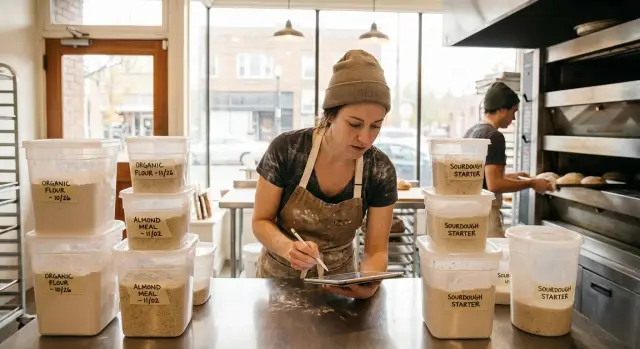
Expiry tracking usually fails for one simple reason: the information lives in places that don’t match how the team actually works. A date on a sticky note, a marker on a lid, or “I’ll remember it” holds up until the first rush.
When production is moving, people grab what’s closest, not what expires first. A tray gets pushed to the back of the fridge, a delivery arrives early, or someone preps extra “just in case.” Two days later you find the problem: items that should’ve been used are now questionable, while newer stock is already open.
The pain usually shows up as surprise spoilage during service, shortcuts under pressure (newest stock gets opened because it’s easiest to reach), inconsistent rotation between shifts, half-used containers with no clear date, and “phantom inventory” where the sheet says you have it but the fridge says you don’t.
A simple rule prevents most of this: “use first.” In plain terms, use the items that will go bad sooner before you touch newer ones. Some teams call it FIFO (first in, first out). For perishables, it’s often closer to FEFO (first expiry, first out). If your croissant filling was made yesterday but expires tomorrow, it should be used before a fresh batch made today that lasts three more days.
The goal isn’t complicated software or perfect data. A good perishable inventory tracker is a small, repeatable system: capture the batch, the expiry date, and where it’s stored, then get a clear “use this next” nudge at the right time.
This matters most in small bakeries, cafes, and catering prep teams where the same people receive deliveries, prep items, and serve customers. When roles overlap, the tracker has to fit real shift habits or it’ll be ignored. A simple setup staff can follow beats a detailed system nobody updates.
A tracker only works if everyone uses the same words the same way. Otherwise one person logs “milk” and another logs “milk 2L,” and alerts stop making sense.
Here are the basics most teams need:
Quantity needs one more point of clarity: track the amount left in the batch, not the amount you started with. If custard started at 6 liters and now has 2 liters left, the tracker should show 2 liters. That’s what makes alerts and “use first” lists useful.
Shelf life is how long something lasts under normal storage. It might be “3 days refrigerated” for a prepared filling. Your tracker turns that into a real expiry date using the made date.
Best-by is a quality date. The product is usually still safe after it, but taste or texture may drop.
Use-by is a safety date. Be explicit about which items are use-by (often dairy, meats, prepared items) so staff don’t treat everything as flexible.
FEFO means first-expire-first-out. It’s the everyday version of “use first”: when you grab an ingredient, pick the batch with the earliest expiry date, even if it was received later.
Batches matter most for items where one bad day creates waste or risk: milk and cream, custards and fillings, deli meats, cooked sauces, salad mixes, and any prepared item you hold overnight.
Traceability is optional but useful. It can be as simple as noting which batch went into which product (for example, which custard batch was used for Tuesday’s pastries). Many teams skip this early on and add it later if recalls, audits, or frequent rework make it worth it.
A tracker only helps if staff can log a batch in seconds. The aim is simple: know what you have, where it is, and what needs using first.
Start with the smallest set of fields that answers one question fast: “What should we use next?” If the form feels like paperwork, people will guess, skip entries, or lump everything into one big batch.
These fields usually pay off right away:
If items move around, add a simple location field (front fridge, walk-in, freezer, display). Without location, staff waste time searching and stop trusting the system.
Optional fields help when they trigger a decision. If they don’t change what you do, they just slow people down. Common “only if needed” extras include supplier (if you reorder by supplier), cost (if you’ll track waste value), storage type (fridge/freezer/ambient), allergen flags (if labels depend on it), and short notes like “opened” or “defrosted at 7am.”
For status, keep it straightforward: in stock, reserved, consumed, wasted, expired. That’s enough for most workflows and makes reporting easier.
Prepared mixes and split batches need one rule: the “child” containers inherit the parent’s dates. If one batch becomes two tubs, create two container records tied to the same batch ID (or sub-IDs like 0142-A and 0142-B) and split the quantity. That keeps FEFO honest without making staff retype details.
For alerts, use plain rules people can remember. Start with one early warning window (for example, 2 days before expiry) and decide who sees it (prep lead, shift lead). If you also want low-stock alerts, begin with a couple of high-impact items and expand once expiry alerts are working.
A tracker works when it matches how your kitchen moves. Before you set up screens, fields, or alerts, make a few small decisions. These choices prevent messy data, duplicate items, and ignored warnings.
1) Set a naming rule. Keep item names searchable and consistent across invoices, labels, and the tracker. For example: “Milk, whole, 2L” (not “Whole milk” one day and “2L milk” the next). For batches, pick one format and stick to it, such as a supplier date plus a short code: “2026-01-25 DAIRY.”
2) Define locations that match reality. Keep location names short and fixed so people don’t invent new ones mid-shift. If your team says “front fridge” and “prep line,” use those.
3) Keep alert rules simple. Instead of custom rules for every item, start with a few categories. For example: 2 days for dairy, 1 day for produce, 3 days for prepared sauces. Adjust later, but make the first version easy to follow.
4) Decide who can change what. If everyone can edit everything, counts drift fast and nobody knows what’s true. A common setup is: receiving lead adds stock, supervisors adjust counts, shift leads mark waste with a short reason, and only managers edit item names and rules.
5) Choose the daily habit. Tie the tracker to moments that already exist: opening (check alerts and pull “use first” items forward), after prep (log new batches), and close (log waste and do a quick count of a short list).
If you build this in a tool like AppMaster, keep the first version small: items, batches, locations, expiry date, and one alert rule per category. A tracker staff use beats a perfect one that gets ignored.
Build in the same order your team works: define items, record batches, then make “what to use next” obvious.
Create an item list that doesn’t change often. For each item, store a default shelf life (in hours or days) and when you want alerts.
Keep it practical: item name and unit (tray, piece, liter), default shelf life (muffins 2 days, opened cream 24 hours), and a simple alert plan (for example, warn at 24 hours, warn again at 4 hours). If different teams use the same tracker (kitchen and bar), note ownership so alerts go to the right people.
Set up a fast intake flow for deliveries and in-house prep. Every batch needs its own expiry date, even if the item name is the same.
A good batch intake screen needs only: item, quantity, location, and an expiry date (auto-filled from shelf life, with an easy edit).
Then build a “use first” view staff can trust. Sort by soonest expiry and group by location so the barista sees the milk in the bar fridge first, and the kitchen sees today’s pastry trays.
For daily updates, focus on a few quick actions: consume (sold/used) with quantity, move (fridge to display), adjust (count was wrong), mark waste (spoilage, damaged), and mark expired (often auto-suggested).
Set notifications to match your rhythm: a heads-up before the morning rush, a reminder before closing, and one daily summary for managers.
Before rolling out, test with 10 real batches: two croissant trays with different bake times, a carton of milk, a tub of cream, and a couple of sauces. If staff can add, find, and consume those without asking questions, you’re ready to expand.
If you’re building this in a no-code tool like AppMaster, start by modeling Items, Batches, and Locations, then add the “use first” screen and quick actions as the main workflow.
A tracker only works if people use it during a rush. Design for 10 seconds, one hand, and a noisy kitchen.
The biggest win is making batch actions nearly frictionless. If you can, add barcode or QR labels per batch so staff scan instead of type. It’s optional, but it often changes behavior because it feels like part of normal prep.
Mobile-friendly screens matter just as much. A simple phone view for receiving, prep, and waste logging beats a spreadsheet that only works on a manager’s laptop.
Defaults should match reality: today’s date, common batch sizes, usual shelf life, and the locations people actually use. If a scanned item has an older batch available, the tracker should prompt staff to use that batch first.
If your kitchen has weak signal, offline-friendly entry (save and sync later) can be the difference between clean data and gaps.
Staff should be able to do daily work, but not accidentally rewrite history. Permissions help: anyone can reduce quantity when they use items, but only a lead can edit expiry dates or delete a batch.
An audit trail also builds trust. When someone changes quantity, you want to see who did it and when, with a short note like “spilled” or “overbaked.” That turns arguments into quick fixes.
Manager views should stay tied to actions. A short set is usually enough: near-expiry for the next 48-72 hours, waste by reason, stockouts that forced menu changes, and a simple activity log for edits and overrides.
Trust collapses when the numbers look “right” but the kitchen still finds expired product. Most failures come from a few predictable traps.
Tracking items but not batches. If “milk” is one line item, new cartons and old cartons get mixed, and the expiry date becomes a guess. Fix it by treating each delivery or production run as a batch with its own quantity and expiry.
Casual editing of expiry dates. If anyone can change dates to make an alert disappear, the tracker stops helping. Allow edits, but require a reason (damaged label, supplier corrected date, repacked into smaller containers) and keep a simple history.
Overbuilding. Too many categories and fields turn updates into a chore, and then staff stop recording moves. Start with what helps daily decisions: item name, batch ID, quantity, unit, expiry date, and location.
Noisy alerts. If staff get pinged all day, they’ll ignore everything. Time alerts around real moments (opening, pre-lunch, pre-close) and focus on items that can realistically be used.
Locations that don’t match the kitchen. If the app says “fridge” but the team uses “front fridge,” “back fridge,” and “prep line,” items will “disappear” during busy shifts. Mirror how people talk and move.
A simple scenario shows why this matters: a cafe receives two boxes of spinach on Monday and Thursday. If both are logged as one item, Thursday’s delivery hides Monday’s older batch, and the team reaches for the “fuller” box first. With batches and a “use first” alert at opening, Monday’s batch gets flagged and used that day.
A tracker works only if the data stays fresh. The good news is you don’t need perfect counts on everything. You need a routine staff can follow so “use first” alerts match what’s actually on the shelf.
A simple rhythm that holds up in most cafes:
Keep waste reasons short so people actually use them: expired, over-prepped, damaged, wrong temp, returned. If “over-prepped” keeps showing up, the fix is usually smaller batches, not more reminders.
One practical tip: put the daily “use first” check inside your opening checklist. When it’s treated like turning on the oven, it becomes automatic.
If you’re building the tracker yourself in a no-code tool (for example, in AppMaster), these same moments are the best places to trigger simple notifications: a morning “use first” summary, an end-of-day waste prompt, and a weekly waste report for the manager.
River Street Cafe sells breakfast sandwiches, milk for coffee drinks, pastries, and two house-made sauces (chipotle mayo and herb vinaigrette). They keep everything in a simple tracker with batches, expiry dates, and a “use first” list.
On Monday morning, the prep cook makes a fresh batch of chipotle mayo and logs it as a new batch, not just “chipotle mayo” as one number. The batch entry looks like this:
They do the same for pastries (by tray) and milk (by case). Each batch has its own expiry date and location, so staff don’t waste time guessing which one to grab.
By Wednesday afternoon, the tracker shows a “use first” alert: an older vinaigrette batch expires tomorrow. Nobody noticed it in the back of the walk-in because a newer batch was placed in front.
The shift lead has two options. If freezing is allowed for that item, they portion and freeze it with a note in the tracker. If freezing isn’t allowed, they plan a fast move: add a lunch special that uses vinaigrette (a salad combo or a sandwich add-on). The point is to use the batch on purpose, not hope it sells.
At close, the closing person makes small updates, not a full recount. They confirm new batches, subtract what was used (rough but consistent), and log waste only when it happens.
On Friday, the manager reviews a single screen: what expired, what was wasted, and which items triggered the most “use first” alerts. Over a few weeks, they adjust prep sizes for sauces and set clearer stocking rules, like “new milk goes behind old milk,” so alerts become rare and waste drops.
Pick the smallest tool your team will actually use every day. Expiry tracking fails more from too much process than from missing features.
If you have one location, few items, and one person maintaining it, a spreadsheet can be enough. If multiple people receive, prep, and log waste across shifts, an app is usually a better fit. If you need specific rules (like FEFO), multiple storage locations, and permissions with an audit trail, a custom workflow is often worth it.
Keep the first version small. The starting set most teams actually use is:
You can add integrations later once the basics stick. Common next steps are pulling daily totals from your POS (to compare usage vs sales) and sending alerts to where your team already communicates (Telegram) or by email/SMS.
If you want to build a custom app without coding, AppMaster (appmaster.io) is one option. You can model Items, Batches, and Locations in PostgreSQL, add business rules for FEFO “use first” alerts, and build simple mobile screens for receiving and waste logging. Because it generates real source code and can regenerate the app when requirements change, it’s easier to adjust fields and rules as you learn.
To roll it out smoothly, pilot first. Run the tracker only for the prep fridge for two weeks. Train one habit: receive batches, then always pick from Use First. At the end of each week, review two numbers with the team: missed expiries and waste entries. If those improve, expand to the freezer, then dry storage, then the full menu.
 What’s the fastest way to stop surprise spoilage in a busy cafe?
Start with a simple rule everyone can follow: always use the batch that expires soonest. Then make it easy to see that batch by recording it separately (not just “milk” as one number) and showing a daily “use first” view sorted by expiry and grouped by location.
Should we use FIFO or FEFO for perishables?FIFO uses the oldest received stock first, while FEFO uses the stock with the earliest expiry date first. For perishables, FEFO is usually safer because a newer delivery can expire sooner than an older one depending on the supplier date or how it was stored.
What are the minimum fields a perishable inventory tracker needs?Track the batch and its expiry date, the quantity left, and where it’s stored. If you can answer “what should we use next, and where is it?” in a few seconds, you have enough data to get real value.
Why do we need batch tracking instead of just tracking items?Log each delivery or production run as its own batch with its own expiry date and quantity. If you merge everything into one “milk” line item, the tracker can’t tell which carton expires first, and the alerts become guesses.
How do we keep item names consistent so alerts don’t get messy?Use a consistent item naming rule and keep it short but specific, like “Milk, whole, 2L” or “Croissant dough.” Decide one format, train it once, and restrict who can edit item names so the list doesn’t drift over time.
How detailed should storage locations be?Start with a small set of locations that match what staff actually say, like “front fridge,” “walk-in,” and “display.” Avoid generic or changing names, because unclear locations make people stop trusting the tracker when they can’t find what the screen shows.
What should we do when one batch gets split into multiple containers?Treat each container as its own record but keep the same batch ID and dates. Split the quantity between the containers and add simple sub-IDs if needed so FEFO still works without making staff retype expiry details.
How far ahead should expiry alerts trigger?Pick one early warning window and align it with real moments, like opening and pre-close, instead of pinging all day. If alerts feel noisy or impossible to act on, staff will ignore them, so start with high-risk items and expand later.
Who should be allowed to edit quantities and expiry dates?A simple default is: receiving or prep staff add batches, anyone can reduce quantity when they use items, shift leads log waste with a reason, and only managers can change expiry rules or edit item names. This keeps daily work fast while preventing quiet “fixes” that hide problems.
Can we build this as a simple internal app without coding?You can build a small app that tracks Items, Batches, and Locations, then add a “use first” screen and quick actions like consume, move, and waste. In AppMaster, this maps well to a PostgreSQL data model plus business rules for FEFO alerts and mobile-friendly screens for logging during prep and close.
Experiment with AppMaster with free plan.
When you will be ready you can choose the proper subscription.
 Jul 14, 20268 min
 Jul 13, 20268 min
 Jul 08, 20268 min