


 Jul 14, 2026
 8 min
8 minEquipment reservation app: prevent conflicts and track returns
Plan an equipment reservation app that prevents double bookings, records returns and damage, and places faulty items on maintenance hold.

Multi-tenant SaaS data model choices shape security, reporting, and speed. Compare tenant_id, separate schemas, and separate databases with clear tradeoffs.
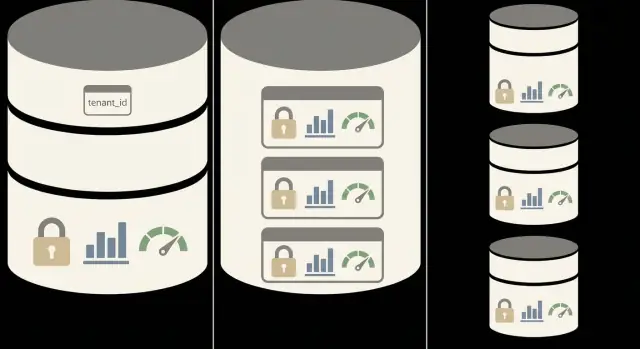
Multi-tenancy means one software product serves many customers (tenants), and each tenant must only see their own data. The hard part is doing that consistently: not just on one screen, but across every API call, admin panel, export, and background job.
Your data model affects day-to-day operations more than most teams expect. It shapes permissions, reporting, query speed as you grow, and how risky a “small” bug can become. Miss one filter and you can leak data. Isolate too aggressively and reporting turns into a chore.
There are three common ways to structure a multi-tenant SaaS data model:
Even if you build visually in a no-code backend, the same tradeoffs apply. Tools like AppMaster generate real backend code and database structures from your design, so early modeling decisions show up quickly in production behavior and performance.
Picture a helpdesk tool. If every ticket row has tenant_id, it’s easy to query “all open tickets,” but you must enforce tenant checks everywhere. If each tenant has its own schema or database, isolation is stronger by default, but cross-tenant reporting (like “average time to close across all customers”) takes more work.
The goal is separation you can trust without adding friction to reporting, support, and growth.
Don’t start with database theory. Start with how the product will be used and what you’ll need to operate every week.
How sensitive is the data, and are you under strict rules? Healthcare, finance, and tight customer contracts often push you toward stronger isolation (separate schema or separate database). It can reduce risk and make audits easier.
Do you need cross-tenant reporting often? If you regularly need “all customers” metrics (usage, revenue, performance), a single database with a tenant_id is usually the simplest. Separate databases make this harder because you have to query many places and combine results.
How different will tenants be from each other? If tenants need custom fields, custom workflows, or unique integrations, separate schemas or databases can reduce the chance that changes spill over. If most tenants share the same structure, tenant_id stays clean.
What can your team realistically operate? More isolation usually means more work: more backups, more migrations, more moving parts, and more places for failures to hide.
A practical approach is to prototype your top two choices, then test the real pain points: permission rules, reporting queries, and how changes roll out as the model evolves.
This is the most common setup: all customers share the same tables, and every tenant-owned record carries a tenant_id. It’s operationally simple because you run one database and one set of migrations.
The rule is strict: if a row belongs to a tenant, it must include tenant_id, and every query must filter by it. Tenant-owned tables typically include users, roles, projects, tickets, invoices, messages, file metadata, and join tables that connect tenant data.
To reduce leaks, treat tenant_id as non-negotiable:
tenant_id required (NOT NULL) on tenant-owned tablestenant_id (for example, tenant_id, created_at)tenant_id (like unique email per tenant)tenant_id through every API and business flow, not just UI formsIn PostgreSQL, row-level security policies can add a strong safety net, especially when queries are generated dynamically.
Reference data usually falls into one of two buckets: shared tables (like countries) with no tenant_id, and tenant-scoped catalogs (like custom tags or pipelines) that include tenant_id.
If you’re building with AppMaster, a simple habit prevents most incidents: set tenant_id from the authenticated user’s tenant before any create or read in your Business Process logic, and keep that pattern consistent.
Permissions are where multi-tenancy succeeds or fails. The data layout you pick changes how you store users, how you scope queries, and how you avoid “oops” moments in admin screens.
With a single database and tenant_id on every row, teams often use one shared Users table and connect each user to a tenant and one or more roles. The big rule stays the same: every read and write must include tenant scope, even for “small” tables like settings, tags, or logs.
With separate schemas, you often keep a shared identity layer (login, password, MFA) in one place, while tenant data lives in a schema per tenant. Permissions become partly a routing problem: the app must point queries at the correct schema before business logic runs.
With separate databases, isolation is strongest, but permission logic shifts into infrastructure: choosing the right database connection, managing credentials, and handling “global” staff accounts.
Across all three approaches, a few patterns consistently reduce cross-tenant risk:
tenant_id into the session or auth token claims and treat it as required.In AppMaster, this typically means storing tenant context right after authentication and reusing it in API endpoints and Business Processes so every query stays scoped. A support agent should only see orders after the app has set tenant context, not because the UI happened to filter correctly.
With the tenant_id single-database approach, reporting is usually straightforward. Global dashboards (MRR, signups, usage) can run a single query across everyone, and tenant-level reports are the same query with a filter.
The tradeoff is performance over time. As tables grow, one busy tenant can become a noisy neighbor by creating more rows, triggering more writes, and making common queries slower if the database has to scan too much.
Indexing keeps this model healthy. Most tenant-scoped reads should be able to use an index that starts with tenant_id, so the database can jump straight to that tenant’s slice of data.
A good baseline:
tenant_id is the first column (for example, tenant_id + created_at, tenant_id + status, tenant_id + user_id)tenant_id, which can cause slow scansRetention and deletes also need a plan because one tenant’s history can bloat tables for everyone. If tenants have different retention policies, consider soft deletes plus scheduled archiving per tenant, or moving old rows to an archive table keyed by tenant_id.
With separate schemas, you still use one PostgreSQL database, but each tenant gets its own schema (for example, tenant_42). Tables inside that schema belong only to that tenant. It can feel like giving every customer a “mini database,” without the overhead of running many databases.
A common setup keeps global services in a shared schema and tenant data in tenant schemas. The split is usually about what must be shared across all customers versus what must never mix.
Typical split:
This model reduces the risk of cross-tenant joins because tables live in different namespaces. It can also make it easier to back up or restore one tenant by targeting one schema.
Migrations are what surprise teams. When you add a new table or column, you must apply the change to every tenant schema. With 10 tenants it’s manageable. With 1,000, you need process: track schema versions, run migrations in batches, and fail safely so one broken tenant doesn’t block the rest.
Shared services like auth and billing usually live outside tenant schemas. A practical pattern is shared auth (one user table with a tenant membership table) and shared billing (Stripe customer IDs, invoices), while tenant schemas store tenant-owned business data.
If you’re using AppMaster, plan early how Data Designer models map to shared vs tenant schemas, and keep global services stable so tenant schemas can evolve without breaking login or payments.
Separate schemas give stronger separation by default than a pure tenant_id filter because tables are physically distinct and permissions can be set per schema.
Reporting is great when most reports are per tenant. Queries stay simple because you read from one tenant’s tables without constantly filtering shared tables. This model also supports “special” tenants that need extra tables or custom columns without forcing everyone else to carry them.
Aggregate reporting across all tenants is where schemas start to hurt. You either need a reporting layer that can query many schemas, or you maintain shared summary tables in a common schema.
Common patterns:
Performance is usually solid for tenant-level workloads. Indexes are smaller per tenant, and heavy writes in one schema are less likely to affect others. The tradeoff is operational overhead: provisioning a new tenant means creating a schema, running migrations, and keeping every schema aligned when the model changes.
Schemas are a good fit when you want stricter isolation without the cost of many databases, or when you expect customization per tenant.
With a separate database per tenant, every customer gets their own database (or their own database on the same server). This is the most isolated option: if one tenant’s data is corrupted, misconfigured, or under heavy load, it’s much less likely to spill over into others.
It’s a strong fit for regulated environments (health, finance, government) or enterprise customers who expect strict separation, custom retention rules, or dedicated performance.
Onboarding becomes a provisioning workflow. When a new tenant signs up, your system needs to create or clone a database, apply the base schema (tables, indexes, constraints), create and store credentials safely, and route API requests to the correct database.
If you’re building with AppMaster, the key design choice is where you keep the tenant directory (a central map of tenant to database connection) and how you ensure every request uses the right connection.
Upgrades and migrations are the main tradeoff. A schema change is no longer “run once,” it’s “run for every tenant.” That adds operational work and risk, so teams often version schemas and run migrations as controlled jobs that track progress per tenant.
The upside is control. You can migrate large tenants first, watch performance, then roll changes out gradually.
Separate databases are the simplest to reason about. Accidental cross-tenant reads are much less likely, and a permission mistake tends to affect only one tenant.
Performance is also a strength. Heavy queries, big imports, or a runaway report in Tenant A won’t slow down Tenant B. This is strong protection against noisy neighbors, and it lets you tune resources per tenant.
The tradeoff shows up in reporting. Global analytics across all tenants becomes the hardest because data is physically split. Patterns that work in practice include copying key events or tables into a central reporting database, sending events to a warehouse-style dataset, running per-tenant reports and aggregating results (when tenant count is small), and keeping product metrics separate from customer data.
Operational cost is the other big factor. More databases means more backups, upgrades, monitoring, and incident response. You can also hit connection limits faster because each tenant may need its own connection pool.
Most multi-tenant issues aren’t “big design” failures. They’re small omissions that grow into security bugs, messy reporting, and expensive cleanups. Multi-tenancy works when tenant separation is treated as a habit, not a feature you bolt on later.
A common leak is forgetting the tenant field on one table, especially join tables like user_roles, invoice_items, or tags. Everything looks fine until a report or search query joins through that table and pulls rows from another tenant.
Another frequent problem is admin dashboards that bypass tenant filtering. It often starts as “just for support,” then gets reused. No-code tools don’t change the risk here: every query, business process, and endpoint that reads tenant data needs the same tenant scope.
IDs can also bite you. If you share human-friendly IDs across tenants (like order_number = 1001) and assume they’re globally unique, support tools and integrations will mix records. Keep tenant-scoped identifiers separate from internal primary keys, and include tenant context in lookups.
Finally, teams underestimate migrations and backups as they scale. What’s easy with 10 tenants can be slow and risky with 1,000.
Quick checks that prevent most pain:
Example: a support agent searches for “invoice 1001” and pulls the wrong tenant because the lookup skipped tenant scope. It’s a small bug with a big impact.
Before you lock in a multi-tenant SaaS data model, run a few tests. The goal is to catch data leaks early and confirm your choice still works when tables get big.
(tenant_id, created_at) and other common filters), and measure at least one slow query on purpose so you know what “bad” looks like.To make the reporting test concrete, pick two questions you know you’ll need (one tenant-scoped, one global) and run them against sample data.
-- Tenant-only: last 30 days, one tenant
SELECT count(*)
FROM tickets
WHERE tenant_id = :tenant_id
  AND created_at >= now() - interval '30 days';

-- Global (admin): compare tenants
SELECT tenant_id, count(*)
FROM tickets
WHERE created_at >= now() - interval '30 days'
GROUP BY tenant_id;
If you’re prototyping in AppMaster, build these checks into your Business Process flows (read, write, delete), and seed two tenants in the Data Designer. When these tests pass with realistic data volume, you can commit with confidence.
A 20-person company is launching a customer portal for its clients: invoices, tickets, and a simple dashboard. They expect 10 tenants in the first month, with a plan to grow to 1,000 over the next year.
Early on, the simplest model is usually one database where every table that stores customer data includes a tenant_id. It’s quick to build, easy to report on, and avoids duplicated setup.
With 10 tenants, the biggest risk isn’t performance. It’s permissions. One missed filter (for example, a “list invoices” query that forgets tenant_id) can leak data. The team should enforce tenant checks in one consistent place (shared business logic or reusable API patterns) and treat tenant scoping as non-negotiable.
As they move from 10 to 1,000 tenants, needs change. Reporting gets heavier, support asks for “export everything for this tenant,” and a few large tenants start to dominate traffic and slow down shared tables.
A practical upgrade path often looks like this:
Pick the simplest model that keeps data safely separated today, then plan a migration path for the “few huge tenants” problem instead of optimizing for it on day one.
Choose based on what you need to protect first: data isolation, operational simplicity, or tenant-level scaling. Confidence comes from building a small prototype and trying to break it with real permission and reporting cases.
A simple starting guide:
tenant_id on every row.Before you build, write tenant boundaries in plain language. Define roles (owner, admin, agent, viewer), what each can do, and what “global” data means (plans, templates, audit logs). Decide how reporting should work: per-tenant only, or “all tenants” for internal staff.
If you’re using AppMaster, you can prototype these patterns quickly: model tables in the Data Designer (including tenant_id, unique constraints, and the indexes your queries will rely on), then enforce rules in the Business Process Editor so every read and write stays tenant-scoped. If you want a reference point for the platform, AppMaster is available at appmaster.io.
A practical final test: create two tenants (A and B), add similar users and orders, and run the same flows for both. Try to export a report for tenant A, then intentionally pass tenant B IDs into the same endpoints. Your prototype is only “safe enough” when those attempts fail every time and your key reports still run fast with realistic data sizes.
 Which multi-tenant database model should I start with?
Default to a single database with a tenant_id on every tenant-owned table if you want the simplest operations and frequent cross-tenant analytics. Move to separate schemas when you need stronger isolation or per-tenant customization without running many databases. Choose separate databases when compliance or enterprise requirements demand hard separation and per-tenant performance control.
How do I prevent accidental cross-tenant data leaks?Treat tenant scoping as mandatory in the backend, not a UI filter. Make tenant_id required on tenant-owned tables, and always derive it from the authenticated user context instead of trusting client input. Add a safety net like PostgreSQL row-level security if it fits your stack, and build tests that try to access another tenant’s record by changing only an ID.
What indexes matter most in a single database with tenant_id?Put tenant_id first in the indexes that match your common filters, so the database can jump straight to one tenant’s slice of data. A common baseline is indexing (tenant_id, created_at) for time-based views and adding (tenant_id, status) or (tenant_id, user_id) for frequent dashboard filters. Also make uniqueness tenant-scoped, like “email unique per tenant,” to avoid collisions.
What do I gain and lose with separate schemas per tenant?Separate schemas reduce accidental cross-tenant joins because tables live in different namespaces, and you can set permissions at the schema level. The main downside is migrations: every schema needs the same change, and that becomes a process problem as tenant count grows. It’s a good middle ground when you want stronger isolation than tenant_id but still want one database to manage.
When is a separate database per tenant actually worth it?Separate databases minimize blast radius: a performance spike, misconfiguration, or corruption is more likely to stay within one tenant. The cost is operational overhead, because provisioning, backups, monitoring, and migrations multiply by tenant count. You’ll also need a reliable tenant directory and request routing so every API call uses the correct database connection.
How do I handle “all tenants” reporting if data is split by schema or database?Cross-tenant reporting is easiest with a single database and tenant_id, because global dashboards are just queries without the tenant filter. With schemas or separate databases, global analytics usually works best by copying key events or summaries into a shared reporting store on a schedule. Keep the rule simple: product-wide metrics go to the reporting layer, while tenant data stays isolated.
What’s the safest way to let support staff access tenant accounts?Make the tenant context explicit in support tools and require an intentional tenant switch before viewing records. If you use impersonation, log who accessed what and when, and keep it time-limited. Avoid support workflows that accept a record ID without tenant context, because that’s how “invoice 1001” bugs turn into real leaks.
How do I support tenant customization without making the model messy?If tenants need different fields or workflows, schemas or separate databases can reduce the chance that one tenant’s changes affect others. If most tenants are similar, keep one shared model with tenant_id and handle differences with configurable options like feature flags or optional fields. The key is to avoid “almost global” tables that mix shared and tenant-specific meanings without clear ownership.
How do I implement multi-tenancy safely in a no-code backend like AppMaster?Design the tenant boundary early: decide where tenant context is stored after authentication and ensure every read/write uses it. In AppMaster, this usually means setting tenant_id from the authenticated user in your Business Process logic before creating or querying tenant-owned records, so endpoints can’t forget it. Treat this as a reusable pattern you apply everywhere, not something you re-implement per screen.
What tests should I run before committing to a multi-tenant model?Create two tenants with similar data and try to break isolation by changing only record IDs during reads, updates, and deletes. Verify background jobs, imports, and exports still write into the correct tenant scope, because those paths are easy to overlook. Also run one tenant-level report and one global admin report against realistic sample volume to confirm performance and access rules hold up.
Experiment with AppMaster with free plan.
When you will be ready you can choose the proper subscription.
 Jul 14, 20268 min
 Jul 13, 20268 min
 Jul 08, 20268 min