


 Jul 14, 2026
 8 min
8 minEquipment reservation app: prevent conflicts and track returns
Plan an equipment reservation app that prevents double bookings, records returns and damage, and places faulty items on maintenance hold.

Minimal observability setup for CRUD-heavy backends: structured logs, core metrics, and practical alerts to catch slow queries, errors, and outages early.
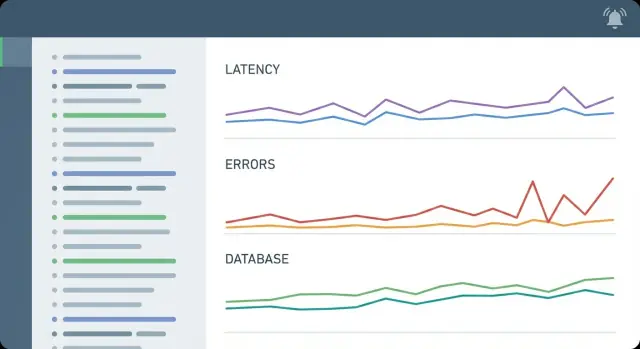
CRUD-heavy business apps usually fail in boring, expensive ways. A list page gets slower each week, a save button sometimes times out, and support reports “random 500s” you can’t reproduce. Nothing looks broken in development, but production feels unreliable.
The real cost isn’t just the incident. It’s the time spent guessing. Without clear signals, teams bounce between “it must be the database,” “it must be the network,” and “it must be that one endpoint,” while users wait and trust drops.
Observability turns those guesses into answers. Put simply: you can look at what happened and understand why. You get there with three signal types:
For CRUD apps and API services, this is less about fancy dashboards and more about fast diagnosis. When a “Create invoice” call slows down, you should be able to tell whether the delay came from a database query, a downstream API, or an overloaded worker in minutes, not hours.
A minimal setup starts from the questions you actually need to answer on a bad day:
If you build backends with a generated stack (for example, AppMaster generating Go services), the same rule applies: begin small, keep signals consistent, and only add new metrics or alerts after a real incident proves they would’ve saved time.
A minimal observability setup has three pillars: logs, metrics, and alerts. Traces are useful, but they’re a bonus for most CRUD-heavy business apps.
The goal is straightforward. You should know (1) when users are failing, (2) why they’re failing, and (3) where in the system it’s happening. If you can’t answer those quickly, you’ll waste time guessing and arguing about what changed.
The smallest set of signals that usually gets you there looks like this:
It also helps to separate symptoms from causes. A symptom is what users feel: 500s, timeouts, slow pages. A cause is what creates it: lock contention, a saturated connection pool, or a slow query after a new filter was added. Alert on symptoms and use “cause” signals to investigate.
One practical rule: pick a single place to view the important signals. Context switching between a log tool, a metrics tool, and a separate alert inbox slows you down when it matters most.
When something breaks, the fastest path to an answer is usually: “Which exact request did this user hit?” That’s why a stable correlation ID matters more than almost any other log tweak.
Pick one field name (commonly request_id) and treat it as required. Generate it at the edge (API gateway or first handler), pass it through internal calls, and include it in every log line. For background jobs, create a new request_id per job run and store a parent_request_id when a job was triggered by an API call.
Log in JSON, not free text. It keeps logs searchable and consistent when you’re tired, stressed, and skimming.
A simple set of fields is enough for most CRUD-heavy API services:
timestamp, level, service, envrequest_id, route, method, statusduration_ms, db_query_counttenant_id or account_id (safe identifiers, not personal data)Logs should help you narrow down “which customer and which screen,” without turning into a data leak. Avoid names, emails, phone numbers, addresses, tokens, or full request bodies by default. If you need deeper detail, log it only on demand and with redaction.
Two fields pay off quickly in CRUD systems: duration_ms and db_query_count. They catch slow handlers and accidental N+1 patterns even before you add tracing.
Define log levels so everyone uses them the same way:
info: expected events (request completed, job started)warn: unusual but recoverable (slow request, retry succeeded)error: failed request or job (exception, timeout, bad dependency)If you build backends with a platform like AppMaster, keep the same field names across generated services so “search by request_id” works everywhere.
Most incidents in CRUD-heavy apps have a familiar shape: one or two endpoints slow down, the database gets stressed, and users see spinners or timeouts. Your metrics should make that story obvious within minutes.
A minimal set usually covers five areas:
Two details make metrics far more actionable.
First, separate interactive API requests from background work. A slow email sender or webhook retry loop can starve CPU, DB connections, or outgoing network and make the API look “randomly slow.” Track queues, retries, and job duration as their own time series, even if they run in the same backend.
Second, always attach version/build metadata to dashboards and alerts. When you deploy a new generated backend (for example, after regenerating code from a no-code tool like AppMaster), you want to answer one question quickly: did the error rate or p95 latency jump right after this release?
A simple rule: if a metric can’t tell you what to do next (roll back, scale, fix a query, or stop a job), it doesn’t belong in your minimal set.
In CRUD-heavy apps, the database is often where “it feels slow” becomes real user pain. A minimal setup should make it obvious when the bottleneck is PostgreSQL (not the API code), and what kind of DB problem it is.
You don’t need dozens of dashboards. Start with signals that explain most incidents:
Add a query timing histogram in the API layer and tag it with the endpoint or use case (for example: GET /customers, “search orders”, “update ticket status”). This shows whether an endpoint is slow because it runs many small queries or one big one.
CRUD screens often trigger N+1 queries: one list query, then one query per row to fetch related data. Watch for endpoints where request count stays flat but DB query count per request climbs. If you generate backends from models and business logic, this is often where you tune the fetch pattern.
If you already have a cache, track hit rate. Don’t add a cache just to get better charts.
Treat schema changes and migrations as a risk window. Record when they start and end, then watch for spikes in locks, query time, and connection errors during that window.
Alerts should point to a real user problem, not a busy chart. For CRUD-heavy apps, start by watching what users feel: errors and slowness.
If you only add three alerts at first, make them:
After that, add a couple of “likely cause” alerts. CRUD backends often fail in predictable ways: the database runs out of connections, a background queue piles up, or a single endpoint starts timing out and drags the whole API down.
Hardcoding numbers like “p95 > 200ms” rarely works across environments. Measure a normal week, then set the alert just above normal with a safety margin. For example, if p95 latency is usually 350-450ms during business hours, alert at 700ms for 10 minutes. If 5xx is typically 0.1-0.3%, page at 2% for 5 minutes.
Keep thresholds stable. Don’t tune them every day. Tune them after an incident, when you can tie changes to real outcomes.
Use two severities so people trust the signal:
Silence alerts during expected changes like deploy windows and planned maintenance.
Make alerts actionable. Include “what to check first” (top endpoint, DB connections, recent deploy) and “what changed” (new release, schema update). If you build in AppMaster, note which backend or module was regenerated and deployed most recently, because that’s often the quickest lead.
A minimal setup gets easier when you decide what “good enough” means. That’s what SLOs are for: clear targets that turn vague monitoring into specific alerts.
Start with SLIs that map to what users feel: availability (can users complete requests), latency (how fast actions finish), and error rate (how often requests fail).
Set SLOs per endpoint group, not per route. For CRUD-heavy apps, grouping keeps things readable: reads (GET/list/search), writes (create/update/delete), and auth (login/token refresh). This avoids a hundred tiny SLOs no one maintains.
Example SLOs that fit typical expectations:
Error budgets are the allowed “bad time” within the SLO. A 99.9% monthly availability SLO means you can spend about 43 minutes of downtime per month. If you spend it early, pause risky changes until stability returns.
Use SLOs to decide what deserves an alert versus a dashboard trend. Alert when you’re burning the error budget fast (users are actively failing), not when a metric looks slightly worse than yesterday.
If you build backends quickly (for example, with AppMaster generating a Go service), SLOs keep the focus on user impact even as the implementation changes underneath.
Start with the slice of the system users touch most. Pick the API calls and jobs that, if slow or broken, make the whole app feel down.
Write down your top endpoints and background work. For a CRUD business app, that’s usually login, list/search, create/update, and one export or import job. If you built the backend with AppMaster, include your generated endpoints and any Business Process flows that run on schedules or webhooks.
request_id, user_id (if available), endpoint, status_code, latency_ms, db_time_ms, and a short error_code for known failures.Keep alerts few and focused. You want alerts that point to user impact, not “something changed.”
A solid starter set is: API p95 latency too high, sustained 5xx rate, sudden spike in 4xx (often auth or validation changes), background job failures, DB slow queries, DB connections near limit, and low disk space (if self-hosted).
Then write a tiny runbook per alert. One page is enough: what to check first (dashboard panels and key log fields), likely causes (DB locks, missing index, downstream outage), and the first safe action (restart a stuck worker, roll back a change, pause a heavy job).
The fastest way to waste a minimal observability setup is to treat monitoring like a checkbox. CRUD-heavy apps usually fail in a few predictable ways (slow DB calls, timeouts, bad releases), so your signals should stay focused on those.
The most common failure is alert fatigue: too many alerts, too little action. If you page on every spike, people stop trusting alerts by week two. A good rule is simple: an alert should point to a likely fix, not just “something changed.”
Another classic mistake is missing correlation IDs. If you can’t tie an error log, a slow request, and a DB query to one request, you lose hours. Make sure every request gets a request_id (and include it in logs, traces if you have them, and responses when safe).
Noisy systems tend to share the same issues:
CRUD apps are especially vulnerable to the “average trap.” A single slow query can make 5% of requests painful while the average looks fine. Tail latency plus error rate gives a clearer picture.
Add deploy markers. Whether you ship from CI or regenerate code on a platform like AppMaster, record the version and deployment time as an event and in your logs.
Your setup is working when you can answer a few questions fast, without digging through dashboards for 20 minutes. If you can’t get to “yes/no” quickly, you’re missing a key signal or your views are too scattered.
You should be able to do most of this in under a minute:
Logs should be safe and useful at the same time. They need enough context to follow one failing request across services, but they must not leak personal data.
Pick one recent failure and open its logs. Confirm you have request_id, endpoint, status code, duration, and a clear error message. Also confirm you’re not logging raw tokens, passwords, full payment details, or personal fields.
If you’re building CRUD-heavy backends with AppMaster, aim for a single “incident view” that combines these checks: errors, p95 latency by endpoint, and DB health. That alone covers most real outages in business apps.
An internal admin portal is fine all morning, then gets noticeably slow during a busy hour. Users complain that opening the “Orders” list and saving edits takes 10 to 20 seconds.
You start with top-level signals. The API dashboard shows p95 latency for read endpoints jumped from about 300 ms to 4-6 s, while error rate stayed low. At the same time, the database panel shows active connections near the pool limit and a rise in lock waits. CPU on the backend nodes looks normal, so this doesn’t look like a compute problem.
Next, you pick one slow request and follow it through logs. Filter by the endpoint (for example, GET /orders) and sort by duration. Grab a request_id from a 6-second request and search for it across services. You see the handler finished quickly, but the DB query log line within that same request_id shows a 5.4-second query with rows=50 and a large lock_wait_ms.
Now you can state the cause confidently: the slowdown is in the database path (a slow query or lock contention), not the network or backend CPU. That’s what a minimal setup buys you: a faster narrowing of the search.
Typical fixes, in order of safety:
Close the loop with a targeted alert. Page only when p95 latency for the endpoint group stays above your threshold for 10 minutes and DB connection usage is above (for example) 80%. That combination avoids noise and catches this issue earlier next time.
A minimal observability setup should feel boring on day one. If you start with too many dashboards and alerts, you’ll tune them forever and still miss the real issues.
Treat every incident as feedback. After the fix ships, ask: what would have made this faster to spot and easier to diagnose? Add only that.
Standardize early, even if you have only one service today. Use the same field names in logs and the same metric names everywhere so new services match the pattern without debate. It also makes dashboards reusable.
A small release discipline pays off quickly:
If you build backends with AppMaster, it helps to plan your observability fields and key metrics before generating services, so every new API ships with consistent structured logs and health signals by default. If you want a single place to start building those backends, AppMaster (appmaster.io) is designed to generate production-ready backend, web, and mobile apps while keeping the implementation consistent as requirements change.
Pick one next improvement at a time, based on what actually hurt:
Repeat that cycle after each real incident. Over a few weeks, you end up with monitoring that fits your CRUD app and API traffic instead of a generic template.
 When should I bother adding observability to a CRUD-heavy app?
Start with observability when production issues take longer to explain than to fix. If you’re seeing “random 500s,” slow list pages, or timeouts you can’t reproduce, a small set of consistent logs, metrics, and alerts will save hours of guessing.
What’s the difference between monitoring and observability in practice?Monitoring tells you that something is wrong, while observability helps you understand why it happened by using context-rich signals you can correlate. For CRUD APIs, the practical goal is quick diagnosis: which endpoint, which user/tenant, and whether the time was spent in the app or the database.
What’s the smallest observability setup that actually works?Start with structured request logs, a handful of core metrics, and a few user-impact alerts. Tracing can wait for many CRUD apps if you already log duration_ms, db_time_ms (or similar), and a stable request_id you can search everywhere.
How do I set up correlation IDs so logs are useful during incidents?Use a single correlation field like request_id and include it in every request log line and every background job run. Generate it at the edge, pass it through internal calls, and make sure you can search logs by that ID to reconstruct one failing or slow request quickly.
What should I include in structured logs for a CRUD API?Log timestamp, level, service, env, route, method, status, duration_ms, and safe identifiers like tenant_id or account_id. Avoid logging personal data, tokens, and full request bodies by default; if you need detail, add it only for specific errors with redaction.
Which metrics matter most for CRUD backends and API services?Track request rate, 5xx rate, latency percentiles (at least p50 and p95), and basic saturation (CPU/memory plus any worker or queue pressure you have). Add database time and connection pool usage early, because many CRUD outages are really database contention or pool exhaustion.
Why do you emphasize p95/p99 latency instead of average latency?Because they hide the slow tail that users actually feel. Averages can look fine while p95 latency is terrible for a meaningful slice of requests, which is exactly how CRUD screens feel “randomly slow” without obvious errors.
What database signals should I measure first in PostgreSQL for CRUD apps?Watch slow query rate and query time percentiles, lock waits/deadlocks, and connection usage versus pool limits. Those signals tell you whether the database is the bottleneck and whether the problem is query performance, contention, or simply running out of connections under load.
Which alerts should I set up first to avoid alert fatigue?Start with alerts on user symptoms: sustained 5xx rate, sustained p95 latency, and a sudden drop in successful requests. Add cause-oriented alerts only after that (like DB connections near limit or job backlog) so the on-call signal stays trustworthy and actionable.
How do I tie incidents to deployments, especially with generated backends like AppMaster?Attach version/build metadata to logs, dashboards, and alerts, and record deploy markers so you can see when changes shipped. With generated backends (like AppMaster-generated Go services), this is especially important because regeneration and redeploys can happen often, and you’ll want to quickly confirm whether a regression started right after a release.
Experiment with AppMaster with free plan.
When you will be ready you can choose the proper subscription.
 Jul 14, 20268 min
 Jul 13, 20268 min
 Jul 08, 20268 min