


 Jul 14, 2026
 8 min
8 minEquipment reservation app: prevent conflicts and track returns
Plan an equipment reservation app that prevents double bookings, records returns and damage, and places faulty items on maintenance hold.

Lot and expiry traceability app setup for small food producers: track lots from receiving to sales, spot near-expiry stock, and run fast recalls.
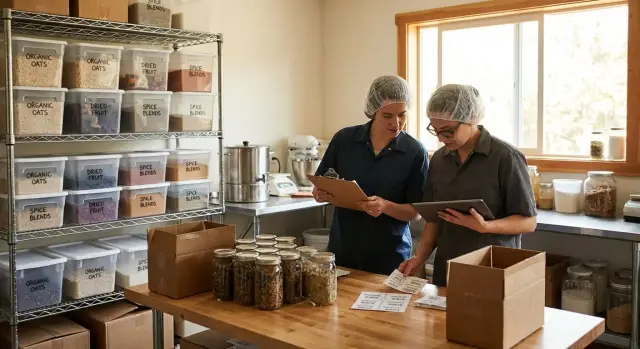
When you’re small, a spreadsheet feels fine. You can scan a few rows, filter by date, and tell yourself you’ll clean it up later. That stops working once you have multiple ingredients, multiple finished products, and production runs that reuse the same inputs.
Spreadsheets struggle with real life. One ingredient lot gets split across several batches. One batch becomes multiple SKUs or pack sizes. Returns happen. Labels get reprinted. Someone copies a row and forgets to change the lot number. By the time there’s an issue, you’re not dealing with “data entry.” You’re dealing with missing history.
Lot traceability is the ability to answer two questions quickly and confidently:
A lot and expiry traceability app makes those answers routine. Instead of hunting through notes, you record lots at the moments that matter: receiving, production, packing, and sales. Each movement leaves a trail you can follow later.
Expiry tracking solves a different problem: quiet losses. Without a clear view of what’s close to its use-by date, you either waste product (it expires on the shelf) or take a bigger risk (it gets sold when it shouldn’t). Near-expiry visibility also helps you plan production: use older ingredients first, adjust purchase orders, and avoid overbuying.
A “recall by lot number” should feel simple in practice. You enter or scan a lot number and see what it’s connected to: which finished lots it became, who received those lots, what’s still on hand (and where), and a clean list of customers and quantities for notifications and internal tracking.
For a small sauce maker, that could mean spotting that one chili powder lot was used in three batches across two SKUs, then identifying the 18 cases still in the warehouse and the six customers who received shipments last week.
If you build this in a tool like AppMaster, you can model lots, batches, and expiries in a database-first way, then add simple receiving and production forms so the right information gets captured while work is happening.
A traceability system only works if everyone records the same few facts the same way. You don’t need a huge database to start, but you do need clear terms.
A SKU is the product you sell (for example, “12 oz Strawberry Jam”). A lot is a specific group of that SKU made or received at the same time and tracked together. A batch is often used like “lot” in small plants, but it can also mean a single kettle run or production event. Pick one term (lot or batch) and use it everywhere.
At receiving, capture the minimum set of fields that lets you answer: what is it, where did it come from, and when does it expire? Great screens won’t help if receiving data is inconsistent.
Record these fields at receiving:
Expiry dates usually come from the supplier label. For items you produce, they come from an internal shelf-life rule (for example, “14 days after production date”) or a tested best-by period. When you create lots during production, store both the production date and the calculated expiry date so the rule stays visible.
As product moves, keep one simple idea in mind: every transaction should say “lot X changed by Y.” At each step (produce, store, ship, sell), capture the lot number, date/time, location (or storage area), and quantity change.
Rework and mixing lots is where teams get lost. Treat it like a recipe: if you combine Lot A and Lot B into a new run, create a new lot (Lot C) and record Lot C’s “parents” (A and B) with quantities used. That way, searching Lot A still shows where it ended up.
Tools like AppMaster can model these fields quickly with a few tables and forms, so your team can enter lots consistently from day one.
A lot and expiry traceability app works best when your process is simple and consistent. Think of it as a “lot story” that starts at the dock and ends when the product leaves your hands. If you can follow that story in one screen per step, recalls and stock decisions get much easier.
Start with receiving. Every delivery should create a lot record immediately. Capture the supplier, product, lot number, expiry/best-by date, quantity, and the date received. Then print or write a matching label and attach it to the case, tote, or bin. The goal is that the lot number is visible wherever the inventory sits.
In production, you connect ingredients to what you make. If you turn milk, cultures, and salt into cheese, your finished run becomes its own lot. That finished lot should “remember” which ingredient lots went into it. This is what lets you trace backward (what did we use?) and forward (where did it go?).
Storage is where traceability often breaks down. Keep it practical: one location name per shelf, fridge, or pallet spot, plus a simple bin ID if needed. Update counts when you move stock. You don’t need perfect real-time accuracy, but you do need a clear last known location.
Sales and shipping are the final link. Each order should record which finished lots were picked, how many units, and who received them. If you sell direct and don’t have “orders,” use a simple sales log per customer or market day.
Returns, waste, and rework need to be treated like real movements, not side notes. Returned items go back into a specific location under the same lot. Waste is logged against the lot with a reason (expired, damaged, QA hold). Rework becomes a new finished lot linked to its input lot.
Example: a small salsa producer receives tomatoes (Lot T-104), makes Salsa Mild (Lot SM-220), stores it in “Cooler A Shelf 2,” then ships 30 jars of SM-220 to a local shop. If a customer calls later, you can find SM-220, see it used T-104, and confirm exactly which orders included it.
Start small and make the everyday path the easiest path. A lot and expiry traceability app only works when receiving, production, and shipping take seconds, not minutes.
Write down what you actually handle, not what your accounting system calls it. Keep names consistent so the same item isn’t entered three different ways.
You need three simple lists:
In AppMaster, this maps cleanly to a few tables in the Data Designer. Add fields later, but start with the minimum your team will use every day.
The best lot format is the one people can create correctly under pressure. Many small producers use a date plus a short run code (for example: 2026-01-25-A). If you also need to capture the supplier lot, store it as a separate field so you don’t lose it.
Then build three simple screens that match real work:
Make quick search the default. If you have barcodes, scan. If you don’t, use a big “search lot” field and a short lot format so manual entry is reliable.
Pilot with one fast-moving product. Don’t try to perfect everything at once.
A useful test is: receive one ingredient delivery, make one batch, ship a few units, then try to trace it backward and forward.
Use this pilot checklist:
If a step feels slow, simplify the screen, reduce required fields, or add scanning. Speed is what makes traceability consistent.
Near-expiry alerts only help when they point to decisions you can make today. The goal is to catch product early enough to act, without being spammed about items that are already gone.
Start by defining a small set of “near-expiry” windows that match how you operate. Many small producers use 14 days for urgent action, 30 days for planning, and 60 days for early visibility (especially for slower-moving SKUs). Keep it consistent across products at first, then adjust for special cases like short shelf-life items.
Decide where warnings should show up. A dashboard badge is good for quick scanning. A daily list works better if one person owns inventory each morning. Email or SMS can help for the urgent window, but keep messages rare or they’ll get ignored.
The best way to avoid alert fatigue is to alert only when there’s stock on hand. If a lot is near expiry but the quantity is zero, it shouldn’t appear. That means the rule needs to check both dates and current balance.
When something is flagged, make the next step obvious. Most teams stick to a short set of actions: pick oldest first, move to promo channels, quarantine for quality checks, dispose with a recorded reason, or rework/return if the process allows it.
A practical example: you review yogurts every Monday. Lots expiring in 14 days go to “pick first” and get a sales push. Lots expiring in 7 days get quarantined for a quick quality check and then either sold immediately or disposed with a logged reason.
A simple routine keeps this clean: one person runs the near-expiry view, confirms counts, takes action, and clears any stale flags. If you build this workflow in AppMaster, keep the rules visible (windows, stock checks, actions) so the whole team follows the same playbook.
A recall gets easier when your system can answer one question in seconds: where did this lot go, and what used it? If you can see that clearly, you can act quickly and document what happened.
There are two paths to support:
In practice, you often need both. A spice lot might go into three batches, and those batches might ship to ten customers. A good system shows that chain without hunting.
When someone types or scans a lot number, the recall screen should show the facts needed to make decisions and send notices:
Small details matter here. If you ship partial cases or split lots, record quantities in the same unit you ship (cases, bags, jars) and keep conversions consistent. If you open a 20 kg bag into 1 kg packs, treat it as a repack step: consume the source lot and create new child lots. That way, the recall can follow the trail through splits instead of stopping at “bag opened.”
A recall isn’t only about tracing. It’s also about documenting what you did.
Capture actions as they happen: placing inventory on hold, stopping production, notifying customers, receiving returns, and final disposal. A short action log attached to the lot can include date, person, action, quantities affected, and a note (for example, “Customer confirmed quarantine”).
If you build this workflow in AppMaster, treat the recall view as one shared workspace: trace results at the top, actions at the bottom, and a clear status that shows whether the lot is in progress or closed.
A lot and expiry traceability app only helps during a recall if your records are easy to trust. The goal isn’t more paperwork. It’s fewer questions when something goes wrong.
Most small food teams can run traceability with a short, repeatable set of reports:
A practical rhythm is to check the near-expiry list daily and stock on hand by lot weekly. Lot history is the one you pull the moment a customer calls or a supplier notifies you of an issue.
You don’t need a complicated compliance system to be audit-friendly. You do need a basic activity log: who received a lot, who moved it, who changed a count, and when. Even a simple reason field on adjustments (damaged case, relabel, sample used, data entry fix) prevents guesswork later.
Inventory accuracy is the other half. Do quick cycle counts focused on risk: high-value items, fast movers, or lots near expiry. If you have multiple storage spots, count by location and by lot so you catch mix-ups like “same product, different lot” on the wrong shelf.
Labeling is what makes the data usable on the floor. Aim for labels that a tired person can read at arm’s length. At minimum, include lot number and expiry date in large text, product name or SKU (to avoid lookalikes), and unit size (case, pouch, jar) if you store mixed units. If you use multiple storage areas, add a simple location code.
If you build this in AppMaster, keep the screens simple: one receiving form, one move form, one adjust form, and these few reports. The easier it is to do the right thing, the more reliable your traceability becomes.
A small salsa producer brings in two ingredient deliveries on the same morning. One is diced tomatoes, Lot T-041, expiring May 30. The other is jalapenos, Lot J-112, expiring June 20. At receiving, they record the supplier, lot number, expiry date, quantity, and where each pallet is stored.
After lunch, they make a finished batch of salsa, Finished Lot S-2304, with 120 jars. In the production record, they connect S-2304 to both ingredient lots (T-041 and J-112) and note the run date and line/operator. This is the step many small teams skip, but it’s what keeps the chain intact.
Later that day, a retailer order ships: 24 jars from Finished Lot S-2304. The shipping note captures the customer, date, and the finished lot shipped.
At 3:00 pm, an email arrives from the tomato supplier: Ingredient Lot T-041 may be contaminated and should be held. Because the producer has a lot and expiry traceability app, they search for T-041 and immediately see every finished lot that used it. The result shows that only Finished Lot S-2304 is affected.
They create a simple action list:
Within an hour, the team quarantines the remaining jars, notifies the retailer that received S-2304, and documents what happened. The key is that the app doesn’t just store lot numbers. It connects receiving, production, inventory, and sales so one search answers: “Where did this lot go, and what do we still have?”
Recalls get messy when you’re trying to answer a basic question (where did this lot go?) with partial, shaky data. A lot and expiry traceability app only helps if data is captured at the exact moments inventory changes hands.
The most expensive mistake is skipping lot capture at receiving and telling yourself you’ll add it later. Later usually means after product has moved, been repacked, or sold, so you end up guessing from invoices and memory.
Another common trap is mixing lots in storage without tracking the split. It happens when you top up a bin, combine partial cases, or rework product into a new SKU. If you can’t say which outgoing units came from which incoming lot, the recall scope grows fast.
Small inconsistencies add up, too. If lot IDs are typed freehand, duplicates and typos creep in, and people quietly change the format over time. That breaks search and makes reports unreliable.
Expiry data is often the silent failure. Missing dates, wrong date formats, or confusing “best before” with “use by” creates false confidence. Then alerts either never fire or fire so often that people ignore them.
The patterns that most often turn a 20-minute check into an all-day scramble are consistent:
A quick real example: a producer discovers a supplier notice on Lot A17. If A17 was entered as “A-17” on one delivery, mixed into a shared freezer bin, and later used in two batches without recording the split, you end up recalling everything made that week.
If you build this in a no-code tool like AppMaster, keep the rules strict but simple: require lot and expiry on receiving, enforce a consistent lot format, and assign one person to close the loop on alerts and recall actions.
If your process works, you should be able to answer basic traceability questions quickly, even on a busy day. These quick checks are a good stress test before you rely on the system.
Run these with a real lot number and time yourself:
If any answer is “not reliably,” don’t add more features yet. Fix the basics: consistent lot capture at receiving, clear labels, and one place to record adjustments.
Start small so you can learn fast without slowing production:
If you want a tailored tool instead of forcing spreadsheets to behave like software, AppMaster (appmaster.io) is one option for building a no-code traceability app with the data models you need (products, lots, locations, orders) and simple web/mobile screens your team can use on the floor.
 Why do I need a lot traceability app if spreadsheets “work” right now?
A traceability app keeps a connected history of lots across receiving, production, storage, and sales. Instead of hunting through spreadsheets, you can search a lot number and see what it became, where it went, and what’s still on hand.
What’s the minimum data I should record at receiving?At minimum, capture supplier name, supplier lot (if provided), receive date, your internal lot ID, expiry or best-by date, quantity with unit, and the first storage location. If those fields are consistent, forward and backward tracing becomes much easier.
What’s the difference between a lot and a batch, and does it matter?Pick one term for daily use and stick to it. Many small teams treat a "lot" as the trackable unit you search during a recall, while "batch" can describe the production event; what matters is that everyone records movements using the same label and rules.
How should I choose a lot number format my team will follow?Use a short format people can create correctly under pressure, often a date plus a run letter or number. Keep supplier lot as a separate field so you don’t lose it, and avoid formats that invite typos or change depending on who is working.
How do I handle mixing, rework, or combining two lots in production?Create a new finished lot and record the input lots as its “parents,” including the quantities used. This preserves the chain so an ingredient lot search still shows every finished lot and shipment it touched.
What should we do when we split one lot into smaller packs or multiple SKUs?Treat repacking as a real conversion step: consume quantity from the source lot and create one or more new child lots for the packs you made. That way, a recall can trace through splits instead of stopping at “bag opened.”
How detailed does location tracking need to be?Keep locations simple and practical, like a cooler name plus shelf or bin, and record the last known location whenever stock moves. You don’t need perfect real-time counts, but you do need enough accuracy that someone can find the lot without guessing.
How do I set near-expiry alerts without getting spammed?Start with a small set of windows you can act on, such as 14 days for urgent action and 30 days for planning. Only flag lots that still have stock on hand, otherwise alerts turn into noise and people stop trusting them.
What should a “recall by lot number” screen include?A good recall view shows where the lot went (customers, dates, quantities), what it touched (related batches, repacks, finished lots), what you still have (on hand by location), and who changed what and when. It should also let you log actions like holds, notifications, returns, and disposal so the record is complete.
Can I build this workflow in AppMaster without overcomplicating it?Build a small pilot that matches real work: a receiving form, a production link between ingredient lots and finished lots, and a shipping or sales log that records which finished lot was sent. With AppMaster, you can model the tables first and then add simple web/mobile screens so lot capture happens while work is happening, not later.
Experiment with AppMaster with free plan.
When you will be ready you can choose the proper subscription.
 Jul 14, 20268 min
 Jul 13, 20268 min
 Jul 08, 20268 min