


 Jul 14, 2026
 8 min
8 minEquipment reservation app: prevent conflicts and track returns
Plan an equipment reservation app that prevents double bookings, records returns and damage, and places faulty items on maintenance hold.

Learn how to keep exported source code in sync with a regenerating platform using clear ownership, safe extension points, reviews, and quick checks.
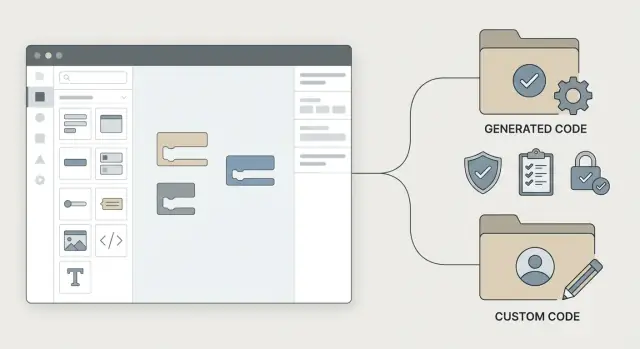
When a platform regenerates your app, it can rewrite large parts of the codebase. That keeps the code clean, but it also means any manual edits inside generated files can disappear the next time you click regenerate or publish a new build.
The real goal isn't "never export code." It's keeping the visual model as the source of truth so changes stay consistent and repeatable. In AppMaster, that model includes your data schema, business processes, API endpoints, and UI screens. When the model stays correct, regeneration becomes a safe, routine action instead of a stressful event.
"Exported source code" usually means taking the generated Go backend, Vue3 web app, and Kotlin/SwiftUI mobile apps and putting them under your control. Teams export for practical reasons: security reviews, self-hosting, custom infrastructure rules, special integrations, or long-term maintenance outside the platform.
The trouble starts when the exported repo begins living its own life. Someone fixes a bug directly in generated files, adds a feature "quickly" in code, or tweaks the database layer by hand. Later, the model changes (a field rename, a new endpoint, a modified business process), the app is regenerated, and now you have drift, painful merges, or lost work.
Governance is mostly process, not tooling. It answers a few basic questions:
When those rules are clear, regeneration stops being a risk. It becomes a dependable way to ship updates while protecting the small set of hand-written parts that truly need to exist.
To keep exported source code in sync with a regenerating platform, you need one clear default: where do changes live?
For platforms like AppMaster, the safest default is simple: the visual model is the source of truth. The things that define what the product does day to day should live in the model, not in the exported repository. That usually includes your data model, business logic, API endpoints, and the main UI flows.
Exported code is still useful, but treat it like a build artifact plus a small, explicitly allowed zone for work the model can't express well.
A policy most teams can follow looks like this:
Keep the allowed zone small on purpose. The bigger it gets, the more likely regeneration will overwrite changes or create hidden drift.
Also decide who can approve exceptions. For example, only a tech lead can approve code changes that affect authentication, data validation, or core workflows. Add a simple rule for when exceptions expire, like "review after the next regeneration cycle," so temporary fixes don't quietly become permanent forks.
Exporting source code can be the right move, but only if you're clear on why you're doing it and what you expect to change afterward. With a regenerating platform like AppMaster, the safest default is to treat the visual model as the source of truth and the export as something you can inspect, test, and deploy.
Exporting usually makes sense when teams need stronger auditability (being able to show what runs in production), self-hosting (your own cloud or on-prem rules), or special integrations that aren't covered by built-in modules. It can also help when your security team requires code scanning, or when you want a vendor-independent exit plan.
The key question is whether you need code access or code edits.
Read-only export is easier because you can regenerate often without worrying about overwriting hand edits.
Editable export is where teams get into trouble. Long-lived manual changes are a governance decision, not a developer preference. If you can't answer "where does this change live in a year?", you'll end up with drift: the model says one thing, production code says another.
A rule that holds up well: if the change is business logic, data shape, UI flow, or API behavior, keep it in the model. If it's a true platform gap, allow code edits only with explicit ownership, a written extension pattern, and a clear plan for how regeneration will be handled.
Never treat generated files as a place to "just add one small change." Regeneration will win sooner or later.
Start by drawing a hard line between what is owned by the visual model and what is owned by your team. With AppMaster, the model can regenerate backend (Go), web (Vue3), and mobile (Kotlin/SwiftUI) code, so assume anything in the generated area can be replaced at any time.
Make the boundary obvious in your repo and in your habits. People do the wrong thing when the right thing is inconvenient.
A few guardrails that work in practice:
That last point matters. A clear "DO NOT EDIT: regenerated from model" message prevents well-meaning fixes that turn into future breakage.
When you need custom behavior, wrap the generated code instead of changing it. Think "adapter layer" or "thin facade" sitting between your app and the generated parts.
For example, if you export an AppMaster backend and need a custom integration to a third-party inventory system, don't edit the generated endpoint handler. Instead:
Keep the generated endpoint as-is.
Add a custom service (in your custom area) that calls the inventory API.
Have the generated logic call your service through a stable interface you own, such as a small package with an interface like InventoryClient.
Regeneration can replace the endpoint implementation, but your integration code stays intact. Only the interface boundary needs to remain stable.
Before writing custom code, check if you can attach behavior through stable hooks like APIs, webhooks, or platform modules. For example, AppMaster includes pre-built modules for Stripe payments and Telegram or email/SMS messaging. Using stable integration points reduces how often regeneration can surprise you.
Document the "do not edit" zones in one short page and enforce them with automation. Rules that live only in people's heads don't survive deadlines.
A repo that survives regeneration makes one thing obvious at a glance: what is generated, what is owned by humans, and what is configuration. If someone can't tell in 10 seconds, overwrites and "mystery fixes" happen.
When you export from a regenerating platform like AppMaster, treat the export as a repeatable build artifact, not a one-time handoff.
A practical structure separates code by ownership and lifecycle:
generated/ (or appmaster_generated/): everything that can be regenerated. No manual edits.custom/: all hand-written extensions, adapters, and glue code.config/: environment templates, deployment settings, secret placeholders (not real secrets).scripts/: automation like "regen + patch + test".docs/: a short rules page for the repo.Naming conventions help when people are in a hurry. Use a consistent prefix for custom pieces (for example, custom_ or ext_) and mirror the generated layout only where it genuinely helps. If you feel tempted to touch a generated file "just this once," stop and move that change into custom/ or into an agreed extension point.
Branching should reflect the same separation. Many teams keep two kinds of work visible: model-driven changes (visual model updates that will regenerate code) and custom-code changes (extensions and integrations). Even in a single repository, requiring PR labels or branch naming like model/* and custom/* makes reviews clearer.
For releases, make "fresh regeneration" non-negotiable. The release candidate should start by regenerating into generated/, reapplying any scripted patches, then running tests. If it can't be rebuilt from scratch, the repo is already drifting.
Treat every export like a small release: regenerate, verify, reapply only what is safe, then lock it in with a clear record. This keeps the visual model as the source of truth while still allowing carefully controlled custom work.
A workflow that holds up well:
If something breaks after regeneration, fix it in the model first whenever possible. Choose custom code only when the model can't express the requirement, and keep that code isolated so the next regen doesn't erase it.
If your platform can regenerate code (like AppMaster), governance is what prevents lost work. Without clear ownership and a simple approval path, teams edit whatever is closest, and regeneration turns into a recurring surprise.
Name a few owners. You don't need a committee, but you do need clarity.
Make reviews non-negotiable for risky areas. Any custom code that touches integrations (payments, messaging, external APIs) or security (auth, roles, secrets, data access) should require review by the custom code maintainer plus one additional reviewer. This is less about style and more about preventing drift that's painful to unwind.
For change control, use a small change request anyone can fill in. Keep it quick enough that people actually use it.
Set a rule for urgent fixes. If a hotfix must be applied directly to exported code, schedule the work to recreate the same change in the visual model (or redesign the extension point) within a fixed window, such as 1 to 3 business days. That one rule often determines whether an exception stays temporary or becomes permanent drift.
Most overwrite problems start as a reasonable shortcut: "I'll just change this one file." With a regenerating platform like AppMaster, that shortcut usually turns into rework because the next export regenerates the same files.
The most common cause is editing generated code because it feels faster in the moment. It works until the next regeneration, when the patch disappears or conflicts with new output.
Another frequent issue is multiple people adding custom code without a clear boundary. If one team adds a "temporary" helper inside generated folders and another adds a different helper in the same area, you can no longer regenerate reliably or review changes cleanly.
Drift also happens when releases skip regeneration because it feels risky. Then the visual model changes, but production runs code from an old export. After a few cycles, nobody is sure what the app really does.
A quieter mistake is failing to record which model version produced which export. Without a simple tag or release note, you can't answer basic questions like "Is this API behavior coming from the model or a custom patch?"
A developer notices a missing validation rule and edits a generated Go handler directly to block empty values. It passes tests and ships. Two weeks later, the team updates an AppMaster Business Process and exports again. The handler is regenerated, the validation is gone, and the bug returns.
Early warning signs to watch for:
Treat every regeneration like a small release. You're not only checking that the app still runs. You're checking that the visual model (for example, your AppMaster Data Designer and Business Process Editor) still matches what your repo deploys.
Start with a minimal test suite that mirrors real user behavior. Keep it small so it runs on every change, but make sure it covers the flows that make money or cause support tickets. For an internal ops tool, that might be: sign in, create a record, approve it, and see it in a report.
A few focused checks that are easy to repeat:
Contract checks catch "looks fine in UI" problems. Example: a regenerated endpoint still exists, but a field type changed from integer to string, breaking a downstream billing call.
For diff review, keep a simple rule: if a file is in a generated directory, you don't hand-edit it. Reviewers should ignore noisy churn and focus on what you own (custom modules, adapters, integration wrappers).
Write down a rollback plan before you need it. If regeneration introduces a breaking change, you should know who can approve the rollback, where the last stable artifact is, and which model version produced it.
Say your team builds a customer portal in AppMaster but needs a custom messaging integration that isn't covered by built-in modules (for example, a niche SMS provider). You export the source code to add the provider SDK and handle a few edge cases.
The rule that prevents pain later is simple: keep the visual model as the source of truth for data, API endpoints, and the core flow. Put the custom provider code in an adapter layer that the generated code calls, but does not own.
A clean split looks like this:
SendMessage(to, text, metadata) that the business process triggersWeek to week, regeneration becomes boring, which is the goal. On Monday, a product change adds a new message type and a field in PostgreSQL. You update the AppMaster model and regenerate. The generated backend code changes, but the adapter layer does not. If the interface needs a new parameter, you change it once, then update the single call site at the agreed boundary.
Reviews and tests help you avoid relying on tribal knowledge. A good minimum is:
Write a short integration card for the next person: what the adapter does, where it lives, how to rotate credentials, how to run tests, and what to change when the visual model adds new fields.
Start small and write it down. A one-page policy is enough if it answers two questions: what is allowed to change in the repo, and what must change in the visual model. Add a simple boundary diagram (even a screenshot) showing which folders are generated and which are yours.
Then pilot the workflow on one real feature. Pick something valuable but contained, like adding a webhook, a small admin screen, or a new approval step.
A practical rollout plan:
Tool choice note: if you use AppMaster, treat the visual model as the default place for data, APIs, and business logic. Use exported code for deployment needs (your cloud, your policies) or carefully controlled extensions that live in clearly separated areas.
If you're building with AppMaster on appmaster.io, a good habit is to practice on a small no-code project first: create the core application logic in the visual editors, export, regenerate, and prove your boundaries hold before you scale to bigger systems.
 What should be the source of truth after exporting AppMaster code?
Treat the visual model as the source of truth. Keep data structures, business processes, API behavior, and main UI flows in AppMaster so regeneration produces the intended app every time.
Can developers edit generated source files directly?Avoid editing generated files. A new export can replace them, so move custom behavior into a separate module, wrapper, or adapter that has a stable interface.
When is a read-only code export enough?Use a read-only export when you need audits, security scans, self-hosting, or a recovery copy. It lets you regenerate often without preserving hand-written changes.
When should a team allow editable exported code?Keep custom code only for needs the visual model cannot express, such as a special provider SDK or a strict runtime requirement. Assign an owner, document the reason, and plan how regeneration will preserve the extension.
How should we organize the exported repository?Separate the repository by ownership: put regenerated output in generated/, hand-written extensions in custom/, deployment templates in config/, and regeneration checks in scripts/. Make generated folders off-limits for manual changes.
How do wrappers protect custom integrations during regeneration?Wrap the generated app instead of changing its internals. For example, put a third-party inventory or messaging client in custom code and expose a small interface that the generated logic can call.
What should happen during each regeneration release?Regenerate from the current model, build from a clean state, run smoke tests, test API contracts, and tag the release with the model version and deployed commit. This proves the export can be rebuilt without hidden patches.
Who should approve changes to the model and custom code?Give the visual model, custom extensions, and releases clear owners. Require review for changes involving authentication, data access, payments, secrets, or external integrations.
What if an urgent production fix requires a direct code edit?Treat it as a short-term emergency exception. Record the patch, then recreate it in the visual model or move it into a supported extension boundary within a fixed window, such as one to three business days.
What are the early signs of source-code drift?Watch for custom commits inside generated folders, skipped regenerations, releases without a model version, and fixes that exist only in code. These signs mean the model and deployed app are starting to diverge.
Experiment with AppMaster with free plan.
When you will be ready you can choose the proper subscription.
 Jul 14, 20268 min
 Jul 13, 20268 min
 Jul 08, 20268 min