


 Jul 14, 2026
 8 min
8 minEquipment reservation app: prevent conflicts and track returns
Plan an equipment reservation app that prevents double bookings, records returns and damage, and places faulty items on maintenance hold.

Set up an equipment maintenance request and repair log with photos, location, status updates, and cost tracking so teams can report issues fast and learn over time.
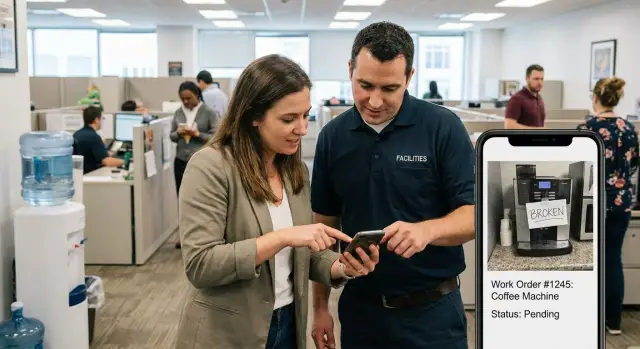
Most maintenance systems start as “just email me” or a paper log near the break room. That works until the first busy week, when three people report the same issue in different ways and nobody knows what’s already been handled.
Email and paper break down for the same reasons: details get lost, ownership is unclear, and the history is hard to search later. A subject line like “Door stuck again” doesn’t tell a technician which door, what “stuck” means, or whether it’s a safety issue.
The pattern is usually the same: requests miss basic info (exact location, asset, urgency, who to contact), updates get scattered across threads, nobody is clearly assigned, photos end up buried in a phone, and costs or parts never get tied back to the original problem.
Photos and precise location cut through the back-and-forth faster than anything else. A clear picture of a leaking valve plus “Building B, 2nd floor, mechanical room, by the west panel” helps a technician show up with the right tools and parts. Without that, triage becomes guesswork and you get repeat visits.
The goal of an equipment maintenance request and repair log is straightforward: make reporting quick for the person who notices the issue, make status obvious for everyone watching it, and keep a searchable history that includes what it cost and how long it took.
Everyone benefits, just in different ways. Requesters want to know it was received and when it’ll be fixed. Technicians want clearer tickets and fewer interruptions. Operations wants fewer repeat failures and better planning. Finance wants cost visibility over time, especially when it’s time to decide repair vs replace.
An equipment maintenance request and repair log only works if people can fill it out in under a minute, and technicians can act on it without a phone call. The goal isn’t “more data.” It’s the handful of fields that prevent follow-up questions.
Start by defining the core records you’ll store. Keep it simple, but don’t skip the basics: equipment (the asset), locations (where it is), requests (the reported problem), and work orders (the repair job). Add parts and vendors only if you truly need them for purchasing, warranty, or recurring supplier work.
A practical minimum looks like this:
Next, decide what counts as an issue versus planned maintenance. A simple rule works well: issues are unplanned and triggered by a report (“it’s leaking”), while planned maintenance is scheduled (“monthly filter change”). Keep them separate so routine work doesn’t get mixed into the same backlog as emergencies.
Use a small status set that matches how work actually moves:
Define what “Done” means so people trust it. For example: the fix was tested, a closing note explains what was done, an after photo is attached when relevant, and critical equipment gets a sign-off (requester or supervisor). That small definition prevents the “closed but not fixed” frustration.
Most teams don’t struggle because they don’t care. They struggle because nobody is clearly responsible for the next step. A good equipment maintenance request and repair log makes ownership obvious at every status.
Keep roles familiar and keep handoffs simple:
Permissions are where many setups get stuck. If requesters can’t submit because a field is missing, or techs can’t close because finance hasn’t posted an invoice, tickets will linger. Aim for low-friction rules: requesters can create and comment (but not reassign), technicians can update status and work details (but not change priority), and finance/admin handles approvals while still allowing technicians to enter estimated parts.
Most bad maintenance tickets fail in the same way: nobody can tell where the issue is, or which asset it belongs to. Photos and location remove the guesswork, which is exactly what you want in an equipment maintenance request and repair log.
Start with a consistent naming scheme. Pick one format for sites, buildings, floors, rooms, and asset tags, then use it everywhere (labels on equipment, floor plans, and the request form). If people call the same place “Warehouse 2,” “WH2,” and “Back storage,” your data won’t match and trends will be hard to see.
Make location selection faster than typing. A good form lets someone choose Site, then Building, then Room, with search for common spots. On mobile, GPS can help for outdoor assets (generators, loading docks), but don’t rely on GPS inside buildings.
To help a technician find the problem on the first try, capture:
For hard-to-find equipment, add reusable “location photos” that show the route: hallway sign, door, then the asset.
Plan for poor reception. Basements and mechanical rooms often drop signal, so let people save notes and photos and submit when they reconnect.
Finally, decide what happens when equipment moves. You usually need both current location for day-to-day work and a trail of changes (date, from/to, who changed it). If a request was tied to an older location, keep that snapshot so the history still makes sense.
A request-to-repair workflow works best when it feels the same every time. People should know what to enter, what happens next, and how to check progress later in your equipment maintenance request and repair log.
Keep intake short, but specific. Ask for the equipment (or asset tag), exact location, issue type, urgency, a plain description, and photos. If you can, offer a small set of issue types (leak, noise, power, safety, other). That keeps triage fast and reporting consistent.
Right after submission, show a confirmation with a tracking number and the current status (like “New”). Even if the reporter does nothing else, they’ll know it was received and can reference it later.
Triage is where requests stop turning into chaos. A few simple checks go a long way:
Then assign the request to a person (or a queue) and set expectations. Store an expected response time and a next update time. Example: “Assigned to Facilities, response within 2 hours, next update by 3:00 PM.” Those two timestamps prevent tickets from going silent.
When the work is done, close-out should capture what you’ll need later: a short work summary, parts used, labor time, total cost, and an after photo when it helps.
Example: a forklift battery charger fails in Bay 3. The reporter adds a photo of the error code and selects “Power.” Triage flags it as urgent because charging affects operations. It gets assigned with a same-day response time. The tech closes it with the replaced fuse part number, 0.5 hours labor, total cost, and an after photo showing the charger running.
People stop trusting a maintenance log when updates are vague, rare, or noisy. The goal isn’t more messages. It’s clearer messages that answer the same three questions every time: what’s happening now, what’s needed, and when the next update will happen.
A simple status note template keeps everyone aligned. For example: “Diagnosed. Belt is worn. Ordering part today. Next update by Wed 3pm.” That one sentence reduces follow-up calls and makes your equipment maintenance request and repair log feel reliable.
Notifications matter as much as the status text. If everyone gets every change, people mute alerts and miss what matters. A practical rule is:
Even with good forms, some requests will arrive missing details. Build a quick question flow so the assignee can ask for what they need without a long back-and-forth. Keep it to one question at a time and make it easy to answer on a phone: “Can you add one photo of the label?” “Which room is it in?” “Do you know the model number?”
Stalled jobs need automatic pressure, not awkward chasing. Set an escalation rule like “if no update in 2 business days, remind the assignee; after 4 days, notify the manager.” Pair that with a required delay reason so the silence has an explanation. Common reasons include waiting on parts, vendor scheduling, access issues (site closed, escort needed), and safety approval.
A maintenance log is only useful if it helps you make better calls next month. The aim is to know what each asset has cost you, why it keeps failing, and when it’s time to replace it.
Separate money and time into clear buckets. When labor and parts are mixed together, it’s hard to compare jobs or spot where costs are creeping up. Also capture estimated vs actual labor. That one comparison quickly shows where planning is off or where surprises keep happening.
You don’t need accounting-level detail, but you do need consistency. Add a few structured fields:
Vendor and invoice references sound boring, but they save time when someone asks, “Which vendor charged for this?” or when finance needs to match a charge to a repair.
Cause tags are where the learning happens. If “installation” or “misuse” shows up often, the right fix might be training or a better checklist, not another repair.
Give every asset a simple timeline: total labor hours (or cost), total parts cost, and downtime. After a few months, patterns appear. If a conveyor motor is repaired three times in six months and downtime keeps landing during peak hours, the repair vs replace decision becomes clearer.
To keep it practical, agree on a short monthly review that focuses on the numbers that matter:
Most teams don’t fail because they lack tools. They fail because the log becomes messy and people stop trusting it. The same issue should be reported the same way every time, and every request should end with a clear close.
The traps that create most of the chaos are familiar: too many status options, free-text locations that create duplicates, treating photos as optional when they’re the fastest proof, using “In progress” to mean everything, and closing tickets without recording what was done and why.
Two quick fixes prevent a lot of pain: reduce choice and standardize location. Keep statuses to a small set people can remember, and make locations a pick list tied to how your site is laid out (building, floor, room, asset tag). If someone can’t find a location, let them request a new one, but don’t let every report invent a new spelling.
Be strict about photos only where it helps. If the issue type is “water leak” or “safety hazard,” require at least one photo before submission.
Also watch out for “In progress.” Either split it (Assigned, Repairing, Waiting on parts) or require a blocker note when a ticket sits too long. “Waiting on glass delivery” sets expectations in a way “In progress” never will.
Finally, make “Close” ask two small questions: what was done, and why it happened (even if the answer is “unknown”). Those two fields are what make history and reporting useful.
Before you announce the new process, run a hallway test with two or three real people. Hand them a phone, point at a piece of equipment, and watch what happens. If they hesitate, you have a UX problem, not a training problem.
Use this checklist to catch the issues that break adoption:
Example: a forklift battery issue reported with a photo but no location wastes time. Location without an owner means it sits. Location plus owner without close-out notes means the same problem returns next month and nobody learns.
A retail store notices the walk-in refrigeration unit is louder than usual, and the temperature display keeps climbing. They don’t know if it’s a quick fix or the start of a failure, so they file a request right away.
The shift lead opens the equipment maintenance request and repair log on their phone and submits a new ticket. They add one clear photo of the unit’s control panel and one photo of the condenser area. They select the site as “Store 12” and the location as “Back room, near receiving door,” then type: “Loud grinding noise, temp went from 2C to 7C in 30 minutes.” They set urgency to High and check “Potential food safety risk.”
The store manager reviews the photos and triages it in under a minute. Because of the risk, they change priority to Critical, add a short note (“Move perishables to backup cooler now”), and assign it to the on-call technician with a due time of today.
The technician arrives, adds a quick diagnosis, and updates status to Waiting on parts. They note: “Evaporator fan motor failing. Temporary reset works for 10 minutes.” They list the needed part number, estimated labor (1.5 hours), and a simple plan (“Return tomorrow morning after delivery”).
When the part arrives, the technician completes the repair and closes the ticket. They upload an after photo showing the new motor installed, record time on site and travel time, add parts cost and extra materials (wire connectors, screws), and confirm the temperature is stable.
A week later, anyone can see the full history in one place: who reported it, what was done, total cost, and how long the unit was at risk. That’s the difference between “we fixed it” and a log you can learn from.
Start small on purpose. Pick one site, one team, and run it for one month with real tickets. A pilot shows what people actually enter when they’re in a hurry, not what you hoped they’d enter.
During the pilot, treat your equipment maintenance request and repair log like a product. Watch where people get stuck (missing photos, unclear locations, status not updated) and remove that friction fast.
A simple app is usually enough: one form to report an issue, a clear status flow, and the right people notified at the right time. Keep the first version boring and reliable.
A practical pilot setup:
Before you build anything, pick the first report you want to trust, like cost by asset, repeat issues by category, or average time to close. Then confirm your form actually captures what that report needs (asset ID, category, labor time, parts cost, downtime).
If you want to build the workflow without coding, a no-code platform like AppMaster (appmaster.io) can be a practical fit for turning the same process into a web and mobile app with forms, role-based access, and status-driven steps.
Set a review cadence while the pilot runs. A 20-minute weekly review is enough to decide which fields to remove, which rules to add (like auto-assign by location), and which statuses people misunderstand. After four weeks, you’ll know what to lock in for a wider rollout.
 Why do maintenance requests fall apart when we use email or a paper log?
Email and paper don’t enforce the basics: clear location, asset, urgency, owner, and a single place for updates. A simple log gives you one ticket per issue, one assignee, a visible status, and a searchable history so the same problem doesn’t get “rediscovered” every week.
What’s the minimum information a maintenance request should include?Keep it to what prevents follow-up questions: the asset (or tag), exact location, issue category, short description, urgency, and at least one photo when it helps. If people can’t submit in under a minute, they’ll skip the system or write vague tickets.
How do we separate “issues” from planned maintenance without making it complicated?Use issues for unplanned problems reported by someone, like leaks, failures, or safety hazards. Use planned maintenance for scheduled work like monthly checks, so routine tasks don’t bury urgent repairs in the same backlog.
What statuses should we use so people actually understand what’s happening?Start with a small set that matches real work, like New, Triaged, In progress, Waiting on parts, and Done. The key is defining what “Done” means, such as tested fix, a closing note, and an after photo for important equipment, so people trust closures.
Who should own a request so it doesn’t sit unassigned?Assign ownership right after triage, and make it a named person or a clearly managed queue. “Maintenance” as an owner usually means nobody feels responsible, so tickets sit until someone complains.
How do we stop location from becoming messy and inconsistent?Make location selection faster than typing by using a consistent structure like site, building, and room, plus an optional “how to find it” note. If you let everyone free-type locations, you’ll get duplicates and reports that can’t be grouped or searched reliably.
What photos should we require to make tickets actionable?Ask for one context photo and one close-up photo, and capture the asset tag if possible. A clear picture plus a precise location usually cuts the back-and-forth more than any extra description.
How do we handle notifications without spamming everyone?Send fewer, clearer updates that answer what’s happening now, what’s needed, and when the next update will be. If everyone gets every change, people mute notifications and miss the important ones, so limit alerts to major status changes for requesters and escalations for managers.
What cost details are worth tracking without turning this into accounting?Track labor time and parts cost separately, and store a simple vendor and invoice reference when outside work is involved. Add a basic cause tag like wear, misuse, installation, or unknown so you can spot patterns and decide repair versus replace with real evidence.
How can we pilot this process and turn it into a simple app quickly?Pick one site and a limited set of assets, then run real tickets for a month and remove friction fast. If you want to turn the workflow into a web and mobile app without coding, AppMaster can help you build forms, role-based access, and status-driven steps while still producing production-ready applications.
Experiment with AppMaster with free plan.
When you will be ready you can choose the proper subscription.
 Jul 14, 20268 min
 Jul 13, 20268 min
 Jul 08, 20268 min