


 Jul 14, 2026
 8 min
8 minEquipment reservation app: prevent conflicts and track returns
Plan an equipment reservation app that prevents double bookings, records returns and damage, and places faulty items on maintenance hold.

Learn to debug webhook integrations by standardizing signatures, handling retries safely, enabling replay, and keeping event logs that are easy to search.
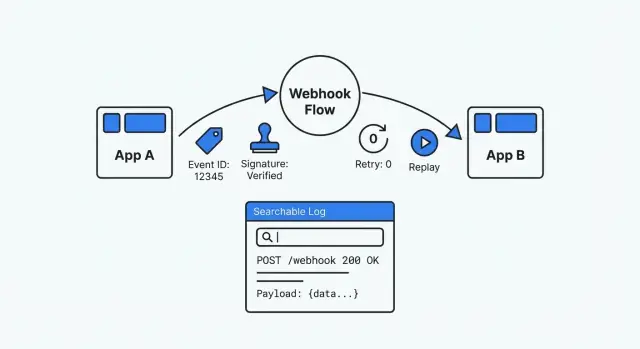
A webhook is just one app calling your app when something happens. A payment provider tells you “payment succeeded”, a form tool says “new submission”, or a CRM reports “deal updated”. It feels simple until something breaks and you realize there’s no screen to open, no obvious history, and no safe way to replay what happened.
That’s why webhook issues are so frustrating. The request arrives (or doesn’t). Your system processes it (or fails). The first signal is often a vague ticket like “customers can’t check out” or “the status didn’t update”. If the provider retries, you might get duplicates. If they change a payload field, your parser can break for only some accounts.
Common symptoms:
A debuggable webhook setup is the opposite of guesswork. It’s traceable (you can find every delivery and what you did with it), repeatable (you can safely replay a past event), and verifiable (you can prove authenticity and processing results). When someone asks “what happened to this event?”, you should be able to answer with evidence in minutes.
If you build apps on a platform like AppMaster, this mindset matters even more. Visual logic is quick to change, but you still need a clear event history and safe replay so external systems never become a black box.
When you’re debugging under pressure, you need the same basics every time: a record you can trust, search, and replay. Without that, every webhook becomes a one-off mystery.
Decide what a single webhook “event” means in your system. Treat it like a receipt: one incoming request equals one stored event, even if processing happens later.
At minimum, store:
received_at separate from timestamps inside the payload.Example: a payments provider sends “payment_succeeded” but your customer still shows unpaid. If your event log includes the raw request, you can confirm the signature and see the exact amount and currency. If it also includes invoice_id, support can find the event from the invoice, see it’s stuck in “failed”, and hand engineering a clear error reason.
In AppMaster, one practical approach is a “WebhookEvent” table in the Data Designer, with a Business Process updating status as each step completes. The tool isn’t the point. The consistent record is.
If every provider sends a different payload shape, your logs will always feel messy. A stable event “envelope” makes debugging faster because you can scan for the same fields every time, even when the data changes.
A useful envelope typically includes:
id (unique event id)type (clear event name like invoice.paid)created_at (when the event happened, not when you received it)data (the business payload)version (like v1)Here’s a simple example you can log and store as-is:
{
  "id": "evt_01H...",
  "type": "payment.failed",
  "created_at": "2026-01-25T10:12:30Z",
  "version": "v1",
  "correlation": {"order_id": "A-10492", "customer_id": "C-883"},
  "data": {"amount": 4990, "currency": "USD", "reason": "insufficient_funds"}
}
Pick one naming style (snake_case or camelCase) and stick to it. Be strict about types too: don’t make amount a string sometimes and a number other times.
Versioning is your safety net. When you need to change fields, publish v2 while keeping v1 working for a while. It prevents support incidents and makes upgrades much easier to debug.
Signatures keep your webhook endpoint from becoming an open door. Without verification, anyone who learns your URL can send fake events, and attackers can try to tamper with real requests.
The most common pattern is an HMAC signature with a shared secret. The sender signs the raw request body (best) or a canonical string. You recompute the HMAC and compare. Many providers include a timestamp in what they sign so captured requests can’t be replayed later.
A verification routine should be boring and consistent:
Make it testable. Put verification in one small function and write tests with known-good and known-bad samples. A common time sink is signing parsed JSON instead of raw bytes.
Plan for secret rotation from day one. Support two active secrets during transitions: try the newest first, then fall back to the previous secret.
When verification fails, log enough to debug without leaking secrets: provider name, timestamp (and whether it was too old), signature version, request/correlation ID, and a short hash of the raw body (not the body itself).
Retries are normal. Providers retry on timeouts, network hiccups, or 5xx responses. Even if your system did the work, the provider may not have received your response in time, so the same event can show up again.
Decide up front what responses mean “retry” vs “stop”. Many teams use rules like:
Idempotency means you can safely handle the same event more than once without repeating side effects (charging twice, creating duplicate orders, sending two emails). Treat webhooks as at-least-once delivery.
A practical pattern is to store each incoming event’s unique ID with the outcome of processing. On repeat delivery:
For internal retries, use exponential backoff and cap attempts. After the cap, move the event to a “needs review” state with the last error. In AppMaster, this maps cleanly to a small table for event IDs and statuses, plus a Business Process that schedules retries and routes repeated failures.
Retries are automatic. Replay is intentional.
A replay tool turns “we think it sent” into a repeatable test with the exact same payload. It’s also only safe when two things are true: idempotency and an audit trail. Idempotency prevents double charging, double shipping, or double emailing. The audit trail shows what was replayed, by whom, and what happened.
Single-event replay is the common support case: one customer, one failed event, re-deliver it after a fix. Time-range replay is for incidents: a provider outage in a specific window and you need to re-send everything that failed.
Keep selection simple: filter by event type, time range, and status (failed, timed out, or delivered but unacknowledged), then replay one event or a batch.
Replay should be powerful, but not dangerous. A few guardrails help:
After replay, show results next to the original event: success, still failing (with the latest error), or ignored (duplicate detected via idempotency).
When a webhook breaks during an incident, you need answers in minutes. A good log tells a clear story: what arrived, what you did with it, and where it stopped.
Store the raw request exactly as received: timestamp, path, method, headers, and raw body. That raw payload is your ground truth when vendors change fields or your parser misreads data. Mask sensitive values before saving (authorization headers, tokens, and any personal or payment data you don’t need).
Raw data alone isn’t enough. Also store a parsed, searchable view: event type, external event ID, customer/account identifiers, related object IDs (invoice_id, order_id), and your internal correlation ID. This is what lets support find “all events for customer 8142” without opening every payload.
During processing, keep a short step timeline with consistent wording, for example: “validated signature”, “mapped fields”, “checked idempotency”, “updated records”, “queued follow-ups”.
Retention matters. Keep enough history to cover real delays and disputes, but don’t hoard indefinitely. Consider deleting or anonymizing raw payloads first while keeping lightweight metadata longer.
Build the receiver like a small pipeline with clear checkpoints. Every request becomes a stored event, every processing run becomes an attempt, and every failure becomes searchable.
Treat the HTTP endpoint as intake only. Do the minimum work up front, then move processing to a worker so timeouts don’t turn into mystery behavior.
In practice, you’ll want two core records: one row per webhook event, and one row per processing attempt.
A solid event model includes: event_id, provider, received_at, signature_status, payload_hash, payload_json (or raw payload), current_status, last_error, next_retry_at. Attempt records can store: attempt_number, started_at, finished_at, http_status (if applicable), error_code, error_text.
Once the data exists, add a small admin page so support can search by event ID, customer ID, or time range, and filter by status. Keep it boring and fast.
Set alerts on patterns, not one-off failures. For example: “provider failed 10 times in 5 minutes” or “event stuck in failed”.
If you control the sending side, standardize three things: always include an event ID, always sign the payload the same way, and publish a retry policy in plain language. It prevents endless back-and-forth when a partner says “we sent it” and your system shows nothing.
A common pattern is a Stripe webhook that does two things: creates an Order record, then sends a receipt via email/SMS. It sounds simple until one event fails and nobody knows whether the customer was charged, whether the order exists, or whether the receipt went out.
Here’s a realistic failure: you rotate your Stripe signing secret. For a few minutes, your endpoint still verifies with the old secret, so Stripe delivers events but your server rejects them with a 401/400. The dashboard shows “webhook failed”, while your app logs only say “invalid signature”.
Good logs make the cause obvious. For the failed event, the record should show a stable event ID plus enough verification detail to pinpoint the mismatch: signature version, signature timestamp, verification result, and a clear reject reason (wrong secret vs timestamp drift). During rotation, it also helps to log which secret was attempted (for example “current” vs “previous”), not the raw secret.
Once the secret is fixed and both “current” and “previous” are accepted for a short window, you still have to handle the backlog. A replay tool turns that into a quick task:
Most webhook problems feel mysterious because systems only record the final error. Treat every delivery like a small incident report: what arrived, what you decided, and what happened next.
A few mistakes show up over and over:
Practical fixes:
If you’re using AppMaster, these pieces fit naturally into the platform: an event table in the Data Designer, a status-driven Business Process for verification and processing, and an admin UI for search and replay.
Aim for the same basics every time:
Missing just one of these can still turn an integration into a black box. If you don’t store the raw payload, you can’t prove what the provider sent. If signature failures aren’t specific, you’ll waste hours arguing about whose fault it is.
If you want to build this quickly without hand-coding every component, AppMaster (appmaster.io) can help you assemble the data model, processing flows, and admin UI in one place, while still generating real source code for the final app.
 What should I store for each webhook event?
Store one durable record for every incoming request before you start business processing. Include the provider event ID, receipt time, status, raw request data, and searchable IDs such as an order or invoice ID.
How do I stop duplicate webhook deliveries from creating duplicates?Use the provider's event ID as the idempotency ID whenever it exists. Save the processing result against that ID, then return success without repeating the business action when the same event arrives again.
Why does webhook signature verification fail?Verify the signature against the raw request body before parsing JSON. Recreate the HMAC with your shared secret, compare it in constant time, and reject requests with missing, invalid, or expired signature data.
Why do webhook providers send the same event more than once?Retries happen because the sender may time out or receive a server error even after your app did some work. Treat delivery as at-least-once, store events first, and make every handler safe to run again.
Should my webhook endpoint process events immediately?Keep the intake endpoint short: capture the request, verify it, store the event, and queue processing. A worker can then perform the slower business actions and record each attempt without risking an HTTP timeout.
How can support find a missing webhook event quickly?Start with the event ID and status, then search by a related customer, order, invoice, or ticket ID. A useful event log shows when the request arrived, whether verification passed, each processing step, and the latest error.
What is webhook replay and when should I use it?Replay sends a stored event through processing again after you fix the cause of a failure. Restrict it to authorized users, require a reason note, record who ran it, and rely on idempotency to prevent duplicate charges or messages.
How should I structure webhook payloads?Use a stable envelope with fields such as id, type, created_at, version, and data. Keep field names and types consistent, and introduce a new version when you need to change the payload contract.
Is it safe to log raw webhook payloads?Save the raw body and headers for debugging, but mask authorization values, tokens, and unnecessary personal or payment data. Keep searchable metadata longer if you need it, then delete or anonymize raw payloads under your retention policy.
How can I build a debuggable webhook flow in AppMaster?Create a WebhookEvent table for receipts and statuses, then use a Business Process for verification, idempotency checks, processing, retries, and replay. Add a simple admin UI so support can search events and review failures without digging through logs.
Experiment with AppMaster with free plan.
When you will be ready you can choose the proper subscription.
 Jul 14, 20268 min
 Jul 13, 20268 min
 Jul 08, 20268 min