


 Jul 14, 2026
 8 min
8 minEquipment reservation app: prevent conflicts and track returns
Plan an equipment reservation app that prevents double bookings, records returns and damage, and places faulty items on maintenance hold.

Bike repair work order tracker tips for front desks: capture intake details, track parts, update status, and notify customers when bikes are ready.
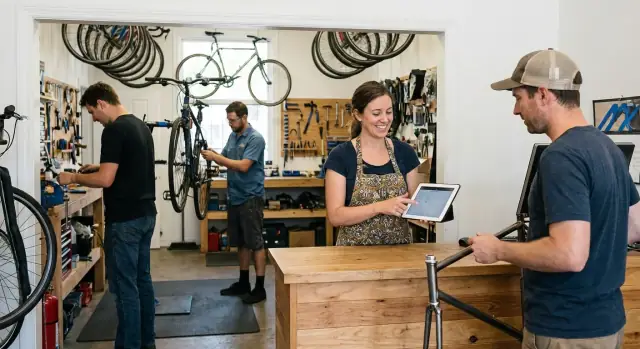
Most problems start in the first 3 minutes at the counter. A customer is explaining an issue, the phone is ringing, and a mechanic is asking, “What’s next?” If intake lives on sticky notes, photos, or half-filled forms, details slip fast.
Missing details are the usual trigger. A bike comes back with “brake rub” written down, but not which brake, what brand, or whether the customer wants quiet pads or maximum bite. Later someone has to call, the bike sits, and the promise made at drop-off quietly changes.
Tracking turns the front desk into a bottleneck when every question routes back through whoever did intake. Techs can’t move forward without a clear go-ahead. Customers can’t get updates because nobody trusts the current status. Your tracker should remove pressure, not add another place to check.
Here’s how small intake mistakes turn into rework on a busy day:
Good tracking feels calm. Staff open one work order and immediately see what came in, what was promised, what’s waiting on parts, and who last touched it. When a customer asks, “Is it ready?”, the answer comes from the same shared truth everyone sees.
Example: a customer says “gears skip sometimes.” If intake also captures “only in the smallest cog, after the last rain ride,” the tech checks the derailleur hanger and cable housing first instead of test riding for 20 minutes and guessing.
A work order works only if it answers the questions people ask all day: who is this for, what bike is it, what are we doing, what will it cost, and how do we reach them fast.
Start with customer details that help you close the loop: name, plus two ways to reach them (text and email, or phone and text). Then ask one preference: “Do you want pickup updates by text or by call?” That one choice cuts down on missed messages and voicemail tag.
Next, lock down bike identification. Many shops see two black Treks on the same day. Capture enough to avoid mix-ups and to protect both sides if there’s ever a dispute:
For the problem description, write the customer’s words first, then add your quick translation. Example: customer says “grinding in the back,” you add “likely rear derailleur or cassette wear, check chain stretch.” It keeps everyone aligned when the tech starts later.
Money and approvals are where tickets stall. Capture a quoted range (not just one number), a “call before exceeding” limit, and who can approve changes (customer, partner, parent). If you take deposits, note the amount and payment method.
Finally, leave a small space for front desk notes: promised deadlines, commuting needs (“needs it for Monday”), or special handling (“do not wash, custom paint”). Those tiny details prevent big arguments.
Statuses only work if everyone reads them the same way. If one tech uses “In progress” for anything on their bench and the front desk uses it to mean “almost done,” customers get the wrong updates.
Keep the list short, and make each status mean one thing:
Statuses go stale when nobody owns the change. Pick simple rules and stick to them:
For “on hold” jobs, avoid a vague status that hides the reason. Use a blocker status (usually “Waiting on approval” or “Waiting on parts”) and add a short note like “Customer traveling until Friday” or “Backorder, expected 1/25.” The job stays visible, searchable, and easy to follow up on.
Parts are where a simple ticket turns into a guessing game. The fix is to treat parts like a mini-workflow inside the same work order, updated the moment a tech flags something.
Your front desk should be able to answer three questions fast: What parts do we need, where are they, and what did we tell the customer?
Add a small “Parts” table to every ticket. Each line is one part, even if it’s “shop supplies” or “cable end cap.” That makes blockers obvious.
Use consistent part statuses:
For each part line, capture enough detail to stop interruptions: supplier, ETA, unit cost, and who ordered it.
Substitutions and backorders happen. Don’t rewrite the ticket or delete the original line. Mark the original part as Returned (or Backordered, if you use that), add a new line for the replacement, and note why it changed (for example, “customer approved different rotor size due to stock”).
Keep a short customer comms note tied to parts delays, with timestamps if possible. Example: “Tue 3:10pm: told Alex chain is backordered, new ETA Friday; ok to proceed when received.”
Repairs change once a mechanic gets the bike on the stand. Make changes visible and approved so the customer is never surprised at pickup.
“Approval required” should mean one clear thing: stop and contact the customer before you do work that changes price or scope. Common triggers include a revised total over your threshold, add-ons not on the original ticket (like a chain replacement during a tune-up), safety-related findings that change the plan, or parts substitutions because the original item is out of stock.
Store the estimate as a few line items (labor, parts, fees) with a running total. When something changes, add a new revision instead of editing old numbers. Then the front desk can answer “What changed and why?” without guessing.
A simple structure:
“Approved” isn’t enough. Record what the customer agreed to, the amount, and the limit. For example: “Approved: replace rear brake pads and cable, up to $145 parts and labor.” Capture who approved (customer name), when, and the channel (in person, phone, text).
To avoid surprise charges while still moving work forward, set a rule at intake: either a not-to-exceed cap, or a pre-approved buffer (for example, up to $X extra without another call). If your tracker supports it, flag revisions that cross the cap so work can’t move forward until approval is recorded.
A tracker helps only if every job follows the same path. The goal is simple: capture the right details once, keep the tech moving, and keep the customer informed without digging through notes.
Start the ticket while the customer is standing there. That’s when details are fresh and mistakes are easiest to catch. Capture the basics (customer name, phone, bike make/model/color), the problem in the customer’s words, and the services requested.
Also record intake facts you’ll forget later: accessories left on the bike, obvious damage, and a quick safety note (for example, “rear brake barely engages”). If you use a bike shop intake form, make sure it forces these fields so nothing gets skipped on busy days.
Move the job forward in small, clear steps:
Once diagnosis and parts are logged, pause and get approval before work expands:
Close-out should read like a receipt and a handoff note combined: labor summary, parts actually used (not just requested), and payment status (paid, due at pickup, warranty).
A clean close-out also makes future repair status updates easy. If a customer calls next week, anyone at the desk can see what happened in seconds.
Most customer frustration comes from silence, not the repair itself. Prevent that with one simple rule: choose a default channel (SMS, email, or phone) and stick to it unless the customer asks otherwise.
Pick a few events that always trigger an update, and ignore everything else. That keeps your team from over-messaging while still giving customers confidence:
Keep templates short and always include the next action. Any staff member should be able to read the last note and know exactly what to do next.
Three templates that stay clear without sounding robotic:
Log every message sent inside the work order, including attempted calls and voicemails. That way, if the morning shift hands off to the afternoon shift, the conversation continues smoothly.
One practical limit helps: no more than one update per day unless something important changes. Customers don’t want frequent check-ins. They want progress.
A tracker is only as strong as the habits at the counter. This checklist keeps tickets consistent so techs don’t have to chase details and customers aren’t left guessing.
Use the same order every time, even when the shop is slammed:
After intake, the biggest delays come from parts and silence. Do a parts review early: list what’s needed, capture ETAs, and mark anything that blocks progress. When an ETA slips, update the expected date and send a simple note so the customer hears it from you first.
Before you move a job to Ready for pickup, confirm two things are written down: final test notes (what you checked and the result) and the total cost. If the price changed, make sure the approval note matches what happened.
At pickup, record payment, add any warranty or follow-up note in plain language, then close the ticket the same day.
Most front desk problems aren’t about a “bad tech.” They come from small gaps in the work order that turn into big surprises later.
One common trap is having too many statuses. If the team can’t remember the difference between “In queue,” “Queued,” “Waiting,” and “Waiting - parts,” they’ll pick whatever sounds close. Two days later, nobody trusts the board.
Another issue is letting tech notes live on paper, a sticky note, or someone’s memory. The customer asks, “Did you check the rotor too?” and the person at the counter has no confident answer.
Disputes at pickup usually come from missing approvals. If a job changes from “basic tune” to “tune + cables + chain,” you need a clear record of what was approved, when, and by whom. Otherwise the customer feels blindsided and the shop eats the cost.
Parts create chaos when they’re tracked somewhere else (a whiteboard, a separate spreadsheet, or a text thread). The work order says “Waiting on parts,” but no one can answer which part, which supplier, or what the ETA is.
These patterns stall jobs silently:
A simple fix: assign one owner per ticket (even if techs change), keep parts and notes inside the same work order, and limit statuses to the few that drive action.
A customer rolls in with a commuter bike and says, “The front brake squeals and it barely stops.” The front desk opens a work order and captures the basics: customer name and phone, bike make/model, drop-off time, and the symptom in the customer’s words.
The tech does a fast check and finds the real cause: pads are worn down, and the rotor is contaminated and scored. The work order is updated with the diagnosis and the plan (replace pads and rotor, clean the caliper, bed-in the brakes). The status moves from Received to In progress so everyone knows the bike is on the stand.
Then the snag: the correct rotor size is backordered. Instead of leaving the ticket half-open, the front desk switches the status to Waiting on parts and records what’s needed, the supplier, and today’s ETA (for example, “Rotor 160 mm, ETA Friday 2 pm”). Now if the customer calls, anyone can answer with confidence.
At a glance, the front desk can see:
When the supplier pushes the ETA to Monday, the shop sends one clear delay update (not a daily drip): “Your rotor is delayed to Monday. No action needed on your side. We’ll message you as soon as it’s ready.” The tracker logs that message and the new ETA.
On Monday, the rotor arrives, the tech finishes the job, and the status moves to Ready for pickup. The customer gets a simple pickup notification text with hours and the balance due.
Decide what you truly need at the front desk. If you mostly want visibility (what’s here, what’s waiting, what’s done), a simple board or spreadsheet-style tracker can be enough. If you also need approvals, parts ordering, messages, and a clean history per bike, you’re closer to a full front desk workflow.
Build around the smallest set of details you’ll actually use every day. Pick a short list of fields and statuses, run it for a week, then add only what solves a real problem.
A practical “start small” setup:
Don’t skip message templates. Standardize two or three short texts and use them every time. Keep them plain and specific: what changed, what you need from the customer, and what happens next.
If you want to build a shared internal app for intake, parts tracking, approvals, and repair status updates, AppMaster (appmaster.io) is one option for creating a custom workflow without coding, while still generating real backend and app source code. The main win is keeping everything in one place so the desk and the service area are always looking at the same ticket.
 What are the must-have fields for a bike repair work order at drop-off?
Capture the customer’s name, two reliable contact methods, the preferred update channel, bike identifiers (brand/model/color and a tag or serial), the symptom in the customer’s words, and a not-to-exceed limit. Add promised timing and any constraints like “needs it for Monday” while the customer is still there.
How many repair statuses should our shop use, and how do we keep them consistent?Use a small set where each status means one thing and triggers an action. If a status can mean “working on it” and “almost done,” it will create bad updates; tighten the wording until anyone can give the same answer from the same screen.
Who should be responsible for changing a ticket’s status?The fastest fix is assigning ownership of each status change. Intake sets the initial status, techs update when they start diagnosing or working, and the front desk updates when an estimate is sent, the customer approves, or the bike is ready and picked up.
What’s the simplest way to track parts needed without causing chaos?Track parts inside the same work order, not on a separate board or chat thread. Record what the part is, who ordered it, the supplier, the ETA you told the customer, and update it the moment a missing part becomes a blocker so the ticket doesn’t look “stuck for no reason.”
How do we write problem descriptions so techs can reproduce the issue quickly?Write the customer’s exact words first, then add a short technician translation you can verify later. One extra detail like when it happens, what gear it’s in, or what conditions trigger it can save a long test ride and prevent guessing.
How should we handle estimates, approvals, and surprise add-on work?Default to a quoted range plus a clear not-to-exceed cap, and stop for approval when price or scope changes. Record what was approved, the amount or limit, who approved it, when, and how, so pickup doesn’t turn into an argument.
When should we message customers, and how do we avoid over-messaging?Keep the message short and include the next action every time. A good default is updates only for approval needed, parts delays with a new ETA, safety issues, and ready-for-pickup, and avoid more than one routine update per day unless something important changes.
What if customers don’t respond to approvals or pickup messages?Require a confirmed best contact method at intake and verify it back to them before they leave. If texts are allowed, use them for approvals and pickup since they’re easier to confirm than voicemail; if the customer prefers calls, log attempted calls and the outcome in the ticket.
Do we really need photos and condition notes for every bike?Take quick photos that document condition and identification, then keep them attached to the work order. This helps prevent mix-ups between similar bikes and reduces disputes by showing accessories left on and any existing damage noted at drop-off.
Should we use a spreadsheet, a shop system, or build our own tracker?A shared tracker is enough if you mainly need visibility and basic updates, but you’ll want a workflow tool if you need approvals, parts statuses, message logs, and a clean history per bike in one place. If you want a custom internal app without coding, AppMaster can help you build intake, approvals, parts tracking, and status updates as one system while still generating real backend and app source code.
Experiment with AppMaster with free plan.
When you will be ready you can choose the proper subscription.
 Jul 14, 20268 min
 Jul 13, 20268 min
 Jul 08, 20268 min