


 Jul 14, 2026
 8 min
8 minEquipment reservation app: prevent conflicts and track returns
Plan an equipment reservation app that prevents double bookings, records returns and damage, and places faulty items on maintenance hold.

Use an approval workflow blueprint to design multi-step routing, SLAs, and escalations that stay clear as your team grows, with a reusable requirements checklist.
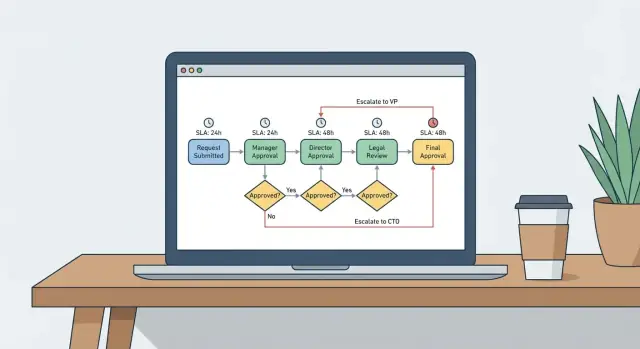
Approval workflows rarely fail because people don't care. They fail because the process was designed for a small team where everyone already knows the unwritten rules. Once the team grows, that shared memory disappears.
When a workflow breaks at scale, it usually looks like this: requests sit in limbo because no one knows who owns the next step; approvals happen in chat or email so there's no reliable audit trail; people bypass the process to hit deadlines and finance or ops has to clean up later; the same request gets approved twice (or not at all) because the latest version and context are unclear.
The root issue is that the rules live in people's heads, not in the workflow. Someone knows that "marketing tools under $500 can be approved by the team lead, unless it's a new vendor," but the system doesn't. When that person is away, everything slows down.
Growth also changes what "approval" means. You get more request types, more approvers, and more exceptions. A purchase request isn't the same as a discount request or an access request. Each one carries different risk and needs different information and evidence.
A workflow that holds up as volume doubles should protect a few basics:
That usually means moving from ad hoc messages to an explicit process where steps, conditions, and ownership are visible and repeatable.
Many workflows fail because nobody agrees on what the request is, or when it's finished. Before you draw anything, define the boundaries and the finish line.
Define the request in plain terms. Who can submit it? What information must be included? What makes it complete enough to review? If the form lets people put "N/A" everywhere, approvers will either block everything or approve blindly.
Define outcomes beyond approve. Decide what happens when an approver needs changes, when the request is no longer needed, or when it should be rejected. These choices shape every later step.
Assign ownership early. A process owner is accountable for the rules and updates. Approvers are responsible for decisions, not the design. Reviewers like finance, security, or legal may advise, but don't always own the final decision.
Draw a hard line around scope. "All spend requests over $500" is clear. "Purchases" isn't. Also list what's out of scope (for example, travel reimbursements or renewals handled elsewhere) so the workflow doesn't become a catch-all.
A quick requirements pass before you build saves rework later:
A simple example: a laptop request is "done" only when it's approved and handed off to procurement, rejected with a reason, or sent back with a specific list of missing details. Without that definition, the same request can bounce for days with no clear endpoint.
Start with a small, repeatable skeleton and expand carefully. Most scaling problems come from mixing responsibilities, adding "just one more exception," and losing track of what happens next.
A reusable skeleton for many workflows:
Keep checks separate from approvals. Checks answer "is this valid and complete?" Approvals answer "should we allow it?" Validation usually belongs with ops or the request owner. Approvals belong with roles accountable for risk, budget, or policy.
Also keep steps small: aim for one decision per step. If a single step asks someone to judge budget, compliance, and technical feasibility, it will stall or turn into a meeting.
Finally, include a "request changes" path that returns to the right place, not back to the start. If finance needs a missing quote, route back to the requester (or validation), then return to finance review without redoing legal and management.
Conditional routing is where workflows often turn into a maze. The fix is mostly discipline: choose a small set of inputs, write the rules in plain English, then implement them exactly as written.
Stick to routing inputs that people already understand and can fill in consistently, such as amount, department or cost center, risk level, vendor type (existing vs first-time), and region.
Write each rule as a one-line sentence before you build anything. If a rule can't fit on one line, it's usually trying to do too much.
Examples that stay readable:
Special cases are unavoidable, so name them and isolate them. "Urgent" is a common one. Define what urgent means (deadline within 24 hours, customer outage, and so on), then route it through a fast path with fewer steps but stricter notes.
When multiple rules apply, decide upfront how conflicts are resolved. Common patterns include a priority order (risk overrides amount), quorum (any 2 of 3), all must approve (serial or parallel), or a tie-breaker role.
If you can explain routing in a two-minute conversation, you can keep it readable when the team doubles.
SLAs are what turn a process that "usually works" into one that stays predictable as volume grows. The goal is simple: decisions happen on time, and nobody has to babysit the queue.
Most teams need more than one clock:
Avoid one global timer for everything. A low-risk request might allow 24 hours for a decision, while a high-value request needs tighter thresholds. Tie SLAs to request type, amount, or risk so the rules feel fair.
Escalation should be a ladder, not a surprise reassignment. A simple pattern:
One detail that prevents endless arguments: define when the clock pauses. If a request is sent back for more info, the SLA should stop until the requester responds. If it's waiting on external paperwork, "waiting" should be a real state, not just a comment.
A scalable workflow is more than steps and conditions. It needs clear states, a reliable audit trail, and permissions that match how the organization works. If you skip these, the process looks fine on day one and becomes painful on day thirty.
Start with state labels anyone can understand. Keep them consistent across workflows: Draft, Pending, Approved, Rejected. If you need detail, add a sub-status like "Pending: Finance" rather than inventing brand-new top-level states for every team.
Define what you log in the audit trail. Treat it as future-proofing for disputes, compliance, and debugging:
Notifications should follow states, not people's memory. When a request becomes Pending, notify the next approver and the requester. When it's Rejected, notify the requester with the reason. When it's Approved, notify downstream teams that need to act (like procurement).
Permissions are where workflows break under pressure. Decide them early:
A practical rule that saves pain: once a request is Pending, lock critical fields (amount, vendor, scope). If something must change, send it back to Draft with a clear "Requested changes" note so the history stays clean.
A visual editor helps you see the whole workflow before it turns into a mess of exceptions. Build in passes so you get a working path first, then add rules.
Map the skeleton. Create steps for intake, validation, approvals, fulfillment, and close. Add clear end states: Approved, Rejected, Sent back.
Add intake data and validation. Define the fields (amount, cost center, vendor, needed-by date). Add quick checks early so bad requests don't enter the queue.
Add conditional routing. Branch only where it changes who should approve. Handle common conflicts explicitly (for example, requester equals approver).
Add timers and escalations. Set SLAs per step. When a timer expires, send reminders and escalations based on your ladder.
Test with real cases and edge cases. Run a small set of scenarios end to end and confirm tasks, messages, states, and audit entries are correct.
Use a consistent set of scenarios every time you change the workflow:
After testing, rename unclear steps and remove temporary branches. If it's hard to read now, it won't survive growth.
Most approval flows fail for predictable reasons. Design for clarity and exceptions from day one.
Trap: adding approvers until nothing moves. Extra approvers feel safe, but they create dead time and confusion. Keep one accountable approver per step. Everyone else can get FYI notifications.
Trap: escalations with no owner. An SLA is meaningless if nobody is empowered to act. Assign an escalation owner (a role, not a person) and define what they can do: approve, reject, reroute, or request changes.
Trap: rules living in inboxes and chat. If routing logic is agreed "somewhere" but not in the process, decisions become inconsistent. Put conditions directly into the workflow and add a short note for why each rule exists.
Trap: no request-changes loop. If reviewers can only approve or reject, people restart requests and lose context. Add a Needs changes state that returns to the right step.
Trap: exceptions force people off-process. Urgent items and missing documents happen. Add a controlled exception path and log who used it and why.
Before building any approval workflow, collect the same inputs. It keeps the flow readable and prevents "special cases" from turning into emergency fixes later.
Run a short workshop (30 to 45 minutes) with the requester, approvers, and someone responsible for compliance or reporting. Capture:
This example stays clear even as volume and team size grow.
A requester submits a purchase with: amount, cost center, vendor, and purpose. Routing follows a few simple thresholds and a vendor-risk rule:
Keep the vendor-risk rule separate from amount rules so you can adjust vendor criteria without touching the rest of the flow.
Set one requester-protecting SLA: first response within 1 business day. "First response" means approve, reject, or request changes.
If there's no action after 24 hours, escalate to the approver's manager and notify the requester. Avoid immediate reassignment on the first escalation. Add visibility first, then reassign only if needed.
Make outcomes explicit:
To see whether the process is working, track approval time by step, rework rate (how often changes are requested), and escalation frequency by step and department.
Start small on purpose. Pick one team and one request type (software access, purchase requests, time off) and run a 2 to 4 week pilot. Keep the flow as designed so you can see where it bends under real work.
Keep the rules and the workflow logic together. If routing lives in a document but logic lives elsewhere, they drift. Put plain-language rule notes next to the steps they affect so "why did this go there?" is easy to answer.
Add lightweight monitoring early. You don't need fancy dashboards to learn a lot. Track average time in each step, the top stall reasons (missing info, wrong approver, unclear policy), escalation counts, and rework rate.
Plan for change before it happens: who proposes new rules, who reviews them, and how updates are announced. A weekly or biweekly review is often enough. Require a short note for each change: the problem it fixes, who it impacts, and how you'll measure success.
If you want to turn this blueprint into a working app without hand-coding, AppMaster (appmaster.io) is a no-code platform where you can model your request data, build the approval logic in a visual Business Process Editor, and ship web and native mobile screens for fast approvals while keeping an audit trail in one place.
 Why do approval workflows start failing when a team grows?
Approval workflows break because the real rules are often unwritten and live in people’s heads. When the team grows, shared context disappears, so requests stall, decisions happen in chat, and nobody can reliably tell what’s next or why a decision was made.
What should I define first before building an approval workflow?A good scope is specific enough that anyone can tell what belongs in the workflow and what doesn’t. Define who can submit, what fields must be provided, and what counts as “done” so requests don’t bounce around with no clear endpoint.
What’s the difference between validation and approval steps?Treat validation as “is this request complete and correct,” and approval as “should we allow this.” Keeping them separate prevents approvers from wasting time fixing missing data and helps the decision step stay fast and consistent.
What’s a simple approval workflow structure I can reuse?Start with a simple skeleton: intake, validation, review, decision, fulfillment, and closeout. Once that works end to end, add only the branches that change ownership or risk, so the flow stays readable as volume increases.
How do I set routing rules without creating a maze of exceptions?Use a small set of inputs people can fill out consistently, like amount, department, vendor type, region, and risk level. Write each rule in one plain sentence first; if it can’t fit, it’s usually too complex and should be split.
What should I do when multiple routing rules apply at the same time?Pick a default order for conflicts and stick to it, such as “risk overrides amount.” Then implement that order directly in the workflow so people don’t have to guess which approver wins when multiple rules apply.
How do SLAs and escalations work without constant manual chasing?Set at least two timers: time to first response and time to final decision, and pause the clock when the request is waiting on the requester. Escalation should be predictable, so it nudges the right person before it reassigns the work.
What states and audit trail details will I wish I had later?Use a small set of states everyone understands, and log who did what, when, and why. Also lock critical fields once a request is pending, so changes happen through a “request changes” path instead of silent edits.
How do I test an approval workflow before rolling it out to everyone?Start with a pilot that covers one team and one request type, and test a few real scenarios, including missing info and “requester equals approver.” If the flow is hard to read in a test, it won’t survive real volume.
Can I build this kind of workflow without writing code?A visual business process editor lets you map steps, conditions, SLAs, and escalations in one place and tie them to your request data and screens. In AppMaster, you can model the request fields, build the approval logic visually, and ship web and native mobile apps with a searchable history without hand-coding.
Experiment with AppMaster with free plan.
When you will be ready you can choose the proper subscription.
 Jul 14, 20268 min
 Jul 13, 20268 min
 Jul 08, 20268 min