


 Jul 14, 2026
 8 min
8 minEquipment reservation app: prevent conflicts and track returns
Plan an equipment reservation app that prevents double bookings, records returns and damage, and places faulty items on maintenance hold.

API versioning for mobile apps explained with a simple rollout plan, backward compatible changes, and deprecation steps so older app versions keep working.
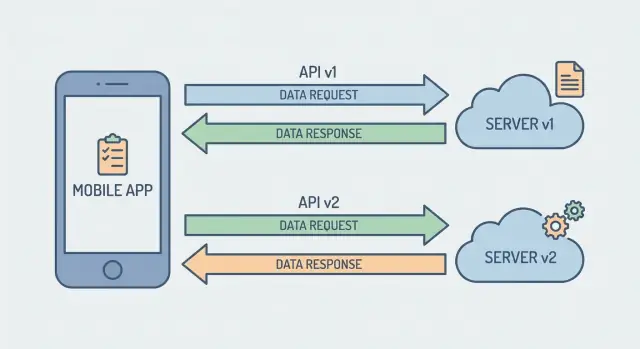
Mobile apps don’t update all at once. Even if you ship a fix today, plenty of people will keep using an older version for days or weeks. Some turn off auto-updates. Some are low on storage. Some just don’t open the app often. App store review time and staged releases add even more delay.
That gap matters because your backend usually changes faster than your mobile clients. If the server changes an endpoint and the old app still calls it, the app can break even though nothing changed on the user’s phone.
Breakage rarely shows up as a neat error message. It usually looks like everyday product pain:
The point of versioning is simple: keep shipping server improvements without forcing everyone to update immediately. Treat your API like a long-running contract. New app versions should work with new server behavior, and older versions should keep working long enough for real-world update cycles.
For most consumer apps, expect to support multiple app versions at the same time. Internal apps can sometimes move faster, but it’s still rarely instant. Planning for overlap keeps phased rollouts calm instead of turning every backend release into a support spike.
An API contract is the promise between your mobile app and your server: what URL to call, what inputs are accepted, what the response looks like, and what each field means. When the app relies on that promise and the server changes it, users feel it as crashes, missing data, or features that stop working.
A change is compatible when older app versions can keep using the API without code changes. In practice, that means the server still understands what old apps send and still returns responses old apps can parse.
A quick way to separate safe changes from risky ones:
Compatibility also needs an end-of-life plan. Retiring old behavior is fine, but it should be scheduled (for example, “keep v1 for 90 days after v2 ships”) so you can evolve without surprising users.
Versioning is about giving older builds a stable contract while you move forward. There are a few common approaches, and each one puts the complexity in a different place.
Putting the version in the path (like /v1/ and /v2/) is the easiest to see and debug. It also works well with caching, logging, and routing because the version is part of the URL. The downside is that teams can end up maintaining parallel handlers longer than expected, even when the difference is small.
With header versioning, the client sends a version in a header (for example, an Accept header or a custom header). URLs stay clean, and you can evolve the API without changing every path. The downside is visibility: proxies, logs, and humans often miss the version unless you’re careful, and mobile clients must reliably set the header on every request.
Query versioning (like ?v=2) looks simple, but it gets messy. Parameters get copied into bookmarks, analytics tools, and scripts, and you can end up with multiple “versions” floating around without clear ownership.
If you want a simple comparison:
Feature flags are a different tool. They let you change behavior behind the same contract (for example, a new ranking algorithm) without creating a new API version. They don’t replace versioning when request or response shapes must change.
Pick one approach and stick to it. Consistency matters more than the “perfect” choice.
The safest mindset is: older clients should keep working even if they never learn about your new feature. That usually means adding things, not changing what already exists.
Prefer additive changes: new fields, new endpoints, new optional parameters. When you add something, make it truly optional from the server’s point of view. If an older app doesn’t send it, the server should behave exactly like before.
A few habits prevent most breakages:
Avoid changing the meaning of an existing field without a version bump. For example, if status=1 used to mean “paid” and you repurpose it to mean “authorized,” older apps will make the wrong decisions and you might not notice until users complain.
Renames and removals need a plan. The safest pattern is to keep the old field and add the new one side by side for a while. Populate both in responses, accept both in requests, and log who’s still using the old field. Remove the old field only after the deprecation window ends.
One small but powerful habit: when you introduce a new required business rule, don’t make the client responsible for it on day one. Put the rule on the server with a default first, then later require the client to send the new value once most users have updated.
Versioning works best when the rules are boring and written down. Keep the policy short enough that product, mobile, and backend teams will actually follow it.
Start with support windows. Decide how long you’ll keep older API versions running after a new version ships (for example, 6-12 months), plus exceptions (security issues, legal changes).
Next, define how you warn clients before you break them. Pick one deprecation signal and use it everywhere. Common options include a response header like Deprecation: true with a retirement date, or a JSON field like "deprecation": {"will_stop_working_on": "2026-04-01"} on selected responses. What matters is consistency: clients can detect it, dashboards can report it, and support teams can explain it.
Set a minimum supported app version, and be explicit about enforcement. Avoid surprise hard-blocks. A practical approach is:
If you do block requests, return a clear error payload with a human message and a machine-readable code.
Finally, decide who can approve breaking changes and what documentation is required. Keep it simple:
Mobile users don’t all update on day one. The safest approach is to ship a new API while leaving the old one untouched, then move traffic over gradually.
First, define what v2 changes and lock v1 behavior. Treat v1 like a promise: same fields, same meanings, same error codes. If v2 needs a different response shape, don’t tweak v1 to match it.
Next, run v2 in parallel. That can mean separate routes (like /v1/... and /v2/...) or separate handlers behind the same gateway. Keep shared logic in one place, but keep the contract separate so a v2 refactor can’t accidentally change v1.
Then update the mobile app to prefer v2. Build in a simple fallback: if v2 returns “not supported” (or another known error), retry v1. This helps during staged releases and when real-world networks get messy.
After releasing the app, monitor adoption and errors. Useful checks include:
Once v2 is stable, add clear deprecation warnings for v1 and communicate a timeline. Retire v1 only when usage drops below a threshold you can live with (for example, under 1-2% for multiple weeks).
Example: you change GET /orders to support filtering and new statuses. v2 adds status_details while v1 stays the same. The new app calls v2, but if it hits an edge case it falls back to v1 and still shows the order list.
Most rollout breakages happen because version handling is scattered across controllers, helpers, and database code. Keep the “what version is this request?” decision in one place, and keep the rest of the logic predictable.
Choose one signal (URL segment, header, or app build number) and normalize it early. Route to the right handler in one module or middleware so every request follows the same path.
A practical pattern:
Be careful when sharing code between versions. Fixing a v2 bug in “shared” code can accidentally change v1 behavior. If logic affects output fields or validation rules, keep it versioned or cover it with version-specific tests.
Database migrations must work for both versions at the same time. Add columns first, backfill if needed, and only later remove or tighten constraints. Avoid renaming or changing meanings mid-rollout. If you need to switch formats, consider writing both formats for a short period until most mobile clients move.
Make errors predictable. Older apps often treat unknown errors as “something went wrong.” Use consistent status codes, stable error identifiers, and short messages that help the client decide what to do (retry, re-auth, show an update prompt).
Finally, guard against missing fields older apps don’t send. Use safe defaults and validate with clear, stable error details.
Because users can stay on an old build for weeks, versioning has to assume multiple client versions will hit your servers at the same time.
A big win is client-side tolerance. If the app crashes or fails parsing when the server adds a field, you’ll feel it as “random” rollout bugs.
Network behavior matters, too. During rollout you can briefly have mixed server versions behind load balancers or caches, and mobile networks amplify small issues.
Pick clear timeout and retry rules: short timeouts for read calls, slightly longer for uploads, and limited retries with backoff. Make idempotency standard for create or payment-like calls so a retry doesn’t double-submit.
Auth changes are the fastest way to lock out older apps. If you change token format, required scopes, or session rules, keep an overlap window where both old and new tokens work. If you must rotate keys or claims, plan a staged migration, not a same-day cutover.
Send app metadata with each request (for example, app version and platform). That makes it easier to return targeted warnings without forking the whole API.
A phased rollout only works if you can see what different app versions are doing. The goal is simple: know who is still on older endpoints, and catch problems before they reach everyone.
Start by tracking usage by API version every day. Don’t just count total requests. Track active devices, and break down key endpoints like login, profile, and payments. This tells you whether an old version is still “alive” even if overall traffic looks small.
Then watch errors split by version and type. A jump in 4xx often means a contract mismatch (required field changed, enum values shifted, auth rules tightened). A jump in 5xx often points to server regressions (bad deploy, slow queries, dependency failures). Seeing both per version helps you choose the right fix fast.
Use staged rollouts in app stores to limit the blast radius. Increase exposure in steps and watch the same dashboards after each step (for example, after 5%, 25%, 50%). If the newest version shows issues, stop the rollout before it becomes a full outage.
Have rollback triggers written down ahead of time, not decided during an incident. Common triggers include:
Keep a short incident playbook for version-related outages: who to page, how to disable a risky flag, which server release to roll back to, and how to extend the deprecation window if older clients are still active.
Checkout is a classic real-world change. You start with a simple flow, then add a new payment step (like stronger authentication) and rename fields to match how the business talks about them.
Say your mobile app calls POST /checkout.
In v1, keep the existing request and behavior so older app versions can finish payments without surprises. In v2, introduce the new flow and cleaner names.
amount, currency, card_token, and a single response like status=paid|failed.payment_method_id (replacing card_token) and a next_action field so the app can handle an extra step (verify, retry, redirect).amount to total_amount and currency to billing_currency.Older apps keep working because the server applies safe defaults. If a v1 request doesn’t know about next_action, the server completes the payment when possible and returns the same v1-style result. If the new step is required, v1 gets a clear, stable error code like requires_update instead of a confusing generic failure.
Track adoption by version: what share of checkout calls hit v2, error rates, and how many users still run builds that only support v1. When v2 usage is consistently high (for example, 95%+ for several weeks) and v1 usage is low, pick a v1 retirement date and communicate it (release notes, in-app messaging).
If something goes wrong after launch, rollback should be boring:
Most mobile API failures aren’t loud. The request succeeds, the app keeps running, but users see missing data, wrong totals, or buttons that do nothing. These issues are hard to spot because they often hit older app versions during a phased rollout.
Common causes:
A concrete example: your response field total is a string ("12.50") and you change it to a number (12.5). New apps look fine. Older apps might treat it as zero, hide it, or crash only on certain screens. Unless you watch client errors by app version, it can slip through.
Versioning is less about clever endpoint naming and more about repeating the same safety checks every release.
Write your versioning and deprecation policy on a single page, then turn the checklist into a release gate your team follows every time.
If you’re building internal tools or customer-facing apps with a no-code platform, it still helps to treat the API as a contract with a clear deprecation window. For teams using AppMaster (appmaster.io), keeping v1 and v2 side by side is often easier because you can regenerate backend and client apps as requirements change while keeping older contracts running during the rollout.
 Why do backend API changes break mobile apps even when users didn’t update anything?
Mobile users don’t all update at the same time, so older app builds keep calling your backend after you deploy changes. If you change an endpoint, validation, or response shape, those older builds can’t adapt and they fail in ways that look like empty screens, crashes, or payments not going through.
What does “backward compatible” actually mean for a mobile API?“Compatible” means an older app can keep making the same requests and still get responses it can parse and use correctly, without any code changes. The safest mental model is that your API is a contract: you can add new capabilities, but you shouldn’t change what existing fields and behaviors mean for current clients.
What are the most common breaking changes in mobile APIs?A change is breaking when it alters something an existing app depends on, like removing or renaming fields, changing a field’s type, tightening validation so old requests fail, or changing the error payload format. If an older app can’t parse the response or can’t satisfy the request rules, it’s breaking even if your server is “working.”
Should I use URL versioning or header-based versioning for a mobile API?URL versioning is usually the easiest default because the version is visible in logs, debugging tools, and routing, and it’s hard to “forget” to send it. Header versioning can work well too, but it’s easier to miss during troubleshooting and requires every client request to set the header correctly.
How long should we keep older API versions running?Pick a clear support window that matches real mobile update behavior, then stick to it; many teams choose months, not days. The key is having a published retirement date and measuring active usage so you’re not guessing when it’s safe to turn an older version off.
What’s a practical way to warn clients that an API version will be retired?Use one consistent deprecation signal so clients and dashboards can detect it reliably, such as a stable response header or a small JSON field that includes a retirement date. Keep it simple and predictable so support and product teams can explain it without digging into implementation details.
How can we evolve responses without breaking older app versions?Prefer additive changes: add new optional fields or new endpoints, and keep old fields working with the same meaning. When you need a rename, run both fields in parallel for a while and populate both so older apps don’t lose data while newer apps move to the new field.
How do we handle database changes while v1 and v2 are live?Design migrations so both API versions can operate at the same time: add columns first, backfill as needed, and only later tighten constraints or remove old fields. Avoid renaming or changing meanings mid-rollout, because you’ll end up with one app version writing data the other can’t read.
What should mobile apps do to be more resilient to API changes?Make the app tolerant: ignore unknown JSON fields, treat missing fields as normal with safe defaults, and handle nulls without crashing. This reduces “random” rollout bugs when the server adds fields or when responses vary briefly during staged deploys.
What should we monitor during a phased rollout, and when is it safe to retire v1?Track usage and errors by API version and app version, especially for login and payments, and widen staged rollouts only when the data looks stable. A safe rollout plan keeps v1 behavior locked, runs v2 in parallel, and moves clients over gradually with a clear fallback strategy until adoption is high enough to retire v1 confidently.
Experiment with AppMaster with free plan.
When you will be ready you can choose the proper subscription.
 Jul 14, 20268 min
 Jul 13, 20268 min
 Jul 08, 20268 min